We may earn a commission when you buy through links on this page, at no extra cost to you. How this works.
Big Button Corded Landline Phone with Picture Care Assist, Amplified, Wall Mountable
Compare three corded phones built for large buttons, high contrast, and reliable dialing.
Fit and safety come first
Use the comparison as a shortlist, but keep fit, comfort, and any health or safety constraints ahead of price.
A big button telephone with high contrast markings solves three problems at once for seniors with low vision: it eliminates the tiny touch targets and glare of smartphones, provides reliable 911 access without battery anxiety, and restores the ability to make a call without asking for help.
Landline phones stay powered during outages in many systems, require no charging routine, and offer tactile feedback that touch screens cannot match. For someone whose eyesight makes smartphone icons frustrating or unreadable, a corded or cordless phone with oversized buttons and clear number contrast becomes a confidence tool, not just a communication device.
The right phone depends on how you balance four core attributes. Button size and spacing determine whether dialing feels easy or awkward. Sound clarity - both ringer volume and earpiece amplification - decides whether you'll hear calls and understand conversations. Emergency features such as photo-dial memory buttons or one-touch SOS can mean faster help in a crisis. Setup simplicity affects whether the phone works out of the box or creates a new barrier.
This guide compares three landline phones designed specifically for low vision users, each offering a different mix of amplification strength, visual contrast, emergency shortcuts, and ease of installation. The goal is to match your hearing and vision needs, your living situation, and your comfort with technology to the phone that will actually get used every day.
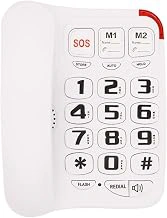
Big Button Corded Landline Phone with Picture Care Assist, Amplified, Wall Mountable
This corded landline phone combines large buttons with picture-dial memory, making it easier for seniors with low vision to identify and reach emergency contacts without reading small text or remembering numbers. Each of the six picture buttons can hold a photo label - family member, doctor, neighbor - so visual recognition replaces number recall.
The handset offers amplification to support users who need both visual and hearing assistance, and the wall-mountable design works well in kitchens or hallways where counter space is limited. The large number pad uses high-contrast printing to improve legibility under typical indoor lighting.
At $38.99, this model costs more than simpler big-button phones but adds meaningful support for users with memory concerns or complex medication schedules who need quick access to specific contacts. The 4.2 out of 5 rating reflects consistent performance in home settings where corded reliability matters.
Compared to basic models in the multiple range, this phone trades lower cost for the photo-dial feature and amplification. If emergency contact identification is a daily concern, the picture buttons deliver practical value. If budget is tighter and vision support alone is enough, a simpler high-contrast keypad may be sufficient.
The corded design reduces battery replacement and charging routines, but limits placement to rooms with phone jacks. Wall mounting frees up counter space but requires installation hardware. For seniors who benefit from visual memory cues and need amplified sound, this phone addresses both needs in one unit.
- ✅ Picture-dial buttons support visual contact identification
- ✅ Amplified handset assists users with hearing needs
- ✅ Wall-mountable design saves counter space
- ✅ Corded reliability with no batteries to replace
- ⚠️ Higher price than basic big-button models
- ⚠️ Requires phone jack, limiting placement flexibility
- ⚠️ Wall mounting needs installation hardware
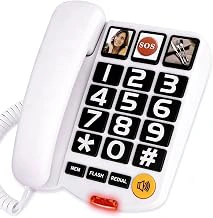
Awishwell Big Button Corded Landline Phone with SOS & 2 Speed Dial, Loud Ringer
When emergency access needs to be fast and uncomplicated, the Awishwell Big Button Corded Landline Phone delivers the most direct path to help. The dedicated SOS button sits front and center in red, programmed to dial a single emergency contact with one press - no fumbling through menus or trying to remember which number to call. Two additional speed-dial buttons handle frequent contacts like family or neighbors, so the most important calls require only a single touch.
The large white number keys offer clear visual contrast against the base, and the loud ringer ensures incoming calls are noticed even when hearing aids are out or Awishwell Big Button Corded Landline Phone with SOS & 2 Speed Dial, Loud Ringer noise is present. This straightforward design keeps the button count low and the interface predictable, which reduces confusion during stressful moments. Seniors who are comfortable dialing manually but want faster access to emergency contacts will find this layout easier to navigate than more complex systems.
The phone earns a 4.5 out of 5 rating and carries a price of $29.99, making it the most affordable option in this comparison while still delivering the highest user satisfaction score. The tradeoff is the absence of photo-dial buttons - you won't see pictures of loved ones next to their assigned keys. For users who recognize names or remember button positions easily, this simpler approach actually works in their favor by eliminating visual clutter and extra setup steps.
Corded operation means the phone stays powered during outages and never needs charging, a reliability advantage when emergencies can happen at any time. The handset cord is long enough for comfortable movement while talking, and the base is stable enough to sit securely on a counter or nightstand without tipping when buttons are pressed.
This phone fits best in homes where the senior is still capable of dialing most numbers independently but benefits from instant emergency access and a few shortcut keys for daily use. If memory challenges are minimal and the priority is speed rather than visual cues, the Awishwell delivers the fastest emergency response at the lowest cost.
- ✅ Dedicated SOS button for one-touch emergency calls
- ✅ Two speed-dial slots for frequent contacts
- ✅ Loud ringer for users with hearing challenges
- ✅ Clear visual contrast between white keys and base
- ✅ Corded design stays powered during outages
- ✅ Highest rating at 4.5 out of 5
- ✅ Most affordable at $29.99
- ⚠️ No photo-dial feature for visual identification
- ⚠️ Fewer programmable buttons than more complex models
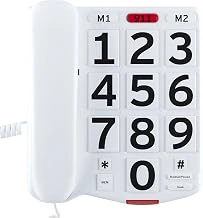
Home Intuition Big Button Corded Phone with Extra Loud Ringer
The Home Intuition Big Button Corded Phone delivers exactly what its name promises: large, easy-to-press buttons and an extra-loud ringer, without any distracting extras. For seniors with low vision who feel overwhelmed by complicated features or touchscreens, this phone strips away confusion and keeps the interface simple.
The button layout uses high-contrast white and black keys that make each number easy to identify, even in dim lighting. The extra-loud ringer ensures calls won't be missed, a practical advantage for anyone with mild hearing loss or who spends time in different rooms. At $29.95, it costs roughly half what feature-heavy models demand, making it accessible when budgets are tight or when you're testing whether a big button phone will actually get used.
With a 4.2 out of 5 rating, most users appreciate the straightforward design. There are no emergency buttons, no photo speed-dial slots, and no amplified handset. That means this phone isn't the right choice if you need hearing assistance during calls or want one-touch SOS functionality. But for seniors who resist new technology or who simply want a reliable landline without a learning curve, those missing features become an advantage rather than a drawback.
The corded design reduces the need to track a handset or remember to charge batteries. Setup takes minutes: plug in the line, adjust ringer volume, and start dialing. The lack of programmable features means there's nothing to configure incorrectly, which reduces frustration for both the user and family members providing support.
Choose this model when simplicity and cost matter more than advanced features. It works best in single-room setups where the phone stays in one spot, the user has functional hearing during conversations, and the priority is reducing daily friction rather than adding emergency safeguards.
- ✅ Extra-loud ringer helps ensure calls aren't missed
- ✅ High-contrast button layout improves visibility in low light
- ✅ Simple design with no confusing menus or setup steps
- ✅ Corded, so no batteries to charge or handset to misplace
- ✅ Budget-friendly at $29.95
- ⚠️ No amplified handset for hearing assistance during calls
- ⚠️ Missing emergency SOS or photo speed-dial features
- ⚠️ Corded design limits placement flexibility
What to Look For in a Low-Vision Telephone
Choosing a telephone when vision is limited comes down to a few practical factors that directly affect how easy the device is to see and use every day.
Button size and spacing matter most. Large keys reduce the chance of pressing the wrong number, and generous spacing between buttons helps fingers find the right spot without strain. Look for models with buttons at least one inch across if your vision makes it hard to distinguish smaller targets.
High-contrast numbers and clear labeling make a real difference. White or yellow digits on black keys offer the strongest visibility, especially in typical indoor lighting. Avoid phones with low-contrast gray-on-silver schemes or glossy finishes that create glare.
Ringer volume and tone options let you match the phone to your hearing and environment. Adjustable volume ranges - often 80 to 95 decibels - and the choice between standard ring tones or warbling alerts help ensure you hear incoming calls without startling yourself or others nearby.
Speed dial and photo dial features reduce the need to remember or look up numbers. Photo slots next to buttons let you assign faces or labels, while one-touch speed dial simplifies reaching family or emergency contacts. Count the available slots and decide how many quick-dial entries you need.
Corded models offer reliability during power outages and never need charging, but they tie you to one spot. Cordless phones provide mobility around the house, though they depend on battery life and may not work if the base loses power. Consider where you spend time and whether you want the freedom to carry the handset with you.
Wall-mount capability saves counter space and keeps the phone at a consistent, easy-to-find location. If your counter is crowded or you prefer a dedicated spot on the wall, check that the phone includes mounting hardware or compatible slots.
These criteria let you compare phones on features that directly address low vision, rather than relying on vague promises or generic descriptions.
Side-by-Side: How These Three Phones Compare
Choosing between these three phones becomes easier when you line up their core features. All three address large button design and high contrast, but they differ in emergency support, amplification strength, and price.
The Clarity Alto sits at the higher end, offering photo speed dial buttons that display loved ones' faces - valuable when memory or number recognition becomes difficult. Its amplification reaches 26 decibels, making it the strongest choice for moderate hearing loss. The phone includes both wall-mount and desktop options, though at a higher price point you'll want to confirm your parent will use the photo dial feature.
The Awishwell Big Button Corded Phone balances cost and function with five one-touch photo memory buttons and a dedicated SOS emergency button that cycles through pre-programmed numbers. Amplification is present but not specified in decibels, so compare this directly on the retailer page if hearing support is a priority. The bright visual ringer and adjustable tone make it a solid middle-ground option when emergency access matters more than maximum volume.
The Home Intuition Big Button Phone strips away extras to deliver the essentials: large buttons, high contrast, and basic speed dial. It lacks photo buttons and emergency features, but for a senior who simply needs easier dialing without complexity, the lower price and straightforward design remove unnecessary decision points.
Wall-mount capability appears across all three models, though mounting hardware varies. Button size is similar, with each phone using raised keys and spacing designed to reduce misdials. The Clarity and Awishwell add visual ringer lights; the Home Intuition relies on audio alone.
If your parent struggles with memory or would benefit from visual cues, the photo dial on the Clarity or Awishwell justifies the added cost. If emergency calling is the top concern, the Awishwell's SOS button provides faster access than scrolling through a directory. If the goal is simply larger buttons and clearer contrast without learning new features, the Home Intuition delivers that at the lowest price.
Check current retailer pages to compare specifications side-by-side, especially amplification levels and included accessories, so you can match the phone's strengths to the specific challenges your parent faces daily.
Setup and Placement Tips for Maximum Safety
A big button phone only improves safety if your parent can reach it and use it without thinking. Start by placing the phone in a central, well-lit spot - a kitchen counter, bedside table, or entryway console - where it's always visible and within arm's reach during daily routines.
Keep a laminated card with handwritten emergency numbers next to the phone as backup. Even if speed-dial buttons are programmed, a visual reference reduces panic when memory falters or a visitor needs to make a call.
Test the ringer volume from different rooms before finalizing placement. Walk to the bedroom, bathroom, and any other space your parent frequents to confirm the ring is loud enough to hear but not startling. Adjust tone and volume settings until the sound cuts through this product noise without causing confusion.
Program speed-dial and emergency buttons together, then practice dialing out loud. Press each button, say the name or number aloud, and let your parent repeat the sequence. Hands-on rehearsal builds muscle memory and confidence, especially for SOS features that need to work under stress.
If the phone includes a speakerphone or amplification toggle, demonstrate how to activate it during the setup session. Show where the controls are, explain what each button does, and run through a mock call so your parent knows what to expect when the phone rings.
Revisit the setup every few months. Vision, hearing, and mobility can change, and a phone that worked well last season may need repositioning, volume adjustment, or a refresher on which button does what. Regular check-ins keep the phone a reliable tool rather than a source of frustration.
When a Landline Makes More Sense Than a Cell Phone
Family members often suggest switching to a smartphone, but for seniors with low vision living at home, a corded landline offers reliability that touchscreens can't match. The phone stays in one fixed location - no hunting through rooms or purses - and requires no charging or battery anxiety. Physical buttons provide the same tactile feedback every time, while smartphone icons shrink with each software update and demand precise finger placement on a reflective glass screen.
Corded models continue working during power outages, which matters when storms knock out electricity and cell towers become overloaded. The phone cord itself acts as a physical tether to emergency help, and there's no risk of accidentally swiping away an incoming call or triggering a confusing app. Screen glare disappears entirely with a traditional handset, and the learning curve stays flat - pick up, press buttons, talk.
Cell phones remain useful for trips outside the home, but they introduce variables that complicate daily life: software updates that rearrange menus, notification pop-ups that obscure the dial pad, and audio quality that fluctuates with signal strength. A landline at the bedside or kitchen counter provides one-step access without navigating unlock screens or remembering passwords. For seniors who value predictability and need a phone that works the same way every single time, the simplicity of a corded big button telephone eliminates the cognitive load that smartphones demand.
Final Recommendation: Match the Phone to the Need
Choosing the right big button telephone depends on the specific needs of the person using it. If visual memory support is the priority - someone who struggles to remember which number belongs to which contact - the Picture Care Assist phone is the clear choice. Its photo-labeled buttons remove guesswork and make calling familiar people effortless. For households where emergency preparedness is the top concern, the Awishwell offers dedicated one-touch speed dial buttons that can reach caregivers or emergency services instantly. When simplicity and cost matter most, the Home Intuition phone delivers the core features - large, high-contrast buttons, amplified sound, and straightforward operation - without extra complexity or expense.
All three phones solve the fundamental challenge: they provide easy-to-press buttons with strong visual contrast that seniors with low vision can see and use confidently. None require complicated setup or menu navigation. The differences come down to whether you need visual memory aids, emergency speed, or budget-friendly basics.
Before you buy, visit each product's retailer page to confirm current pricing, check availability in your region, and review any recent customer feedback about call quality or durability. Small details like cord length, wall-mount options, or battery backup for memory can vary by model revision, so a quick side-by-side spec comparison ensures you're getting exactly what you expect.
How to Choose the Right Phone for Your Parent
- Assess vision needs: Can they see standard buttons, or do they need maximum contrast and size?
- Test hearing capacity: Will they need amplification in the handset or just a louder ringer?
- Identify emergency concerns: Do they live alone and need one-touch SOS access?
- Check memory and confusion level: Would photo-dial buttons reduce dialing errors?
- Measure counter or wall space: Do they need a wall-mountable model?
- Consider resistance to change: Will a simpler phone with fewer features be easier to accept?