We may earn a commission when you buy through links on this page, at no extra cost to you. How this works.
vine Smart WiFi Thermostat - 7-Day Programmable, Energy Star, C-Wire Required
Large displays, minimal buttons, and actual simplicity.
Fit and safety come first
Use the comparison as a shortlist, but keep fit, comfort, and any health or safety constraints ahead of price.
Choosing a thermostat for an older adult's home comes down to three practical factors: whether the screen can be read from across the room, whether the controls make sense without a manual, and whether remote access from a caregiver's phone adds real value or just another layer of complexity.
Most smart thermostats prioritize features over clarity. They bundle voice assistants, learning algorithms, and smartphone apps into devices that require setup guides, Wi-Fi troubleshooting, and frequent software updates. For someone who simply wants to adjust the temperature without confusion, that feature set becomes a barrier rather than a benefit.
The right thermostat balances two competing needs. The person living in the home should be able to walk up, read the current temperature, and change it with one or two taps. At the same time, a family member checking in remotely may need to verify the house isn't too hot in summer or dangerously cold in winter. Some households need both capabilities. Others do better with a large, clear display and physical buttons, skipping connectivity altogether.
This guide compares four thermostats selected for readability, intuitive controls, and varied approaches to remote access. One model strips out Wi-Fi entirely in favor of a screen that's legible in dim hallways. Two others offer optional smartphone control without forcing it as the primary interface. The fourth builds remote monitoring into the core experience for caregivers who check in daily. Each makes different tradeoffs, and the best choice depends on whether the priority is independence at the wall, oversight from a distance, or both.
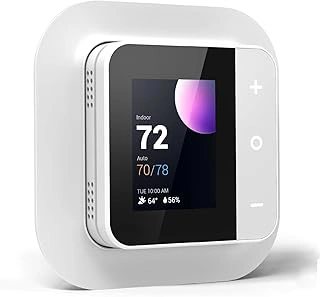
vine Smart WiFi Thermostat - 7-Day Programmable, Energy Star, C-Wire Required
Families who want to check room temperature or adjust the schedule from another city will appreciate what WiFi connectivity adds to a programmable thermostat. The vine Smart WiFi Thermostat offers seven-day programming, Energy Star certification, and an app that lets you monitor and control heating and cooling without calling your parent to ask them to walk to the wall.
The display is straightforward - current temperature, target setting, and mode icons stay visible without nested menus. Programming follows a day-by-day schedule: set wake, leave, return, and sleep times for each day of the week. Once the program runs, the app becomes the remote dashboard. You can nudge the temperature up two degrees before a cold snap or switch from heat to off when an unexpected warm week arrives.
Energy Star certification confirms the unit meets federal efficiency guidelines, which matters when the goal is stable comfort without surprise utility bills. The seven-day structure works well if weekday and weekend routines differ - Monday through Friday might hold at multiple°F during the day, while Saturday and Sunday stay at multiple°F when someone is home.
Installation requires a C-wire, the continuous multiple-volt power line that keeps WiFi and the display active. Many homes built or updated in the past fifteen years have this wire tucked behind the old thermostat. Older systems may not. Before ordering, pull the existing thermostat off the wall and look for a blue, black, or brown wire labeled C or Common. If it is missing, you will need an HVAC technician to run one or install a power adapter. That adds time and cost - often sixty to two hundred dollars depending on your region and the complexity of the furnace panel.
The app is available for iOS and Android. Setup walks through WiFi network selection, confirmation codes, and location permissions. Most users finish in under ten minutes if the home network is stable. Once paired, the app shows real-time temperature, current mode, and schedule. You can override the program with a temporary hold or edit the weekly schedule remotely.
This thermostat makes sense when your parent is comfortable with the idea of a programmed week and you want visibility without daily phone check-ins. It is less suitable if the HVAC system lacks a C-wire and the budget or access to an electrician is limited. For households where remote monitoring justifies the installation step and a weekly routine is already in place, the combination of programmability, efficiency rating, and app access delivers practical value at $62.99.
- ✅ WiFi app provides remote temperature monitoring and schedule adjustments
- ✅ Seven-day programming accommodates different weekday and weekend routines
- ✅ Energy Star certified for efficiency
- ✅ Straightforward display with visible temperature and mode icons
- ⚠️ Requires C-wire; older homes may need professional wiring or adapter installation
- ⚠️ App setup adds a layer of complexity compared to non-WiFi models
What Key Features Make a Smart Thermostat Senior-Friendly?
Three features separate a frustrating thermostat from one that gets used correctly every day. Display size and contrast determine whether someone can read the current temperature from across the room or needs to walk up close and squint. A backlit screen with numbers at least half an inch tall works in dim hallways and for users with mild vision changes. High contrast between the this product and text matters more than color.
Button layout and labeling should make the most common tasks obvious. Physical buttons labeled "Up," "Down," and "Mode" beat touchscreens that require precise taps or multi-step menus. When controls are clearly marked and spaced apart, users can adjust temperature without accidentally triggering settings they don't understand. Thermostats that hide advanced features behind a separate menu or app keep the daily interface simple.
WiFi capability creates a tradeoff worth thinking through. Remote access lets family members adjust temperature, check system status, and catch problems before a house gets too cold. That peace of mind helps when a parent lives alone or forgets to adjust settings seasonally. But WiFi also means network passwords, app downloads, and troubleshooting when the connection drops. If the person living with the thermostat will handle setup alone, a non-WiFi model with good physical controls may cause less frustration. If a family member can complete the initial setup and provide ongoing remote support, WiFi makes sense.

ecobee Smart Sensor 2 Pack - Temperature & Occupancy Detection
When the thermostat sits in a hallway but your parent spends most of the day in the bedroom or living room, temperature readings can be misleading. The ecobee Smart Sensor 2 Pack adds occupancy detection and temperature monitoring to rooms that matter most, helping the thermostat adjust based on where someone actually is rather than the hallway reading alone.
Each sensor is compact and wireless, sitting on a nightstand or shelf without installation tools. The sensors communicate with a compatible ecobee thermostat base unit - this is not a standalone device. When the sensor detects occupancy in a room, the thermostat weighs that room's temperature more heavily in its averaging calculation. If the bedroom reads multiple°F but the hallway thermostat shows multiple°F, the system can adjust to keep the occupied space comfortable.
The occupancy feature also supports scheduling. Set the system to prioritize the bedroom sensor at night and the living room sensor during the day, matching your parent's routine without manual adjustments. The sensors run on included batteries that last around multiple, and battery replacement requires only a coin to open the back panel.
Setup requires pairing each sensor with the ecobee thermostat through the app or thermostat menu. The process is guided but does involve a few steps - menu navigation, sensor naming, and room assignment. Once configured, the sensors work automatically. Before purchasing, confirm that your ecobee thermostat model supports remote sensors; older ecobee3 Lite units, for example, do not.
This two-pack works well for homes where one or two key rooms need better temperature control, especially when mobility or routine keeps someone in a limited area most of the day. The sensors add targeted comfort without replacing the thermostat itself, making them a practical upgrade when the main unit is already installed and functioning.
- ✅ Detects occupancy to prioritize comfort in rooms where your parent actually spends time
- ✅ Wireless design with no tools or wiring required
- ✅ Battery life lasts around 18 months with simple coin-battery replacement
- ✅ Supports scheduling to match daily routines across different rooms
- ⚠️ Requires a compatible ecobee thermostat base unit - not compatible with all ecobee models
- ⚠️ Initial pairing and room assignment involves several menu steps
- ⚠️ Only benefits homes where temperature varies significantly between rooms
Side-by-Side Feature Comparison
- WiFi access: vine offers remote app control; Aowel and budget model are manual-only
- Display size and backlight: Aowel and budget model both feature large, backlit screens; vine is programmable with a smaller interface
- Humidity display: Aowel includes humidity readout; budget model and vine do not
- Programming: vine offers 7-day scheduling; Aowel and budget model are non-programmable
- Price: Budget model under $27, Aowel around $21, vine at $63, ecobee sensors at $80 (requires separate compatible ecobee thermostat)
- Installation: All require basic wiring; vine needs C-wire; ecobee sensors need compatible ecobee thermostat already in place
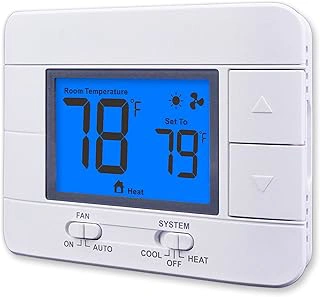
Aowel Non-Programmable Thermostat - 1 Heat/1 Cool, Humidity Display, LCD Backlit
When WiFi, scheduling, and smartphone apps create more friction than value, the Aowel non-programmable thermostat strips away every digital layer. You see the current temperature, the humidity level, and three buttons: up, down, and mode. The backlit LCD screen stays readable in dim hallways and requires no configuration beyond initial wiring.
This model works with single-stage heating and cooling systems - one furnace or heat pump circuit and one air-conditioner circuit. If your parent's home uses a two-stage system or heat pump with auxiliary heat, verify compatibility before purchasing. The thermostat mounts on a standard wall plate and connects to R, W, Y, and G wires; installation mirrors a traditional mechanical unit.
The humidity readout sits permanently on screen, which helps occupants monitor indoor air quality without opening a separate menu. The backlight activates with any button press and remains lit long enough to read the display and make an adjustment. No touch screen, no swipe gesture, no password recovery.
Because the thermostat stores no program, every temperature change requires a manual button press. For households where daily routines stay consistent and someone is home most of the day, this simplicity can outweigh the convenience of automation. Remote monitoring and control remain impossible - if a caregiver needs to check or adjust settings from a distance, one of the WiFi models reviewed earlier will suit that need better.
At $20.74, the unit delivers a large, legible interface and humidity feedback without the cost or learning curve of a connected device. It suits users who want immediate, tactile feedback and reject any system that requires a phone to function.
- ✅ No app, no schedule, no WiFi - manual control only
- ✅ Large backlit LCD with temperature and humidity on one screen
- ✅ Three-button interface with no menus or modes to memorize
- ✅ Standard wall-plate mounting and wiring
- ⚠️ 1 heat/1 cool compatibility limits use with multi-stage systems
- ⚠️ No remote access or monitoring for caregivers
- ⚠️ Every temperature change requires a button press at the wall
When WiFi Access Actually Helps (and When It Doesn't)
Remote app access makes the most sense when a parent lives alone and you worry about extreme temperatures or forgotten adjustments. During a winter cold snap or summer heat wave, you can check the actual indoor temperature from across town and adjust the thermostat if needed. That visibility matters when cognitive changes make it harder for someone to notice their home is too cold or when they routinely turn the heat down to save money but risk discomfort.
The tradeoff is setup complexity and the potential for conflict. Installing a WiFi thermostat requires a stable network, account creation, and sometimes troubleshooting connection issues. If your parent finds the installation process confusing or feels monitored, a non-WiFi programmable thermostat with a clear display may preserve their independence and reduce frustration. Remote access helps caregivers, but it doesn't help if the device sits unused because the initial hurdle was too high.
Consider a WiFi model when you're the primary person managing HVAC schedules or when health concerns make temperature monitoring a safety issue. Choose a non-connected unit when your parent is comfortable with their current thermostat routine and simply needs a larger, easier-to-read replacement. The best choice depends on whether the convenience of remote monitoring outweighs the friction of adding another connected device to their home.
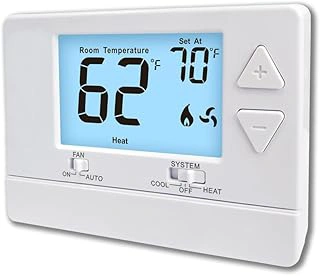
Non-Programmable Digital Thermostat - 1 Heat/1 Cool, Energy-Saving, White Backlight
At $26.99, this non-programmable digital thermostat strips away every advanced feature to deliver the most affordable option in this guide. The white backlight and large display keep numbers visible day or night, and the simple up/down buttons avoid the programming menus that confuse many older users.
This model works with single-stage heating and cooling systems only - one heat and one cool. If your parent's home uses a heat pump, multi-stage furnace, or auxiliary heat, compatibility becomes a concern. The energy-saving mode adjusts target temperatures slightly to reduce runtime, but you lose the remote access and scheduling that the Aowel and Emerson Sensi offer.
The 4.6/5 rating reflects solid reliability for basic temperature control. Reviews mention quick installation and intuitive button layout, though a few users report the backlight Non-Programmable Digital Thermostat - 1 Heat/1 Cool, Energy-Saving, White Backlight fades slightly over time. Because this thermostat lacks WiFi, you cannot adjust settings from another room or check on your parent's home remotely - a meaningful tradeoff if monitoring comfort from a distance matters to your family.
Comparing this model against the Aowel reveals two paths: this thermostat costs about multipleess and simplifies the interface further, while the Aowel adds programmable schedules that can lower energy costs over months. Both avoid touchscreens and complex menus. Choose this non-programmable option when your parent prefers manual control and you want the lowest upfront cost, or pick the Aowel if weekly scheduling and a slightly larger display justify the extra spend.
- ✅ Lowest-cost option at $26.99
- ✅ White backlight improves visibility in dim lighting
- ✅ Simple up/down buttons eliminate programming confusion
- ✅ Energy-saving mode reduces runtime without schedules
- ⚠️ No remote access or WiFi connectivity
- ⚠️ Compatible with single-stage systems only (1 heat/1 cool)
- ⚠️ Backlight brightness may fade over extended use
Installation Considerations: C-Wire, Compatibility, and When to Call a Pro
Most smart thermostats, including WiFi-enabled models, need a C-wire (common wire) to provide continuous power for their screens and wireless radios. If your existing thermostat has only four or five wires and no blue or black wire labeled C, you'll either need to run a new wire from the furnace, install a C-wire adapter at the air handler, or choose a battery-powered model instead. The Vine TJ-610 requires a C-wire for its WiFi connection and color display, so check your current wiring before ordering.
Non-programmable mechanical thermostats like the Honeywell CT87K work with single-stage heating and cooling systems - one heat, one cool - without any power wire at all. They close and open circuits mechanically, so compatibility is straightforward as long as your system isn't a heat pump, multi-stage furnace, or dual-fuel setup. If you have a more complex HVAC system, confirm compatibility with the manufacturer's chart or consult your installer.
DIY installation is realistic if you're comfortable labeling wires, turning off power at the breaker, and following the included wiring diagram step by step. Most thermostats ship with detailed instructions and adhesive wire labels. That said, mismatched wiring can trip a furnace fuse or damage a control board, and troubleshooting a non-responsive system after the fact is frustrating. If you're unsure about your system type, have an older furnace with unlabeled wires, or simply want peace of mind, hiring an HVAC technician for the swap usually costs between $100 and $150 and removes the guesswork.
Remote-access models also require a stable home WiFi network and a smartphone or tablet for initial setup. If your parent isn't comfortable connecting devices to WiFi or creating an account in an app, plan to handle that step yourself - either in person or by walking them through it over the phone. Once configured, day-to-day control from the wall panel should be straightforward, but app setup is a one-time hurdle that's easier with a second set of hands.
Final Considerations: How to Choose the Right Model for Your Parent
Choosing the right thermostat starts with an honest conversation about what your parent actually needs day to day. If you find yourself checking in frequently to adjust the temperature remotely or want to catch sudden changes that might signal a problem, WiFi capability becomes worthwhile despite the extra setup. If your parent simply needs a readable screen and straightforward buttons they can reach without confusion, a non-connected model with a large display often delivers better results with far less frustration.
Display size matters more than most spec sheets suggest. A screen your parent can read from across the room, without squinting or walking up close, eliminates the most common source of thermostat calls. Backlit screens help in dim hallways, and high-contrast text reduces eye strain. Control simplicity follows the same principle: fewer buttons, clearly labeled functions, and intuitive up-down navigation prevent the kind of accidental mode changes that lead to middle-of-the-night temperature swings.
The right thermostat is the one your parent will use confidently without calling for help. Before you buy, compare current prices and recent user reviews on Amazon to get real feedback on installation quirks and long-term usability. Look for comments from other caregivers about setup time and whether their parents adapted quickly. If the retailer offers a flexible return window, treat the first two weeks as a trial period - enough time to spot confusion points or interface problems that might not be obvious from the product page alone.