We may earn a commission when you buy through links on this page, at no extra cost to you. How this works.
Yamiry Smart Door Handle Lock with Keypad and Fingerprint Knob
Compare keypad and proximity lock types for seniors with memory challenges—side-by-side.
Fit and safety come first
Use the comparison as a shortlist, but keep fit, comfort, and any health or safety constraints ahead of price.
Forgetting where you put your keys becomes more than an inconvenience when memory loss is part of daily life. For seniors living independently, fumbling with a physical key at the front door can lead to frustration, locked-out emergencies, and unnecessary calls to family or locksmiths. Keyless entry systems promise to solve that problem, but they introduce a new question: is it easier to remember a four-digit code or to carry a small fob in your pocket?
Keypad locks ask the user to recall and enter a numeric sequence every time they come home. Proximity locks eliminate that step entirely, unlocking automatically when a paired device comes within range - no code, no button press. Both remove the need for a traditional key, but they place very different demands on memory, routine, and physical coordination.
The right choice depends on the type of memory challenge at hand. Some seniors retain procedural memory - muscle memory for routines like entering a familiar PIN - long after short-term recall fades. Others do better with a system that requires no active decision at the door, relying instead on a device they can clip to a walker or keep in a purse. Neither system is universally better; each trades one kind of cognitive load for another.
This guide walks through the practical differences between keypad and proximity locks, comparing how each performs in real-world scenarios involving memory loss, caregiver access, backup entry, and day-to-day reliability. The goal is to match lock type to the specific routines, abilities, and support network of the person using it.
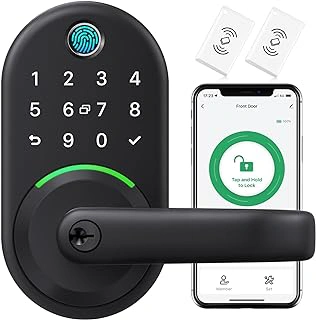
Yamiry Smart Door Handle Lock with Keypad and Fingerprint Knob
The Yamiry Smart Door Handle Lock combines a numeric keypad with fingerprint recognition in a single integrated handle, priced at $69.99 with a 4.3-star rating. This dual-entry design gives families flexibility: seniors who can reliably remember a four- to six-digit code use the keypad, while those who struggle with number recall but retain stable finger dexterity can unlock the door with a stored fingerprint.
Fingerprint entry sits between keypad codes and proximity unlocking in terms of memory demand. No code to rehearse, no smartphone or fob to carry - the door reads the fingertip and opens. That simplicity makes the Yamiry appealing for early-stage memory loss, provided the user's skin stays hydrated and finger placement remains consistent. Dry, peeling, or calloused fingertips reduce sensor accuracy, and hand tremors can make alignment difficult. Unlike a proximity lock that unlocks as the user approaches, fingerprint readers require deliberate contact and a brief pause for scanning.
The integrated handle design means fewer separate parts to install and align compared to deadbolt-plus-exterior-hardware kits. Installation typically involves replacing the existing door handle assembly, drilling pilot holes if needed, and programming fingerprints or codes through the keypad interface. Battery access sits on the interior side, and most units alert users when power runs low. Because the lock does not connect to Wi-Fi or a smart-home hub, there are no network pairing steps, app downloads, or firmware updates - operation stays entirely local.
From a caregiver perspective, the keypad-fingerprint combination reduces device management compared to Bluetooth proximity locks: no phone battery to monitor, no auto-unlock radius to tune, no arrival logs to review in an app. The tradeoff is that unlocking still requires deliberate action at the door. A senior must remember to press a finger to the sensor or recall the numeric code, so complete autopilot entry - walking up and turning the handle - is not an option. For households where a spouse or aide enters frequently, the keypad offers a reliable backup when fingerprint recognition falters.
This lock works best when the senior's memory challenge centers on recalling sequences rather than recognizing familiar objects or completing routine movements. If finger dexterity and skin condition remain stable, fingerprint unlocking can feel intuitive. When either declines, the numeric keypad provides a fallback, assuming code recall is still intact or a caregiver assists. Families choosing between keypad-fingerprint hybrids and pure proximity locks should weigh memory load against the need for autonomous, hands-free entry.
- ✅ Dual-entry modes - keypad and fingerprint - offer flexibility for varying memory and dexterity levels
- ✅ Integrated handle design simplifies installation with fewer separate components
- ✅ No Wi-Fi, app, or smart-home hub required, reducing digital setup and device management
- ✅ $69.99 price point accessible for families exploring keyless entry options
- ⚠️ Fingerprint sensor accuracy drops with dry, calloused, or peeling skin
- ⚠️ Hand tremors or inconsistent finger placement may delay or prevent unlocking
- ⚠️ Requires deliberate action at the door - no automatic hands-free unlocking as user approaches
- ⚠️ Keypad fallback still demands code recall, limiting value if both memory and dexterity decline
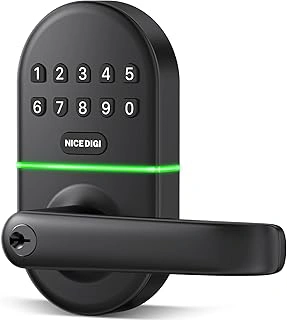
Smart Keypad Door Lock with Handle
The Smart Keypad Door Lock with Handle sells for $49.99 and holds a 4.4-star rating. It operates using only a numeric code - no fingerprint sensor, no Bluetooth, and no app setup required. For seniors who can maintain a consistent routine around a short PIN, this lock offers the most affordable keyless entry option in this comparison.
The reduced feature set means fewer points of confusion. A caregiver programs the code once, writes it down in a visible place if needed, and the senior uses the same keypad sequence every time. There's no fob to carry, no phone to pair, and no second method to remember. That simplicity works well when memory loss is mild and the senior benefits from repetition rather than multiple choices.
The tradeoff is flexibility. If a senior forgets the code or struggles to press the buttons in sequence, this lock has no backup entry mode built in. Proximity locks automatically unlock when the senior approaches, which removes the recall burden entirely. This keypad lock also lacks remote access, so a caregiver cannot unlock the door from a distance if the senior is locked out or confused.
This lock fits budgets that cannot stretch to multiple-plus models and situations where a single, reinforced routine is more helpful than feature variety. Compare pricing and features of basic keypad locks to confirm the code-only approach matches your senior's current memory and motor ability.
- ✅ Lowest-cost keyless entry at $49.99
- ✅ Keypad-only operation with no app or Bluetooth setup
- ✅ Reduced feature set limits decision points for seniors with mild memory loss
- ⚠️ No backup entry method if code is forgotten
- ⚠️ No remote unlock capability for caregiver assistance
- ⚠️ Requires consistent recall and fine motor control to enter PIN
How Keypad Smart Locks Work: Pros and Cons for This Use Case
Keypad smart locks replace traditional keys with a numeric code entry system mounted on the exterior of the door. The user enters their personal code on a button pad, and the lock disengages automatically when the correct sequence is recognized. No smartphone, key fob, or physical key is required at the point of entry.
For seniors living independently, keypad locks offer several practical advantages. There is nothing to carry, misplace, or forget on the counter, which eliminates a common source of lockouts. Family members, caregivers, and trusted neighbors can each be assigned unique codes, making it easy to grant or revoke access without rekeying hardware or tracking spare keys. These locks function entirely offline, so they continue to work during internet outages or if a home network goes down unexpectedly.
The trade-offs become clearer when memory loss is part of the picture. Standing at the door, a senior must recall and accurately enter a four- to eight-digit sequence, often under time pressure or stress. That moment of retrieval can be difficult for someone with short-term memory challenges, particularly if the code has not been used in several hours or if the routine has been disrupted. Button layouts vary by model, and some pads use small, closely spaced keys that can be hard to see in low light or challenging for users with arthritis or reduced finger dexterity to press reliably.
Code entry is also visible to anyone nearby. Neighbors, delivery personnel, or passersby may inadvertently observe the sequence, raising security questions in higher-traffic settings. Some keypads include privacy features such as randomized touch screens or the ability to enter extra digits before and after the real code, but these add complexity that may not suit every user.
Keypad locks tend to work best when the senior has a stable daily rhythm and the opportunity to rehearse the code regularly - entering it multiple times a day reinforces the memory pathway. If the code is used infrequently or the person's routine shifts unpredictably, recall becomes less reliable. In those situations, the independence a keypad promises can turn into frustration or another barrier at the threshold.
How Proximity (Fob/Phone) Smart Locks Work: Pros and Cons for This Use Case
Proximity locks unlock when they detect an authorized device - a key fob, smartphone, or wearable tag - within a few feet of the door. Most systems allow auto-unlock as you approach, or require a quick touch of the handle once the device is sensed. This removes the need to recall any code or manipulate a keypad, which can be especially helpful when memory or fine motor skills are a concern.
The biggest advantage for seniors with memory loss is eliminating the cognitive step of remembering and entering a PIN. A fob clipped to a purse strap, belt loop, or worn on a lanyard becomes part of the daily routine. Many caregivers find that consistency - carrying the same bag or wearing the same lanyard each day - works well for individuals with early to moderate memory decline. Entry is faster and less stressful, and there's no risk of standing outside trying to recall the correct digits.
Phone-based proximity unlocking offers even more flexibility: geofencing can trigger the lock to open as you walk up, and apps let family members grant or revoke access remotely. However, smartphones introduce their own challenges. They need regular charging, the app must remain installed and configured, and touchscreen navigation can frustrate seniors who are less tech-comfortable. If the phone dies or is left in another room, the lock may not respond.
Fobs and wearable tags sidestep many of those issues - they have long battery life, no screen, and no learning curve - but they can be misplaced, forgotten on a dresser, or accidentally left in a coat pocket. Some proximity systems will unlock any time the fob is within range, which means the door might open unexpectedly if the device is sitting near the entryway inside the home. Look for models that require a deliberate touch or button press after detecting the fob to reduce accidental triggering.
Proximity locks work best for seniors who have a stable daily habit: the same purse every outing, a wallet that stays in the same pocket, or a lanyard worn consistently. If that routine is in place, proximity unlocking reduces both memory load and physical effort, making it a strong choice for individuals who struggle with codes but can reliably carry a small device.
Head-to-Head Comparison: Ease of Use, Security, and Reliability
Choosing between keypad and proximity locks for a senior with memory loss comes down to matching the technology to daily habits and cognitive needs. Keypad locks require the user to remember and enter a numeric code each time, which can become a barrier as memory declines. Proximity locks eliminate code recall entirely - the door unlocks when the user approaches with a fob, card, or smartphone - but they shift the burden to keeping track of a physical device or managing battery levels and app settings.
Security profiles differ in meaningful ways. Keypad codes can be observed by visitors or neighbors during entry, and forgotten codes often lead to lockouts or insecure workarounds like writing the code near the door. Proximity credentials are harder to observe in use, but a lost fob or phone grants immediate access to anyone who finds it. Both systems allow remote code changes or credential deactivation, yet the immediacy of physical loss makes proximity devices a higher-stakes item to misplace.
Reliability in daily operation tilts toward keypads when power or connectivity fails. Most keypad locks function completely offline, relying only on battery backup and mechanical components. Proximity locks depend on working batteries in both the lock and the credential device, and Bluetooth or NFC range can be inconsistent near metal doors or thick walls. For seniors who may not notice a dying phone battery or forget to charge a fob, this adds another layer of maintenance that caregivers must monitor.
Installation and programming complexity favors keypads in most households. A keypad lock typically mounts like a traditional deadbolt, with straightforward code entry through the lock's own interface. Proximity systems often require pairing fobs or phones through an app, creating setup steps that may frustrate less tech-comfortable users or require professional help. Once configured, however, proximity locks can be simpler for the end user - no code to enter, just approach and turn the handle.
Caregiver access and flexibility are easier to scale with keypads. You can issue separate codes to family members, home health aides, and house cleaners, then revoke or change codes remotely if needed. Proximity locks require purchasing additional fobs or sharing app credentials, which adds cost and complexity when multiple people need access on different schedules. Some proximity models support temporary virtual keys, but that assumes the caregiver is comfortable with app-based access management.
Upfront and ongoing costs separate the two categories noticeably. Keypad locks often start under $100 and require only periodic battery replacement. Proximity models tend to cost more initially and may need extra fobs at $20 - 40 each, plus the expectation that the senior or caregiver will maintain a charged smartphone or replace fob batteries. The total cost of ownership climbs when you account for lost fobs, backup devices, and the time spent troubleshooting connectivity issues.
Key Considerations Specifically for Memory Loss and Dementia
Memory loss and dementia introduce safety concerns that standard smart lock comparisons rarely address. The lock that works beautifully for a senior with mild forgetfulness may create serious risks for someone with moderate-to-advanced cognitive decline, particularly if wandering becomes a concern.
Auto-unlock proximity features can inadvertently enable unsafe exits. A senior who steps outside in the middle of the night may leave the door unlocked behind them, or the door may unlock automatically as they approach from the inside, removing a barrier that helps prevent wandering. For families managing moderate dementia, this is not a theoretical risk - it is a documented pattern that requires careful evaluation before choosing a proximity lock.
Routine anchoring plays a decisive role in which system will work long-term. If your loved one already clips their keys to a purse, belt loop, or jacket pocket every single day, a proximity fob can integrate into that habit with minimal disruption. But if daily routines are inconsistent or the fob is frequently misplaced, a keypad with a practiced, rehearsed code may prove more reliable. Repetition strengthens procedural memory, and a four-digit code practiced daily with a caregiver often persists longer than episodic memory for where a fob was placed.
Caregiver involvement changes the calculus entirely. Remote access and activity logs - features common in many smart proximity locks - allow family members to monitor entries, unlock the door for visiting nurses, and receive alerts if the door opens at unusual hours. Keypads with offline operation lack these tools, but they also eliminate the risk of connectivity failures that could lock a caregiver out during an emergency.
The stage and progression of memory decline matter more than the lock's feature list. Early-stage memory loss may benefit from the simplicity of proximity unlock, while middle stages often do best with a rehearsed code and caregiver backup. Advanced stages typically require caregiver-controlled access, where the senior is not responsible for operating the lock at all. One-size-fits-all recommendations ignore the reality that cognitive decline is a moving target, and the lock choice should anticipate the next twelve to eighteen months, not just today.
Backup access is non-negotiable. Whether you choose a keypad or proximity lock, confirm that caregivers, family members, and emergency contacts have a reliable secondary entry method - physical key, backup code, or remote unlock - that does not depend on the senior's memory or cooperation.
Which Type of Lock Is Best for Your Loved One?
Choosing the right lock depends on your loved one's current abilities, daily habits, and the support network around them. Memory impairment exists on a spectrum, and the lock you select should match where your loved one is today, not where they were five years ago or where you hope they might stay.
If memory is mildly impaired but your loved one follows a consistent daily routine - leaving for walks at the same time, checking the mail in the afternoon - a keypad lock can work well. The code becomes part of that routine, reinforced through repetition. Plan to practice the code together regularly, write it on a card kept in a wallet, or program it into a phone as a reminder. This approach preserves a sense of control and independence for seniors who still manage most tasks on their own.
When memory loss is more pronounced, proximity locks with a fob or card reduce the cognitive steps required. If your loved one reliably carries a purse, uses a lanyard for keys, or wears the same jacket daily, a fob attached to that item can unlock the door automatically as they approach. The trade-off is that the fob must stay with them; losing it or forgetting to carry it creates a lockout. Keep a backup fob with a trusted neighbor or family member nearby.
For seniors who struggle with both remembering codes and keeping track of physical items, fingerprint readers offer another path. Biometric entry requires no recall and no token to carry, though arthritis or skin changes can sometimes interfere with recognition. Hybrid models that combine fingerprint, keypad, and proximity options provide the most flexibility, allowing you to switch methods as needs evolve.
No lock substitutes for regular contact. If your loved one lives alone, pair any smart lock with scheduled check-ins - morning phone calls, video chats, or visits from a caregiver. Many smart locks log entry and exit times, giving you visibility into daily patterns without being intrusive. Sudden changes in those patterns can signal a need for additional support.
The right lock adapts to your loved one's real, day-to-day abilities. It should reduce frustration, not add to it, and it should give both of you confidence that they can enter and secure their home safely. If you remain uncertain which type fits best, consult an occupational therapist or aging-in-place specialist who can assess your loved one's motor skills, memory, and living environment in person. Their recommendations will be tailored to the specific challenges and strengths you're working with, making the choice clearer and more grounded in practical reality.