We may earn a commission when you buy through links on this page, at no extra cost to you. How this works.
You're deciding between remotes based on three factors: button size, layout simplicity, and setup effort. If your mother has arthritis, a remote with 60 tiny buttons isn't just inconvenient - it's a daily source of pain and confusion. Standard remotes assume nimble fingers and sharp vision, neither of which is realistic for many seniors.
The challenge isn't just physical. Too many buttons create decision fatigue. Your mother shouldn't need to decipher cryptic icons just to raise the volume or change the channel. A well-designed large-button remote strips away everything unnecessary and leaves only the functions she'll actually use.
This guide compares four remotes that prioritize clarity and ease of grip. Some work universally across brands; others are brand-specific but simpler than factory models. We'll help you match the right option to her TV and her needs.
Fit and safety come first
Use the comparison as a shortlist, but keep fit, comfort, and any health or safety constraints ahead of price.
The Benefits of a Simplified, Large-Button Remote
Large buttons reduce the physical effort required to press and hold. For someone with swollen joints, this difference is measurable. Buttons spaced farther apart also prevent accidental presses - a common frustration when fingers don't land precisely.
Simplified layouts cut cognitive load. When a remote shows only power, volume, channel, and mute, there's no hunting through menus. Your mother can glance down and immediately find what she needs. This independence matters, especially when she's alone and doesn't want to wait for help.
High-contrast labels improve visibility. Many senior-friendly remotes use white text on black buttons or backlighting to help users with declining eyesight. The goal is to remove barriers between intention and action.
Tips for Introducing New Tech to an Independent Parent
Swapping her remote isn't just a technical task - it's an emotional one. Approach the conversation by focusing on comfort, not capability. Instead of saying the new remote is 'easier,' explain that the larger buttons might feel better on her hands. This frames it as a comfort upgrade, not a concession to age.
Set it up for her before handing it over. Program the remote, test all the buttons, and label any that might be confusing with a small sticker if needed. The less troubleshooting she has to do, the more likely she'll embrace the change.
Give her time to adjust. Keep the old remote nearby for the first week so she doesn't feel trapped by the new one. Most people need a few days to build new muscle memory. Patience here pays off in long-term independence.
Final Thoughts: Making TV Watching Simple Again
The right remote does more than change channels - it preserves autonomy. When your mother can control her TV without pain or confusion, she maintains a small but important piece of independence. That matters.
Compare these four side-by-side. Check her TV brand, consider her vision and grip strength, and choose the option that removes the most friction. If she has an LG, start there. If she needs universal compatibility, the EZclicker or the flip model offer solid versatility. All four are priced to try without major investment.
A simple remote won't solve every challenge of aging in place, but it's one less daily frustration. That's worth the effort.
What to Look For in a Senior-Friendly Remote
- Button size: Look for buttons at least twice the size of standard remotes
- Contrast: White-on-black or backlit labels help with low vision
- Layout: Fewer than 20 buttons reduces decision fatigue
- Tactile feedback: Raised or textured buttons confirm presses
- Compatibility: Check if it's universal or brand-specific before ordering
- Setup simplicity: One-step pairing beats multi-code programming
- Weight and grip: Lighter remotes are easier to hold for extended periods
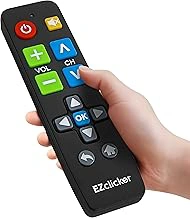
EZclicker Big Button Universal TV Remote (Black)
This universal option works across most major TV brands and keeps the button count minimal. Large, clearly labeled keys handle power, volume, channel, and mute without overwhelming the user. At $19.99, it's an affordable first step if you're uncertain which features matter most.
Setup is straightforward - most users can program it in under five minutes using the brand code included in the instructions. The buttons offer tactile feedback, so your mother will know when she's successfully pressed one. If she's switching between a cable box and a TV, this remote can handle both without needing two devices.
Imagine she's settled in to watch her evening news. She can raise the volume with one large press and mute commercials without fumbling. The simplicity here is the selling point: fewer decisions, less frustration, and a layout that makes sense at a glance.
- ✅ Works with multiple TV brands
- ✅ Simple five-minute setup
- ✅ Budget-friendly at under $20
- ⚠️ May require brand code lookup
- ⚠️ No backlight for low-light use
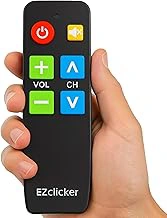
Big Button TV Remote for Seniors (Black)
Another universal model priced at $19.99, this remote focuses on oversized buttons with high-contrast labeling. The layout is clean, with only essential controls visible. If your mother struggles with vision as well as grip strength, the bold white-on-black text helps her identify buttons without squinting.
The remote is compatible with most TV brands, though programming requires entering a code from the manual. Once set up, it handles daily tasks - power, volume, channels - without requiring a tutorial. The button spacing is generous, reducing the chance of pressing two at once.
Picture her trying to lower the volume during a phone call. With this remote, she can find the volume-down button instantly, even if she's not looking directly at it. The tactile design means she can operate it by feel, a useful feature when the room is dim or she's multitasking.
- ✅ High-contrast button labels
- ✅ Compatible with most TV brands
- ✅ Generous button spacing
- ⚠️ Setup requires code entry
- ⚠️ Basic functionality only
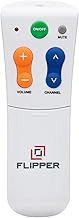
Flipper Big Button Universal TV Remote for Seniors
At $39.95, this is the premium option in the group. The Flipper stands out with its unique flip-open design that reveals a second set of buttons for less-used functions. The primary face shows only the essentials, keeping daily use dead simple. When your mother needs access to input selection or settings, she flips it open.
The buttons are extra-large and raised, providing excellent tactile feedback. The flip mechanism also protects the less-used buttons from accidental presses, a thoughtful touch for someone who may grip the remote tightly. Setup is similar to other universal models but includes more brand compatibility.
Suppose she's watching a DVD and needs to switch inputs. Instead of hunting through a crowded button grid, she flips the remote open, presses the input button once, and flips it closed again. The dual-layer design keeps complexity hidden until it's needed, which respects her independence without sacrificing capability.
- ✅ Flip-open design hides complexity
- ✅ Extra-large raised buttons
- ✅ Broader brand compatibility
- ⚠️ Higher price point at $39.95
- ⚠️ Flip mechanism may confuse some users
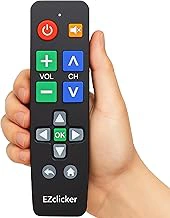
LG Replacement TV Remote with Big Buttons
If your mother owns an LG TV, this brand-specific replacement offers a cleaner layout than the factory remote. Priced at $19.99, it keeps only the most-used buttons prominent and enlarges them for easier pressing. Because it's designed for LG models, there's no programming - it works out of the box.
The button labels are clear and the spacing generous. Unlike universal remotes, this one includes brand-specific smart TV shortcuts, but they're arranged logically so they don't create clutter. The remote feels lighter than many factory models, which can help if grip strength is limited.
Imagine she's trying to access her favorite streaming app. The shortcut button is right there, large and labeled, rather than buried in a menu. For LG owners, this remote delivers simplicity without sacrificing the features that make modern TVs useful. Just confirm her exact LG model before ordering to ensure full compatibility.
- ✅ No programming needed for LG TVs
- ✅ Includes smart TV shortcuts
- ✅ Lightweight and easy to hold
- ⚠️ Only works with LG models
- ⚠️ Requires model compatibility check