We may earn a commission when you buy through links on this page, at no extra cost to you. How this works.
Every family facing this decision balances three priorities: safety, independence, and cost. Medical alert systems with fall detection sit at that intersection, but the market offers everything from $45 caregiver pagers to $150 full-featured systems with GPS tracking and 24/7 monitoring.
The right choice depends on your parent's activity level, their comfort with technology, your budget, and whether they need help beyond the home. Some systems require monthly subscriptions for professional monitoring; others connect directly to family members. Some detect falls automatically; others rely on the wearer pressing a button.
This guide compares four distinct approaches: a comprehensive system with professional monitoring and GPS, a WiFi-based caregiver alert that keeps you in the loop via smartphone, a no-subscription home system, and specialized accessories for medical device wearers. Each serves different needs. Your job is matching features to your situation, not finding a universal 'best.'
Quick comparison
| Medical Alert System with Fall Detection, 24/7 Monitoring, GPS, Water-Resistant, Panic Button | Check current pricing and monitoring options |
| PILSAMAS WiFi Caregiver Pager with Caller ID, App Alerts, Emergency Button for Elderly | View system details and app features |
| No Subscription Senior Medical Alert System SOS | Compare long-term costs vs. subscription systems |
Fit and safety come first
Use the comparison as a shortlist, but keep fit, comfort, and any health or safety constraints ahead of price.
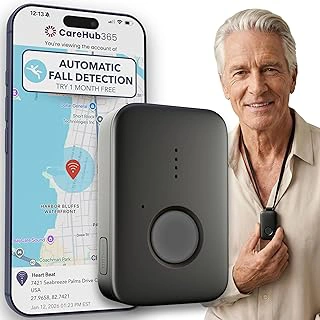
Medical Alert System with Fall Detection, 24/7 Monitoring, GPS, Water-Resistant, Panic Button
This system addresses the full spectrum of concerns families face: automatic fall detection, GPS location tracking for mobile users, water resistance for bathroom safety, and 24/7 professional monitoring. The device works both at home and outside, eliminating the 'coverage gap' that worries families when parents leave the house.
The water-resistant design means your parent can wear it in the shower-where many falls occur-without device failure concerns. GPS tracking helps if they wander or fall while out walking. Professional monitoring provides immediate emergency response without requiring family members to be constantly available.
The $76.99 price point likely covers the device, though monthly monitoring fees typically apply separately. This investment makes sense for active seniors who drive, travel, or spend time outdoors, and for families who want professional oversight rather than managing alerts themselves. The 4.7/5 rating reflects user confidence in comprehensive protection.
- ✅ GPS tracking works anywhere with cellular coverage
- ✅ Water-resistant for shower safety
- ✅ Professional 24/7 monitoring center responds to alerts
- ✅ Automatic fall detection plus manual panic button
- ⚠️ Requires monthly subscription for monitoring service
- ⚠️ Needs regular charging (typical battery life 3-5 days)
- ⚠️ Higher total cost over time compared to no-subscription options
How Fall Detection Works: A Simple, No-Jargon Explanation
Fall detection uses accelerometers-the same sensors that flip your phone screen when you rotate it-to recognize sudden downward movement followed by impact and lack of motion. When the device detects this pattern, it triggers an alert automatically, even if the wearer can't press a button.
Important limitations: Fall detection isn't perfect. It can miss slow slides to the ground or generate false alarms from dropping the device. It works best for sudden falls from standing height. That's why the manual panic button remains essential-it's the primary alert method, with automatic detection as backup.
Systems with GPS add location tracking, critical if your parent is mobile or experiences confusion. Professional monitoring means trained operators respond to alerts 24/7. Direct-to-family systems skip the monitoring center and notify your smartphone instead, faster but requiring you to be available.
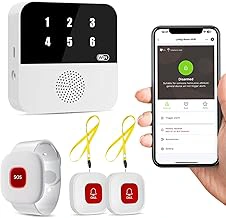
PILSAMAS WiFi Caregiver Pager with Caller ID, App Alerts, Emergency Button for Elderly
This WiFi-based system takes a different approach: it alerts you directly via smartphone app when your parent presses the emergency button, bypassing professional monitoring centers entirely. The caller ID feature means your parent can identify which caregiver or family member is responding, reducing confusion and anxiety during stressful moments.
The app-based alerts deliver notifications faster than systems that route through monitoring centers-you get immediate notification when help is needed. This works well for families with multiple caregivers who can coordinate via smartphone, or for situations where you live close by and can respond quickly.
At $44.96, it's the most budget-friendly option reviewed here, with no monthly monitoring fees. The WiFi requirement limits it to home use-no protection outside the house. The 4.6/5 rating suggests users appreciate the simplicity and direct family connection. Best suited for parents who rarely leave home and families who prefer to manage emergency response themselves rather than involve third-party monitoring.
- ✅ Direct smartphone alerts to family members, no middleman
- ✅ Caller ID reduces confusion about who is responding
- ✅ No monthly subscription fees after purchase
- ✅ Budget-friendly at $44.96
- ⚠️ WiFi-only, no protection outside the home
- ⚠️ Requires family availability to respond to alerts
- ⚠️ No automatic fall detection feature
- ⚠️ No professional monitoring backup
Key Features to Compare Besides Fall Detection (What Really Matters)
Start with range and mobility. Does your parent need protection only at home, or do they drive, walk the neighborhood, or travel? Home-only systems use a base station with limited range (typically 300-600 feet). Mobile systems use cellular networks and GPS to work anywhere.
Consider the alert destination. Professional monitoring centers dispatch emergency services and contact family members. Direct-to-family systems alert your phone immediately but rely on your availability. Hybrid systems offer both options.
Battery life affects reliability. Most wearable devices need charging every 3-7 days. Check if the system alerts you to low battery-a critical feature for parents who may forget to charge.
Water resistance matters because falls often happen in bathrooms. Look for devices rated for shower use.
Finally, assess subscription costs versus upfront investment. Monthly monitoring fees ($30-$50) add up, but no-subscription systems require you to manage emergency response.
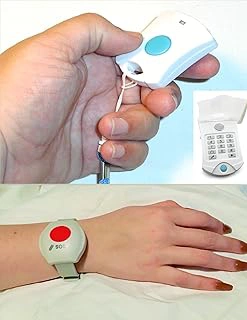
No Subscription Senior Medical Alert System SOS
This system eliminates ongoing monthly fees-a significant consideration for families managing long-term care budgets. The $149.77 upfront cost provides a complete home-based alert system without recurring charges, making total ownership cost predictable and often lower than subscription-based alternatives over time.
The no-subscription model means the system likely connects directly to programmed phone numbers (yours, other family members, neighbors) rather than a monitoring center. When your parent activates the alert, it calls through the list until someone answers. This requires family coordination but offers control over who responds and how.
The 5.0/5 rating, while based on limited reviews typical of newer products, suggests early adopters value the subscription-free approach. This option suits families comfortable managing emergency protocols themselves, those on fixed budgets who want to avoid monthly fees, or situations where multiple nearby relatives can share response duties. Less appropriate for parents who live alone with no nearby family or those who need backup professional monitoring.
- ✅ No monthly subscription fees, one-time purchase
- ✅ Lower total cost over multi-year use
- ✅ Direct connection to family phone numbers
- ✅ Full control over emergency contact list
- ⚠️ No professional monitoring backup
- ⚠️ Requires family availability and coordination
- ⚠️ Home-based system, limited range from base station
- ⚠️ No GPS tracking for use outside the home
The Conversation: How to Talk to Your Independent Parent About a Medical Alert System
Frame the conversation around freedom, not limitation. 'This lets you stay in your home longer' resonates more than 'I'm worried about you falling.' Emphasize that you're respecting their independence by providing tools that let them live alone safely rather than pushing for assisted living or constant supervision.
Pick the right moment-not immediately after a fall or health scare when emotions run high, but during a calm discussion about future planning. Consider introducing it as something you want for your peace of mind: 'This would help me worry less while you stay independent.'
Let them choose features. Show them options and ask which feels most comfortable. Some parents prefer systems that only alert family; others feel safer knowing professionals monitor 24/7. Giving them control over the decision increases acceptance.
Start with a trial. Many systems offer 30-day returns. Frame it as 'trying it out' rather than a permanent commitment. Once they experience the security without losing autonomy, resistance often fades.

FixiC Waterproof Pre-Cut Freestyle Adhesive Patches for Libre, G7, Guardian (25 Pack)
While not a medical alert system itself, these adhesive patches solve a specific problem for seniors who wear continuous glucose monitors or other medical sensors: keeping devices securely attached during daily activities, including showering. For diabetic seniors who already wear medical technology, secure device attachment contributes to overall health monitoring and safety.
The waterproof design means your parent can maintain their normal routine-showering, swimming, or sweating-without device failure or loss. The 25-pack provides roughly three months of daily use at one patch per week, making the $16.91 price point economical for ongoing needs.
The 4.3/5 rating reflects the practical reality that adhesive performance varies with individual skin types and activity levels. These patches complement medical alert systems for parents managing diabetes or other conditions requiring continuous monitoring. They're not a substitute for emergency alert devices but address the related concern of maintaining reliable health monitoring equipment-another layer in comprehensive safety planning.
- ✅ Waterproof protection for continuous glucose monitors
- ✅ Pre-cut for easy application by seniors
- ✅ 25-pack provides roughly 3 months of use
- ✅ Compatible with multiple medical device brands
- ⚠️ Not a medical alert system, only secures existing sensors
- ⚠️ Adhesive performance varies by individual skin type
- ⚠️ Requires specific medical device compatibility
- ⚠️ Additional ongoing cost for sensor wearers
Answering Your Top Questions About Medical Alert Systems
Do all systems require monthly fees? No. Subscription-based systems with professional monitoring typically cost $30-$50 monthly but provide 24/7 trained operators. No-subscription systems have higher upfront costs but connect directly to your phone, eliminating ongoing fees.
How accurate is fall detection? Modern sensors detect 80-90% of sudden falls from standing height but may miss slow slides or generate false alarms from rapid sitting. The manual button remains the primary alert method; automatic detection is backup.
What happens if the battery dies? Most systems alert the wearer and family when battery is low. Establish a charging routine-every Sunday morning, for example-and consider systems with longer battery life (5-7 days) if memory is a concern.
Will it work if they're unconscious? Automatic fall detection systems can trigger alerts without wearer activation. Button-only systems cannot. This distinction matters for parents at high fall risk or those with conditions causing sudden loss of consciousness.
What if they forget to wear it? Start with systems that look like jewelry rather than medical devices. Build wearing it into daily routines. Some families find success with 'charging station' reminders-parent sees the empty charger and remembers to put it on.
The Right Choice for Your Family's Peace of Mind
The best medical alert system matches your parent's lifestyle and your family's capacity to respond. Active parents who drive and travel need GPS and mobile coverage. Homebodies benefit from simpler, lower-cost systems with home-only range. Tech-comfortable families can manage direct-alert systems; others prefer professional monitoring backup.
Budget matters over time. A $45 system with no monthly fees costs less over three years than a $75 device with $30 monthly monitoring ($1,125 total). But that calculation ignores the value of professional response-worth it for many families, unnecessary for others with nearby support networks.
Compare these systems side-by-side against your specific situation: your parent's activity patterns, your proximity and availability, your comfort managing emergencies versus hiring professional monitoring, and your long-term budget. The right answer isn't universal-it's personal to your family's needs and resources. Review the four systems above, check current pricing and feature details, and choose the option that lets your parent maintain independence while giving you genuine peace of mind.