We may earn a commission when you buy through links on this page, at no extra cost to you. How this works.
For decades, medical alert systems relied on landline phones to connect users with emergency operators during a fall or health crisis. But as more households disconnect their landlines - nearly 70% of U.S. homes now rely exclusively on wireless phones - many families face a new question: can a medical alert system work reliably without a traditional phone line?
The short answer is yes. Modern cellular medical alert systems use the same wireless networks as your mobile phone, connecting directly to monitoring centers without requiring a landline or even an internet connection. These systems have become the standard for millions of users, offering dependable emergency communication even when traditional phone service isn't available.
The shift to cellular technology addresses a practical reality: aging adults who live independently often no longer maintain landlines, yet still need immediate access to help if they fall, experience chest pain, or face another urgent situation. Cellular systems eliminate the need to keep an expensive phone service you rarely use, while maintaining the core function that matters most - fast, reliable connection to trained emergency responders.
This doesn't mean all wireless systems work the same way. Cellular medical alert devices differ in how they're powered, where they can be used, and what happens when you press the help button. Understanding these differences helps you choose a system that matches your loved one's daily routine, home environment, and mobility needs - without the guesswork or anxiety about whether the technology will work when it's needed most.
In the sections that follow, we'll walk through exactly how cellular medical alert systems establish and maintain connections, what components make them work, and how in-home systems differ from mobile devices designed for use anywhere. The goal is to give you enough clarity to evaluate options confidently, knowing which features matter for your situation and which are simply nice-to-have.
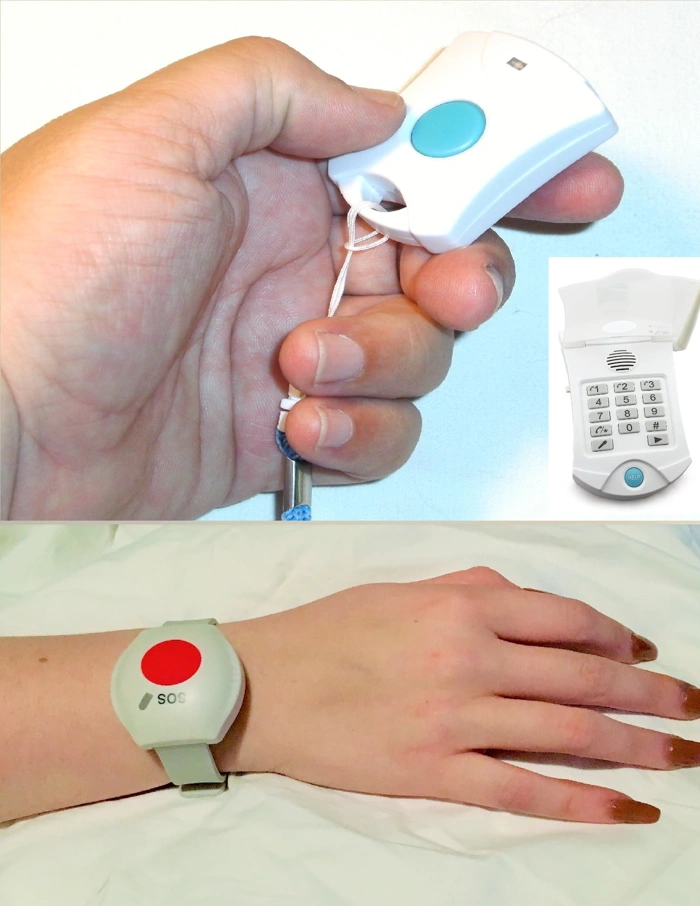
Medical Alert System for Seniors with SOS Function
The Medical Alert System for Seniors with SOS Function is a cellular-enabled device priced at $149.77, currently in stock and carrying a 5.0 out of 5 rating. This system operates independently of a landline, using cellular technology to connect users with help when the SOS button is pressed.
As a representative example of a cellular alert device, this option illustrates how modern systems eliminate the need for traditional phone lines. The SOS function provides a dedicated emergency contact method, and the device is designed for seniors who need reliable access to assistance without maintaining home phone service.
At this price point, the system offers an entry into cellular-based alert technology. When evaluating this or similar options, consider what's included in the package, whether there are monthly service fees beyond the device cost, and how the setup process aligns with your technical comfort level. Cellular systems like this one require adequate mobile network coverage in your area to function properly.
This device represents the type of standalone cellular alert system suitable for in-home use by seniors who want straightforward SOS capability without landline dependency. The high rating suggests user satisfaction, though individual needs vary based on living situation, mobility, and support network.
- ✅ Works without a landline using cellular technology
- ✅ Dedicated SOS function for emergency contact
- ✅ Priced at $149.77 with current availability
- ✅ 5.0 out of 5 user rating
- ⚠️ Requires adequate cellular network coverage to operate
- ⚠️ Setup requirements and monthly service fees not specified in product details
- ⚠️ Limited verified product information available for detailed feature comparison
The Technology Explained: Cellular vs. Landline Systems
The core difference between landline and cellular medical alert systems lies in how they transmit emergency signals. Traditional landline systems connect directly to your home phone line, routing calls through the telephone network. Cellular systems, by contrast, operate like a mobile phone, using built-in wireless modems and SIM cards to connect through cellular networks - no phone service required.
Cellular medical alert devices contain their own radio transmitters that communicate with nearby cell towers. When you press the help button, the device initiates a connection through the cellular network to reach the monitoring center, much like placing a cell phone call. The monthly service fee typically includes the cellular plan, so you don't need to arrange separate wireless service.
This architectural difference creates distinct reliability profiles. Landline systems depend on physical phone lines, which can be cut during storms, accidents, or home emergencies. If the phone line goes down, the alert system stops working. Cellular systems avoid this vulnerability because they transmit wirelessly, maintaining function even if phone or internet service fails.
Cellular systems do have one critical requirement: adequate cell signal strength in your area. Before committing to a cellular device, verify that your provider's network delivers reliable coverage in your home. Most providers use major carriers like AT&T or Verizon and offer signal testing during setup. If you live in a location with weak or inconsistent cell coverage, signal strength becomes the limiting factor, and a landline system - assuming you have active phone service - may prove more dependable.
Another practical consideration is power. Landline systems typically draw power from the phone line itself, continuing to work during electrical outages. Cellular devices rely on rechargeable batteries or plugged-in base units with battery backup. Battery life ranges from one to several days depending on the model, so regular charging matters for sustained reliability.
For most households with stable cellular coverage, cellular systems offer greater flexibility and resilience. They eliminate dependence on a phone line you may no longer maintain, work during line outages, and support mobile devices that travel with you beyond the home. Understanding these fundamental differences helps you match the technology to your living situation and coverage environment.
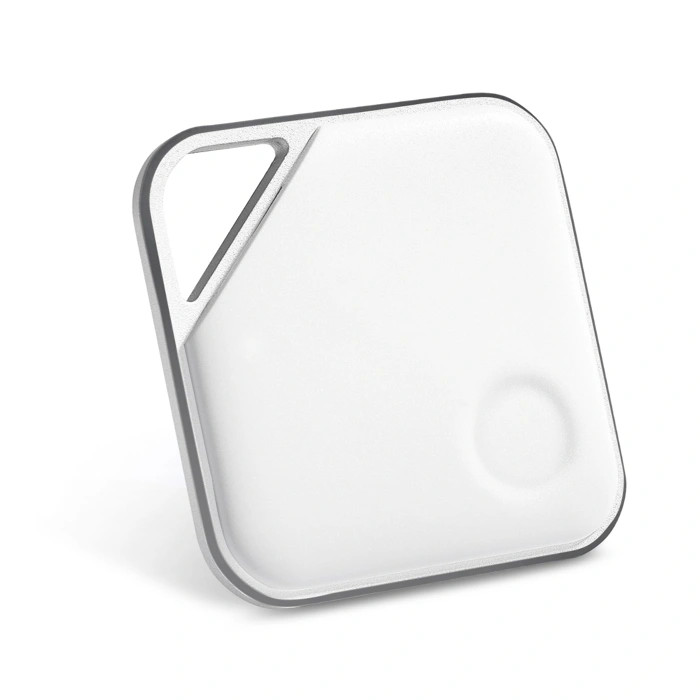
Prox PRD Phone Separation Alert Device
The Prox PRD Phone Separation Alert Device is designed to prevent users from leaving their smartphone behind - a practical concern for seniors who rely on phone-based medical alert apps. This small Bluetooth tracker attaches to a keychain or bag and alerts the user when their phone moves out of range, typically multiple to multiple feet depending on environment.
While this is not a medical alert system itself, it addresses a specific gap: smartphone-based alert services only work when the phone is with the user. For seniors who occasionally forget their phone when stepping outside, visiting neighbors, or running errands, separation alerts provide an extra layer of accountability.
The device pairs with a smartphone via Bluetooth and emits both an audible alarm and phone notification when the connection breaks. This two-way alert system helps users quickly locate a misplaced phone or realize they've walked away without it. Setup requires installing the companion app and pairing the device, which takes a few minutes.
Because it relies on Bluetooth range, the Prox PRD works best for short-distance reminders - not as a long-range tracker. It's most useful in home and neighborhood settings where a senior might step into the yard, garage, or driveway without their phone. Battery life depends on usage, and the device uses a replaceable coin-cell battery.
This accessory makes the most sense for households where a loved one uses a cellular or smartphone-based alert app but has a habit of leaving the phone on a charger, kitchen counter, or nightstand. It won't replace a dedicated medical alert pendant, but it can reduce the risk of separation from a phone that serves as the alert device.
- ✅ Alerts user when phone is left behind
- ✅ Two-way notification system (device and phone)
- ✅ Compact and easy to attach to keys or bag
- ✅ Works with Bluetooth-enabled smartphones
- ⚠️ Limited to Bluetooth range (50 - 150 feet)
- ⚠️ Requires app installation and setup
- ⚠️ Not a medical alert system itself
- ⚠️ Battery requires periodic replacement
How It Works: From Pressing the Button to Getting Help
When someone presses the help button on their medical alert pendant or wristband, a clear sequence of events unfolds - even without a traditional phone line. Understanding each step can help seniors and their families feel more confident about how the system responds in an emergency.
Step 1: Button Press
The person activates the wearable device by pressing the button. This sends a wireless signal to the base unit (for in-home systems) or directly through the built-in cellular radio (for mobile devices). The range for in-home wearables typically extends 600 to 1,000 feet from the base, covering most homes and yards.
Step 2: Signal Transmission
The base unit or mobile device receives the alert and immediately opens a cellular connection to the monitoring center. Because these systems use cellular networks - often on multiple carriers or through AT&T, Verizon, or T-Mobile infrastructure - they do not depend on a landline or even home internet. The connection happens in seconds, similar to placing a cell phone call.
Step 3: Two-Way Communication
Once connected, the monitoring center operator can hear the user and speak to them through the base unit's built-in speaker and microphone, or through the mobile device itself. This two-way audio lets the operator assess the situation, ask questions, and provide reassurance. The user does not need to pick up a phone or move toward any handset.
Step 4: Operator Assessment
The trained operator sees the user's profile on screen, including medical notes, emergency contacts, and address. They listen to determine the nature and urgency of the situation. If the user cannot respond - due to injury, confusion, or unconsciousness - the operator follows protocols to dispatch help immediately.
Step 5: Contacting Help
Depending on the situation, the operator will contact family members, neighbors, or emergency services. For true emergencies, they dispatch 911 and stay on the line until responders arrive. For less urgent issues - like a fall without injury - they may call a relative first. The operator continues to check in until the situation is resolved.
This sequence works the same way day or night, whether the user is in the bedroom, bathroom, or backyard. The cellular connection does not require the user to manage a phone, remember a password, or even speak clearly. As long as the device has battery power and cellular signal, the link to help remains open.
For mobile systems, the process is nearly identical, but the device itself contains the cellular radio, GPS receiver, speaker, and microphone. Pressing the button on a mobile pendant connects directly to the monitoring center from wherever the user happens to be - whether that's a walking trail, grocery store, or friend's home. The operator can see the GPS location and coordinate help based on real-time position data.
Because these systems do not rely on home infrastructure, they continue to work during power outages (base units have battery backup) and remain unaffected by changes to internet or phone service. The cellular pathway is dedicated to the alert system and does not compete with other devices for bandwidth or connection stability.
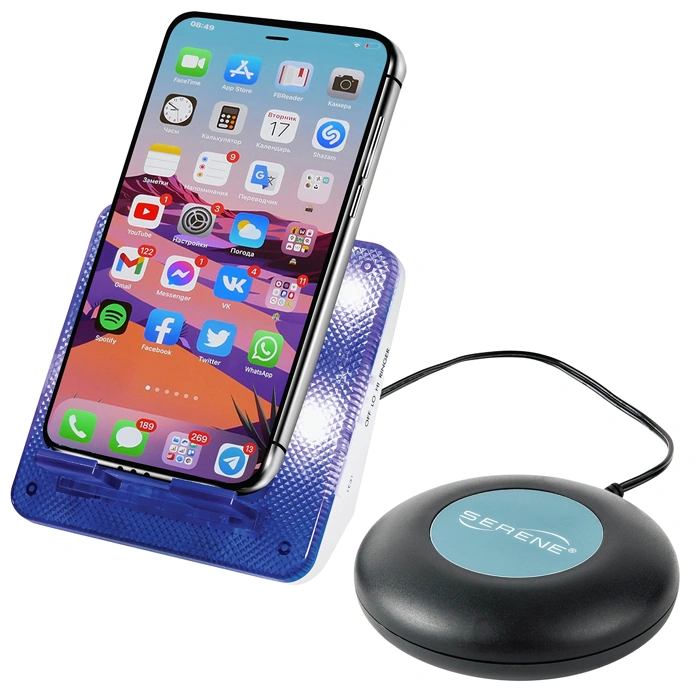
Serene Innovations Cell & Telephone Ringer Amplifier with Bed Shaker
For seniors with hearing challenges who rely on cellular or landline medical alert systems, hearing incoming calls from monitoring centers or family members is essential. The Serene Innovations Cell & Telephone Ringer Amplifier with Bed Shaker acts as an accessibility layer that works alongside any alert system to ensure critical calls are noticed.
This device amplifies the ringer volume for both cell phones and traditional telephones, making it easier to hear incoming calls throughout the home. The included bed shaker provides a tactile alert option - particularly useful at night or in noisy environments where audio alone may not be sufficient. You place your cell phone or cordless handset near the unit, and it detects the incoming ring to trigger the amplified alert and vibration.
The amplifier doesn't replace a medical alert system; it complements one by addressing a specific gap: ensuring that calls from monitoring centers, caregivers, or family reach someone who may have moderate to significant hearing loss. It works with cellular alert systems, traditional landline systems, and everyday phones without requiring any installation or integration.
Setup is straightforward. Place the device on a nightstand or table, position your phone near the built-in microphone, and adjust the volume and vibration settings. There are no wires to connect to your phone, making it compatible with virtually any mobile or cordless handset.
This solution is most valuable for users who have already chosen a medical alert system but worry about missing calls due to hearing limitations. It's a practical option for enhancing notification reliability without upgrading to a more complex alert platform or investing in additional monitoring features.
- ✅ Amplifies ringer volume for both cell and landline phones
- ✅ Bed shaker provides tactile alerts for hearing-impaired users
- ✅ Works with any phone or alert system without installation
- ✅ Simple setup with adjustable volume and vibration
- ⚠️ Does not replace or integrate with alert system itself
- ⚠️ Phone must be placed near the unit to detect rings
- ⚠️ Effectiveness depends on phone ringer volume and placement
Key Components of a Cellular Medical Alert System
- Wearable help button (pendant or wristband with waterproof casing)
- Base unit with cellular modem and two-way speaker (for in-home systems)
- Built-in backup battery (typically 24-32 hours of standby power)
- SIM card for cellular network access (usually pre-installed)
- GPS module (standard in mobile systems, optional in home units)
- 24/7 monitoring center subscription (required for emergency response)
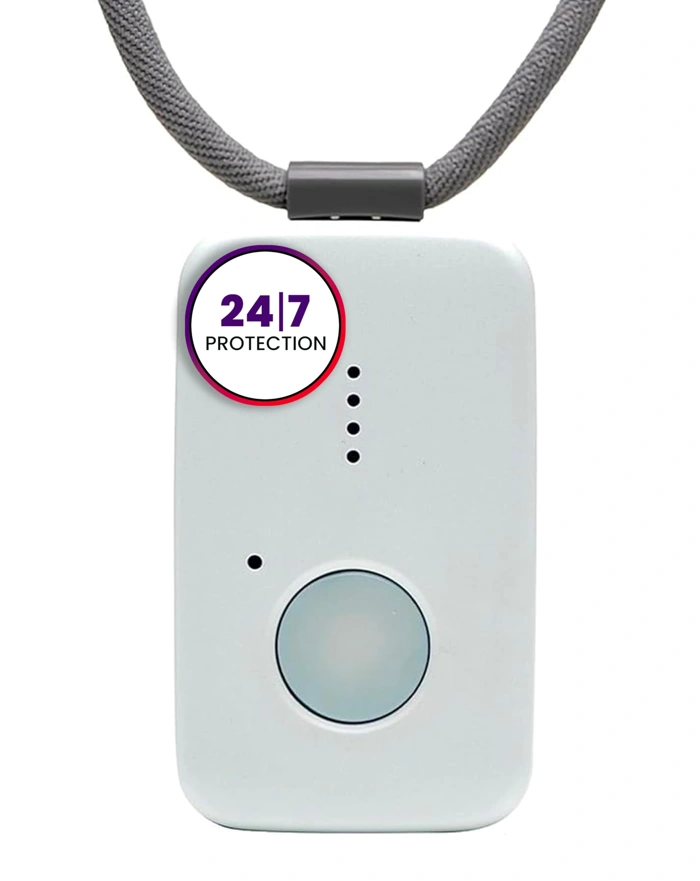
Medical Guardian MGMini Medical Alert Device
The Medical Guardian MGMini is a compact mobile medical alert device designed for portability. Priced at $63.99, this system operates independently of a landline, using cellular connectivity to provide alert services wherever you go.
As a mobile alert device, the MGMini is built for users who want protection beyond their home. Its compact form factor makes it easy to carry in a pocket, purse, or on a belt clip. When you press the help button, the device connects you to a monitoring center through its built-in cellular radio - no landline or Wi-Fi required.
This represents the mobile category of cellular alert systems: devices that travel with you rather than staying fixed in your home. The MGMini includes GPS location features, so operators can identify where you are when you call for help. This makes it suitable for active users who walk, shop, or visit family regularly.
The price point reflects the device cost only; like most medical alert systems, the MGMini requires a monthly monitoring subscription to function. The compact size trades off some battery capacity compared to larger mobile units, so you'll need to charge it more frequently - typically every few days depending on use.
Medical Guardian is an established name in the medical alert industry, which adds confidence for users evaluating mobile options. The 4.2 out of 5 rating suggests solid performance, though as with any mobile cellular device, coverage depends on the strength of the cellular network in your area.
If you need a system that works both at home and away, the MGMini offers that flexibility without requiring any home phone infrastructure. For users who rarely leave home, an in-home cellular base station may offer longer battery backup and louder speakers, but the MGMini serves those who prioritize mobility.
- ✅ Compact and portable design for on-the-go use
- ✅ Works entirely on cellular connectivity with no landline needed
- ✅ GPS location features help operators find you anywhere
- ✅ Affordable device price at $63.99
- ✅ Established Medical Guardian brand
- ⚠️ Requires monthly monitoring subscription to function
- ⚠️ Smaller battery capacity means more frequent charging
- ⚠️ Performance depends on cellular network coverage in your area
In-Home vs. Mobile Systems: Which Is Right for You?
Choosing between an in-home base station system and a mobile device depends on how your loved one spends their day. Both types use cellular connectivity to work without a landline, but they're built for different use cases.
In-home cellular systems consist of a base unit plugged into power and a wearable help button. The button communicates with the base over a radio frequency, typically reaching 600 to 1,400 feet depending on the model and home layout. When pressed, the base unit dials out over its built-in cellular radio and connects to a monitoring center through a two-way speaker. Because the base stays plugged in, it supports louder speakers and doesn't rely on daily charging. The tradeoff: protection ends at your property line. If your loved one walks to the mailbox, works in the yard, or leaves the house regularly, the button won't reach the base.
Mobile systems combine the help button, cellular radio, speaker, microphone, and GPS receiver into a single wearable device - usually a pendant or watch. These units work anywhere there's cellular coverage, making them ideal for active seniors who drive, run errands, or travel. GPS allows the monitoring center to locate the wearer outdoors, which is critical if they can't communicate their location. The compromise: mobile devices run on rechargeable batteries that typically last one to seven days, require regular charging, and often have smaller speakers than base-station systems. Two-way audio quality can be limited by the device's size, especially in noisy environments.
Consider your loved one's routine. If they're primarily homebound or spend most of their time indoors, an in-home system offers reliable range, clear audio, and no charging routine. If they're independent, leave the house daily, or have a history of wandering, a mobile system provides location tracking and uninterrupted coverage. Some families start with an in-home system and add a mobile device later for outings, or choose a provider that offers both in one plan.
Neither option is objectively better - each serves a different lifestyle. Focus on where falls or emergencies are most likely to happen, and match the technology to those spaces.
Common Questions About No-Landline Medical Alerts
Choosing a medical alert system without a landline often raises practical questions about how the technology works and what to expect. Here are answers to the most common concerns.
Do I need to pay for a separate cell phone plan?
No. The cellular connection is built into the base unit or mobile device, and the cost is included in your monthly monitoring fee. You won't receive a separate bill from a wireless carrier, and you don't need to manage a cell plan or data package. The provider handles all connectivity behind the scenes.
What if my cell coverage is weak at home?
Signal strength matters for reliable communication. Before committing to a system, ask the provider if they offer a coverage check or signal test for your address. Some companies will verify that their network reaches your home with adequate strength. If coverage is marginal, you may experience delays or connection issues during an emergency.
Can I use my existing internet connection instead of cellular?
Some medical alert systems do operate over Wi-Fi, connecting through your home internet router. However, cellular systems are generally more reliable during power outages because they don't depend on your modem or router staying online. If your internet goes down or the power fails, a Wi-Fi-based system may lose connectivity, while a cellular unit with backup battery continues working.
What happens if the power goes out?
Most cellular medical alert base units include a backup battery that automatically takes over when household power is lost. Battery runtime varies by model - typically ranging from 24 to 32 hours - but the system will continue monitoring and allow you to call for help even during an extended outage. Mobile devices also carry their own rechargeable batteries independent of home power.
Will the system work if I travel or move?
In-home cellular base units are designed for use at a fixed address and may need to be re-registered if you move. Mobile medical alert devices, on the other hand, work anywhere within the provider's cellular coverage area, making them suitable for travel and everyday outings. Check with your provider about coverage maps and any location restrictions.
Conclusion: Reliable Safety in a Wireless World
Medical alert systems no longer require a landline to deliver reliable protection. Cellular technology has matured into a dependable, modern alternative that connects users to help through the same wireless networks that power millions of smartphones every day.
Whether you choose an in-home cellular base station for around-the-house coverage or a mobile GPS device for on-the-go safety, the core promise remains the same: press the button, reach a trained operator, and get help when it matters most.
The key decision points come down to lifestyle and environment. An in-home system offers wall-powered reliability and broader range within the home, while a mobile device provides freedom to move beyond the front door. Both depend on strong cellular signal, so testing coverage in the specific rooms where your loved one spends time is not optional - it's essential.
Review the component checklist to understand what each system includes: base station or mobile device, wearable help button, backup battery capacity, fall detection capability, and the monitoring plan that ties it all together. Compare how different providers handle equipment fees, monthly monitoring costs, contract length, and cancellation terms.
Eliminating the landline doesn't mean sacrificing safety. It means embracing a communication method that's more flexible, portable, and aligned with how most people live today. With careful attention to signal strength, component quality, and service terms, a cellular medical alert system can provide the same peace of mind families have trusted for decades - without the phone jack.