We may earn a commission when you buy through links on this page, at no extra cost to you. How this works.
You're weighing competing concerns: keeping your parent safe while respecting their independence. A GPS tracker offers a middle path. It doesn't restrict movement, but it does let you confirm location quickly if your parent doesn't answer the phone or seems disoriented.
The right device depends on four decision points: form factor, battery longevity, platform compatibility, and emergency features. A smartwatch with fall detection serves a different need than a pocket-sized tracker with no subscription. Your choice hinges on whether your parent will wear a watch daily, how often you're willing to charge it, and whether you both use iOS or Android.
This comparison keeps those tradeoffs visible so you can match the device to your actual situation, not an idealized one.
Quick comparison
| Fall Detection Smart Watch for Seniors with GPS, SOS Alert, HD Video Call & 4G | Check Current Price |
| Hidden Mini GPS Tracker for Vehicles, No Subscription, Works with Find My (iOS Only) | Check Current Price |
| Hidden Mini GPS Tracker for Vehicles, Ultra Mini | Check Current Price |
Fit and safety come first
Use the comparison as a shortlist, but keep fit, comfort, and any health or safety constraints ahead of price.
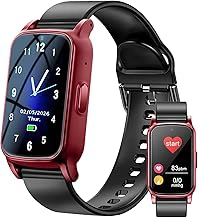
Fall Detection Smart Watch for Seniors with GPS, SOS Alert, HD Video Call & 4G
This smartwatch prioritizes emergency response. It includes an SOS button, fall detection, and 4G connectivity for video calls. If your parent lives alone and has balance concerns, these features offer direct intervention options beyond simple location tracking.
The watch requires a 4G plan, so factor that recurring cost into your budget. Setup involves pairing the device with a phone app and activating the cellular service. Once connected, you get real-time GPS updates and can initiate video calls directly from the watch face.
Imagine your mother feels dizzy while gardening. She presses the SOS button, and you receive an alert with her exact location. You can call the watch immediately to assess whether she needs help or just reassurance.
The tradeoff: this is the most feature-rich option, but also the most complex. If your parent struggles with new technology or resists wearing anything that looks medical, a simpler tracker may meet your needs without the learning curve.
- ✅ Fall detection and SOS button for emergencies
- ✅ HD video calling through 4G connectivity
- ✅ Real-time GPS tracking
- ⚠️ Requires separate 4G plan with monthly fees
- ⚠️ More complex setup than basic trackers
- ⚠️ May look too tech-forward for some seniors
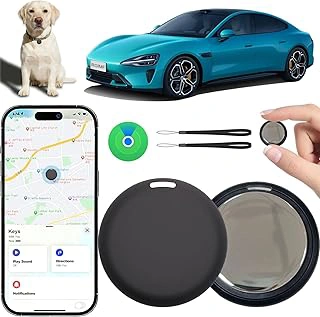
Hidden Mini GPS Tracker for Vehicles, No Subscription, Works with Find My (iOS Only)
This compact tracker eliminates subscription fees by integrating with Apple's Find My network. It's designed for portability: small enough to slip into a pocket, purse, or coat lining. If your parent already carries an iPhone and you want location visibility without wearables, this solves both problems.
The device relies on Bluetooth proximity and the Find My network, so location updates appear whenever the tracker is near another Apple device. In urban or suburban areas with dense iPhone coverage, tracking is reliable. In rural areas, updates may lag.
Picture your father heading to his weekly card game. You check Find My and confirm he arrived safely without calling and interrupting. If he forgets his usual route home, you can see his location update as he passes other iOS users.
The limitation: iOS exclusivity. If anyone in the tracking loop uses Android, this option is off the table. Also, because it's pocket-sized rather than wrist-worn, your parent needs to remember to carry it.
- ✅ No subscription fees
- ✅ Integrates seamlessly with Apple Find My
- ✅ Compact and easy to conceal in pocket or bag
- ⚠️ iOS only, incompatible with Android
- ⚠️ Location updates depend on nearby Apple devices
- ⚠️ Requires parent to remember to carry it
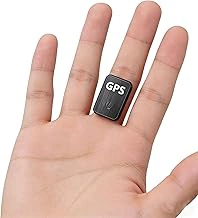
Hidden Mini GPS Tracker for Vehicles, Ultra Mini
The Hidden Mini GPS Tracker for Vehicles, Ultra Mini offers basic real-time location tracking in a compact magnetic housing. Designed primarily for vehicles, this tracker attaches securely with its built-in magnet and provides location updates through a companion mobile app. At $29.80, the price point reflects a device-only purchase; ongoing GPS service typically requires a separate subscription plan for cellular data and mapping features.
The ultra-mini form factor makes this tracker easy to conceal on metal surfaces, which can be useful when appearance matters or when you need placement flexibility inside a vehicle. The magnetic mount eliminates the need for adhesive or complicated installation, though it also means the tracker can be dislodged if placed in high-vibration areas or exposed locations.
Because verified details on battery capacity, waterproofing, and geofence accuracy are limited, treat this option as a budget-friendly entry point rather than a feature-rich monitoring solution. If you plan to use it for senior safety, confirm that the app interface is simple enough for your family's comfort level and that the subscription cost fits your budget long-term. Real-time tracking depends on cellular coverage, so performance may vary in rural areas or inside buildings with poor signal.
This tracker works best when you need an affordable, low-profile device for occasional vehicle location checks and when you're comfortable managing a separate service plan. For seniors who need wearable emergency alerts or fall detection, a purpose-built senior GPS device will deliver more relevant safety features.
- ✅ Compact magnetic design for discreet placement
- ✅ Low upfront cost at $29.80
- ✅ Real-time location tracking via mobile app
- ⚠️ Requires separate subscription for GPS service
- ⚠️ Limited verified details on battery life and durability
- ⚠️ Designed for vehicles, not optimized for wearable senior use

Android GPS Tracker for Vehicles with Find My and Audio
This tracker is built for Android users and includes audio capability alongside GPS. The audio feature lets you listen in on the tracker's surroundings, which can help assess context if your parent seems confused or lost. It's another pocket-sized option designed for vehicles but adaptable for personal carry.
The Find My integration works within the Android ecosystem, so setup is straightforward if you and your parent both use Android phones. The audio function is activated through the app and provides a few seconds of ambient sound to help you understand the environment.
Suppose your father calls from an unfamiliar location but can't describe where he is. You open the app, check his GPS coordinates, and activate the audio feature. You hear traffic and a store announcement, which helps you identify a shopping center near his usual route.
The tradeoff: audio monitoring introduces privacy concerns. Discuss this feature openly before activating it. Also, like other pocket trackers, it depends on your parent remembering to carry it. If consistency is a challenge, a wrist-worn device may be more reliable.
- ✅ Audio feature for environmental context
- ✅ Works with Android Find My
- ✅ Affordable price point
- ⚠️ Audio feature may raise privacy concerns
- ⚠️ Not wearable, must be carried
- ⚠️ Android only, not compatible with iOS
What to Look For in a GPS Tracker for a Senior
Start with wearability. A tracker that stays in a drawer doesn't help. Look for something your parent will accept wearing or carrying daily without self-consciousness.
Battery life matters more than features. A device that dies midday becomes a source of anxiety, not reassurance. Understand the charging cadence before you commit.
Platform compatibility is non-negotiable. If you use an iPhone and the tracker requires Android, the setup will frustrate both of you. Confirm operating system requirements early.
Emergency features like SOS buttons or fall detection add value if your parent has mobility concerns or cognitive changes. If wandering is a risk, prioritize real-time location updates over styled designs.
Subscription fees vary. Some trackers require monthly payments; others integrate with existing phone networks. Calculate the annual cost before deciding.
How to Talk to Your Parent About Wearing a GPS Tracker
Frame the conversation around freedom, not restriction. Explain that the tracker lets them move independently while giving you reassurance. Avoid language that sounds like surveillance or implies incompetence.
Acknowledge their feelings. Many seniors resist trackers because they fear losing autonomy or being treated like children. Validate that concern, then explain how the device supports their goals, not yours alone.
Involve them in the decision. Show them the options and ask which design feels least intrusive. When they have input, they're more likely to wear it consistently.
Start with a trial period. Suggest wearing the tracker for a week to see how it feels. If they hate it, agree to revisit. This reduces pressure and opens room for adjustment.
Be honest about your anxiety. Sometimes saying 'I worry when I can't reach you' is more effective than listing safety statistics. Personal honesty often opens the door better than abstract arguments.
Our Verdict: Balancing Safety with Independence
The smartwatch with fall detection suits families where emergency response is the top priority and your parent is comfortable with wearable tech. It's the most capable but also the most complex.
The iOS-compatible mini tracker works best when you want zero subscription fees and your entire family uses iPhones. It's discreet and affordable but relies on your parent carrying it daily.
The magnetic real-time tracker offers the most flexibility for attachment and works across both platforms. It's a strong middle option if your parent uses mobility aids or has a consistent daily bag.
The Android tracker with audio is the right pick for Android households where contextual information matters. Just navigate the privacy conversation carefully before setup.
Compare the devices side by side on battery expectations, platform compatibility, and whether your parent will wear or carry it reliably. The best tracker is the one that actually gets used.