Three variables determine whether a medication reminder works: volume, simplicity, and visibility. You need a device your parent can actually hear from across the room, program without calling for tech support, and read without searching for reading glasses.
Most reminder apps fail because they require smartphones, charge cycles, and app updates. Traditional pill organizers solve storage but not timing. The sweet spot is a dedicated alarm clock designed specifically for medication prompts - a single-purpose device that sits on the nightstand or kitchen counter and does one job reliably.
These five clocks strip away unnecessary features while keeping the essentials: big numbers, loud alarms, and medication-specific cues. Each takes a slightly different approach to setup, volume, and display style.
Fit and safety come first
Use the comparison as a shortlist, but keep fit, comfort, and any health or safety constraints ahead of price.
Why a Simple Alarm Clock is Often the Best Solution
Smart devices promise comprehensive health tracking, but they introduce three problems: forgotten charging, confusing interfaces, and notification overload. A dedicated clock plugs into the wall and stays on.
The physical presence matters too. A clock on the kitchen counter becomes part of the morning routine. It's visible during breakfast, impossible to dismiss with a swipe, and doesn't compete with texts from grandchildren or news alerts.
Battery backup ensures alarms sound during brief power outages. No Wi-Fi means no connectivity troubleshooting. The tradeoff is manual setup, but for four daily reminders, spending ten minutes once beats daily charging rituals.
Our Top 5 Picks for Simple Medication Reminder Clocks
Each of these clocks balances visibility, volume, and ease of use differently. One emphasizes voice announcements, another focuses on screen size, and several include remote controls for setup assistance. Price differences are minimal - all fall between $27 and $30 - so your decision centers on interface style and alarm preferences rather than budget.
How to Introduce a Reminder Device to an Independent Parent
Frame the device as a convenience tool, not a monitoring system. Instead of "I'm worried you're missing your pills," try "This would let you stop watching the clock all morning."
Set it up together during a visit, not remotely over the phone. Let your parent choose the alarm sound and volume. Place it where they suggest, even if you think another spot is better - ownership of the decision increases daily use.
Start with one or two medication reminders rather than programming the entire day immediately. Success with morning pills builds confidence before adding afternoon and evening doses. Give it a two-week trial period, then ask what's working and what's annoying. Small adjustments to volume or placement often resolve initial resistance.
Frequently Asked Questions About Medication Reminders
Do these clocks work during power outages? All include battery backup that maintains alarm settings and ensures reminders sound during brief outages, though the display may dim or turn off to conserve battery until power returns.
Can you set different alarm sounds for different medications? Most offer 2-3 distinct alarm tones you can assign to different reminders, but customization is limited compared to smartphone apps. The talking clock uses voice labels which effectively creates unique sounds.
How loud are the alarms? Volume typically ranges from 70 to 90 decibels at maximum - comparable to a vacuum cleaner. All offer adjustment, so you can start loud and reduce if it's startling.
Will these remind about non-medication tasks? Yes, the alarm labels work for any scheduled activity: taking out trash, watering plants, or calling family. The medication framing is just default labeling.
A Small Device for Your Peace of Mind
Missed medications create genuine health risks and daily worry for families. These clocks address both problems with straightforward technology that respects your parent's independence while providing reliable prompts.
The right choice depends on whether voice announcements help or annoy, whether vision challenges require extra-large fonts, and whether a remote control simplifies or complicates setup. Compare these factors against your parent's specific situation rather than chasing the highest rating or newest model.
Set up side by side if possible: place two models on the counter, program sample alarms, and let your parent experience the differences in volume, button feel, and display clarity. That direct comparison reveals preferences written instructions can't capture.
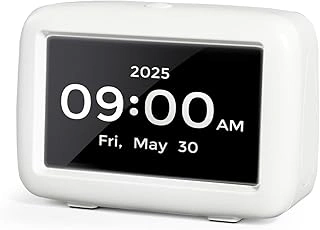
PILSAMAS Talking Alarm Clock with Medication Pill Reminders and Big Digit
The talking function sets this apart: it announces "Time to take your medication" in a clear voice, not just a beep. For parents with hearing aids they don't wear around the house, voice cues cut through ambient noise better than tones.
The display uses large digits visible across a bedroom, and the button layout keeps alarm setup straightforward. You can program multiple daily reminders with distinct labels. Imagine your mother in the garden - the voice prompt reaches her through an open window when a standard beep wouldn't register.
The talking feature does require slightly more button presses to silence, which prevents accidental dismissal but adds a step. Check whether your parent prefers voice cues or finds them intrusive before committing to this style.
- ✅ Clear voice announcements for medication reminders
- ✅ Large digit display readable across rooms
- ✅ Multiple programmable daily alarms
- ⚠️ Voice prompts require extra button press to silence
- ⚠️ Talking feature may not suit all preferences
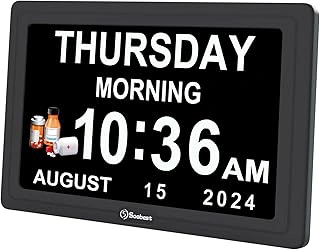
Soobest Dementia Digital Calendar Clock with Large Display for Seniors
This calendar clock combines time display with full date information, which helps orient parents who experience confusion about what day it is - a common concern with dementia or just age-related memory changes.
The large display shows day of the week spelled out completely, reducing the mental step of translating "Wed" into "Wednesday." Alarm setup uses clear on-screen prompts rather than requiring you to remember button sequences. Consider a scenario where your father checks the clock to confirm whether today is his doctor's appointment - the full calendar display answers that immediately.
The screen brightness is adjustable but may be too bright for light sleepers even on the lowest setting. Test placement in the bedroom versus a bathroom or kitchen counter if nighttime glare becomes an issue.
- ✅ Full calendar display with spelled-out day names
- ✅ On-screen prompts simplify alarm programming
- ✅ Adjustable brightness for different room conditions
- ⚠️ Lowest brightness may still be too bright for very dark bedrooms
- ⚠️ Larger footprint than basic clocks
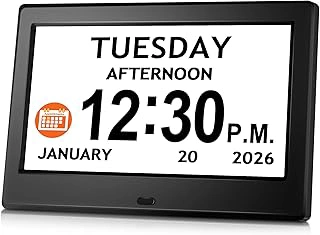
7'' Digital Dementia Clock with Date, Time, Reminders, Alarms & Remote
The included remote control solves a common problem: setting up alarms while standing next to the clock on a high shelf or across a room. You can program medication reminders from the couch, then test alarm volume and timing without moving the device.
The 7-inch screen provides excellent visibility, and the reminder labels let you specify "Morning Medication" or "Evening Pills" rather than generic "Alarm 1." Picture helping your mother set this up during a visit - you handle the remote from the kitchen table while she confirms she can see and hear everything from her usual chair.
The remote introduces one more item to keep track of. If your parent frequently misplaces small objects, the on-device buttons also work, though they're slightly smaller and require closer access for detailed programming.
- ✅ Remote control simplifies setup from any location
- ✅ 7-inch display with clear visibility across rooms
- ✅ Custom reminder labels for different medications
- ⚠️ Remote can be misplaced easily
- ⚠️ On-device buttons smaller than some alternatives
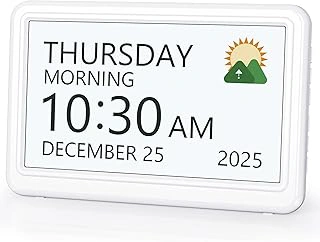
7 Inch Large Font Digital Calendar Dementia Clock with Alarms & Medicine Reminders
This version emphasizes font size above all else - the numbers and letters use every available pixel on the 7-inch screen. For parents with macular degeneration or significant vision loss, the extra-large characters make a real difference.
Medicine reminder programming uses a step-by-step menu that walks through time, label, and repeat settings. The approach takes longer than quick-set buttons but reduces errors during initial setup. Imagine your father with limited vision setting his morning pills reminder - the oversized font lets him confirm each digit without reading glasses.
The focus on visibility means fewer features fit on the home screen. You won't see outdoor temperature or multiple time zones, which keeps things simple but may disappoint parents who want more information at a glance.
- ✅ Extra-large font optimized for low vision
- ✅ Step-by-step menu reduces setup errors
- ✅ Uncluttered display focuses on essential information
- ⚠️ Fewer secondary features on home screen
- ⚠️ Setup process slower than quick-button alternatives
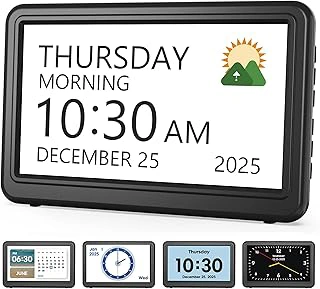
Digital Calendar Day Clock for Dementia and Alzheimer's
The period-of-day display adds context beyond just time: it shows "Morning," "Afternoon," or "Evening" in addition to the hour. This helps parents with memory challenges who struggle with AM/PM distinctions or lose track of which part of the day they're in.
Medication alarms include both visual and audible alerts - the screen flashes while the alarm sounds, catching attention even if your parent is watching television or has hearing aid volume low. Think about your mother napping when her afternoon medication reminder triggers - the screen flash provides a visual cue that complements the audio alarm.
The period labels update automatically but might not align perfectly with personal definitions of when morning becomes afternoon. Someone who considers 11:30 AM still morning may find the automatic "Afternoon" label at noon slightly jarring at first.
- ✅ Period-of-day labels aid time orientation
- ✅ Combined visual and audible alerts for reliability
- ✅ Automatic updates eliminate manual adjustments
- ⚠️ Period labels may not match personal definitions
- ⚠️ Screen flash feature can't be disabled separately
What to Look For in a Medication Reminder Clock: A Quick Checklist
- Display size readable from at least 10 feet away in typical room lighting
- Alarm volume adjustable and loud enough to hear in adjacent rooms
- Button layout with physical spacing between cancel and snooze functions
- Multiple daily alarms (minimum four for standard medication schedules)
- Clear medication-specific labels or voice announcements, not just generic beeps
- Battery backup that maintains alarm settings during power interruptions
- Setup process manageable without technical assistance