We may earn a commission when you buy through links on this page, at no extra cost to you. How this works.
Loose crumbs, pet hair, and tracked-in dust create slip hazards that increase fall risk for older adults living independently. Daily vacuuming keeps floors safer, but bending, pushing an upright, or managing a canister becomes difficult when balance or joint mobility declines. Voice-controlled robotic vacuums remove the physical effort, letting elderly parents trigger a cleaning cycle with a simple spoken command instead of lifting equipment or navigating touch screens.
All three models in this guide work with Alexa and Google Assistant, so your parent can say "start vacuuming" from a chair or bedside without opening an app. The meaningful differences lie in how often you - or they - must empty the bin, the complexity of pairing the vacuum to Wi-Fi during initial setup, and the upfront budget required. One vacuum costs roughly half the price of the others but needs bin emptying after every run. The two pricier options include self-emptying base stations that hold weeks of debris, reducing hands-on maintenance to once a month or less.
If your parent shares the home with shedding dogs or cats, station capacity becomes critical. Homes with thick area rugs or multiple rooms benefit from stronger suction and longer battery life, while smaller apartments may not justify the cost of a high-capacity dock. Setup difficulty also matters: one model pairs through a smartphone app in under five minutes, while another requires toggling router bands and can frustrate less tech-comfortable users. Understanding these tradeoffs before you buy ensures the vacuum actually gets used rather than sitting in a closet because it felt too complicated on day one.
Fit and safety come first
Use the comparison as a shortlist, but keep fit, comfort, and any health or safety constraints ahead of price.
Voice Command Setup: What to Expect in the First Week
Most voice-controlled robot vacuums connect to smart assistants in under ten minutes, but the first week determines whether your parent will use voice commands confidently or fall back on manual buttons. Start by downloading the manufacturer's app and following the pairing instructions, which typically involve pressing a button on the vacuum's base station and granting the app permission to link with Alexa or Google Assistant. Once linked, you'll assign the vacuum to a room in your smart home setup so your parent knows which device name to say - "Kitchen vacuum" works better than a default label like "Roomba-3F8A."
Teach only the commands your parent will use daily: "Start cleaning," "Stop," "Return to dock," and "Clean the kitchen." Write these four phrases on a small card and place it near the voice assistant speaker. Accuracy improves when the command includes the device name and uses natural phrasing - "Alexa, ask the vacuum to start cleaning" works more reliably than fragments like "vacuum go." If the assistant misunderstands a command, have your parent repeat it slightly louder or closer to the speaker rather than shouting, which distorts recognition.
Wi-Fi connection issues cause most early frustration. The vacuum's base station must sit within range of your router, and dual-band routers should be set to broadcast a 2.4 GHz network, since many robot vacuums do not support 5 GHz. If the app fails to locate the vacuum during setup, restart both the router and the vacuum's base station, then try pairing again. Voice recognition accuracy also depends on this product noise - a television or dishwasher running during a command may confuse the assistant, so encourage your parent to pause other sounds briefly when giving instructions.
Expect a three-to-five-day adjustment period. Your parent may forget which phrases trigger the vacuum or speak commands too quickly. Let them experiment with slight variations - most assistants recognize "start vacuuming" and "begin cleaning" as equivalent - but step in if they grow frustrated with repeated failures. Schedule a simple daily clean through the app as a backup, so the vacuum runs automatically even if your parent never speaks a command that week. By day seven, most users settle into one or two preferred phrases and stop referring to the written card, at which point voice control becomes a genuine convenience rather than a novelty.
How to Introduce a Robot Vacuum to a Skeptical Parent
Resistance to a robot vacuum often stems from pride, not stubbornness. Many older adults view accepting help - especially from a machine - as admitting they can no longer manage their home independently. Start the conversation by framing the vacuum as a time-saver, not a caregiver. Position it as something that handles the mundane floor maintenance so your parent can spend energy on activities they enjoy, rather than bending over a heavy vacuum.
A trial run in a single room reduces overwhelm and builds confidence. Let your parent watch the device navigate a bedroom or den before committing to whole-home scheduling. This hands-on observation demystifies the technology and shows that the vacuum follows predictable patterns, not chaotic behavior. Many initial concerns about furniture collisions or tangled cords dissolve once someone sees the obstacle sensors at work.
Invite your parent to name the device and choose the cleaning schedule. These small decisions restore a sense of control and transform the vacuum from an imposed gadget into a household member. Whether it's called "Rosie" or simply "the helper," personalization shifts perception from medical equipment to friendly appliance. Scheduling input ensures the vacuum runs when your parent is comfortable - some prefer morning cleaning before activities, others want it to run while they're out or napping.
Address noise concerns directly by running the vacuum during your visit so your parent hears the actual decibel level, not an imagined roar. Modern models produce sound comparable to a dishwasher, and self-emptying stations create brief suction bursts that last seconds, not minutes. If hearing sensitivity is a factor, schedule cleanings during times when your parent typically has the television on or listens to music.
Cost resistance often reflects worry about wasting money on something that won't work. Share return policies and emphasize that manufacturers expect a learning period. Most robot vacuums adapt to a home's layout over the first few cleaning cycles, so early imperfections don't indicate failure. Point out that reducing fall risk from cords and debris has measurable value, and that weekly housekeeping services cost substantially more over a year.
Cleaning quality doubts deserve honest answers. Robot vacuums handle daily maintenance - crumbs, dust, pet hair - but aren't designed to deep-clean carpet pile or scrub stuck-on spills. They keep floors consistently tidy between less-frequent manual cleanings, which actually extends the time between strenuous vacuuming sessions. For parents who struggle with vacuum weight or balance, this trade-off improves safety without eliminating their role in home care.
Respect independence by avoiding language that implies incapacity. Instead of saying "You can't vacuum safely anymore," try "This takes care of the daily sweeping so you don't have to think about it." The difference preserves dignity while acknowledging the practical benefit. When a parent feels their autonomy is honored rather than questioned, acceptance comes more naturally.
Side-by-Side: Price, Bin Capacity, and Maintenance Intervals
When choosing between the three models, price sits at the center of most decisions - but bin capacity and how often your parent will need to step in matter just as much. The iRobot Roomba j7+ typically retails in the mid-tier range, pairs a 400 ml onboard bin with a self-empty base that holds about 60 days of debris, and requires bag replacement roughly every two months for an average single-story home. The Roborock S7 MaxV Ultra commands a higher price but includes a larger multi-function dock with a 2.5-liter dust bag, extends intervention to around 7 weeks, and adds automatic mop washing - useful if your parent has tile or hardwood throughout. The Shark AI Ultra 2-in-1, often the most budget-friendly of the trio, uses a bagless base that needs manual emptying every 30 days and relies on washable filters, which lowers ongoing costs but adds a monthly chore.
Voice control reliability tracks closely with ecosystem. The Roomba j7+ and Roborock S7 MaxV Ultra both integrate with Alexa and Google Assistant for start, stop, dock, and room-selection commands; Roborock's app also supports Siri Shortcuts. The Shark responds to basic start and dock commands through Alexa or Google but does not offer per-room voice targeting, which can frustrate parents who want to clean the kitchen on demand without opening the app. Setup complexity varies: iRobot walks users through voice pairing in under five minutes, Roborock requires initial app mapping before voice commands work reliably, and Shark pairs quickly but may need Wi-Fi troubleshooting on older routers.
Match the model to living conditions by weighing square footage, surface type, and mobility. For a small apartment with low-pile carpet and a parent who dislikes bending, the Shark's lower upfront cost and simpler maintenance make sense - even if the bagless bin means one monthly lift-and-dump. For a larger home with pets and mixed flooring, the Roborock's extended capacity and mopping justify the premium, especially if another family member can handle the 7-week dock service. The Roomba j7+ splits the difference: reliable obstacle avoidance keeps it from getting stuck on cords or slippers, which matters when a parent cannot easily rescue a stranded vacuum. Compare all three models before deciding, and prioritize whichever combination of price, emptying frequency, and voice simplicity best fits your parent's daily routine and your own availability for remote support.
What Happens When the Vacuum Gets Stuck or Stops Mid-Cycle
A robot vacuum will occasionally stop mid-cycle - on all three models, not just budget options. Obstacle detection works well for furniture legs and walls, but a stray sock, a charging cable, or a sudden shift onto a high-pile rug can halt the unit. Understanding what happens next helps aging parents stay calm and know when to act.
When a vacuum gets stuck, it will announce the problem. Alexa-enabled models speak an error message aloud, such as "Please check my wheels" or "Clear my path." The companion app on a caregiver's phone also sends a push notification with the same message, so someone can respond remotely if needed. Voice alerts repeat every few minutes until the issue is resolved or the battery runs low.
Most stalls require a simple fix. If the vacuum reports blocked wheels, flip it over and remove any tangled hair or string from the roller brush and side brushes. If it says it can't find the dock, carry the vacuum within three feet of the base station and press the home button on top or say "Alexa, tell the vacuum to go home." If the error message isn't clear, restart the vacuum by holding the power button for ten seconds, then placing it back on the dock to recharge.
When the vacuum stops and no one is home, the unit will wait in place rather than try to force through an obstacle. Battery drain is slow when idle, so the vacuum can sit safely for hours until a caregiver arrives or a remote family member checks the app. If the vacuum has been stuck for more than a day, the app will show its last known location on the map, making it easy to find.
Occasional stalls are normal operation, not a sign the vacuum is failing. All three models in this guide include cliff sensors to prevent falls down stairs, and their obstacle detection prevents collisions with heavy furniture. A vacuum that stops when confused is doing exactly what it should. Over time, caregivers learn the common trouble spots - a particular chair leg, a bathroom threshold - and can place a small physical barrier or use the app's no-go zones to steer the vacuum away from repeat snags.
Peace of Mind Through a Cleaner, Safer Home
A voice-controlled robot vacuum reduces the physical effort and bending that make daily floor care risky for older adults. Each of the three models in this guide handles the repetitive work of sweeping and emptying without requiring your parent to push, lift, or remember a cleaning schedule. The right choice depends on floor plan complexity, whether pets shed heavily, and how comfortable your parent feels asking Alexa or Google to start a cleaning cycle. Homes with thick carpet benefit from stronger suction and tangle-resistant brushes, while open layouts with hard floors can work well with any of the three. Self-emptying stations mean weeks between bag changes, and voice commands replace app navigation entirely if that feels easier. Choosing one of these vacuums removes a common fall hazard - scattered debris and the need to maneuver a traditional vacuum - while respecting your parent's ability to manage their own space. Compare the models side-by-side, check current availability and pricing, and pick the option that matches both the home's layout and your parent's daily routine.
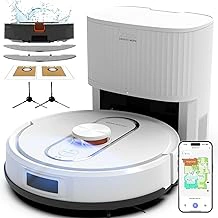
Bagotte Robot Vacuum & Mop Combo with Self-Emptying Station
The Bagotte Robot Vacuum & Mop Combo with Self-Emptying Station sits at the premium end of the voice-controlled robot vacuum category, priced at $799.00. That investment buys the most hands-off maintenance routine available: a self-emptying dock that holds weeks of debris and a mopping function that tackles sticky kitchen spills without requiring anyone to kneel or bend.
Voice command setup works through Alexa and Google Assistant. A parent can start, pause, or dock the vacuum with simple spoken instructions - no app navigation or button hunting required. The self-emptying station runs for roughly four to six weeks between bag changes, depending on floor traffic and pet hair volume. For elderly parents with mobility limitations, this extended interval means fewer trips to empty bins and less bending over the base unit.
The mopping attachment handles light spills and sticky residue on tile and sealed hardwood. It will not replace a full scrub, but it does remove the type of tracked-in grime that creates slip hazards near entryways. The water tank requires manual refills every few mopping cycles, though the vacuum function continues independently when the tank runs dry.
The tradeoff is straightforward: the Bagotte costs roughly twice what simpler voice-controlled models charge, but it cuts hands-on maintenance time by two-thirds. That premium makes the most sense in multi-surface homes where mopping matters, or when a parent's balance or joint pain makes frequent bin emptying a genuine fall risk. If budget is tight and floors are mostly carpet, a vacuum-only model with weekly manual emptying may serve just as well. If the goal is truly minimizing physical intervention - particularly for parents who struggle with grip strength or kneeling - the self-emptying station and mopping combo deliver measurable day-to-day relief.
The 4.8 out of 5 rating reflects strong owner satisfaction with reliability and ease of use. The dock itself is larger than basic charging stations, so measure the intended corner before purchasing to confirm it fits without blocking walkways.
- ✅ Self-emptying station holds 4 - 6 weeks of debris, reducing bending and bin handling
- ✅ Mopping function removes sticky spills without kneeling
- ✅ Voice commands through Alexa and Google Assistant require no app navigation
- ✅ High owner satisfaction at 4.8 out of 5
- ⚠️ $799.00 price point is roughly double simpler voice-controlled models
- ⚠️ Mopping water tank requires manual refills every few cycles
- ⚠️ Larger docking station footprint may not fit tight corners
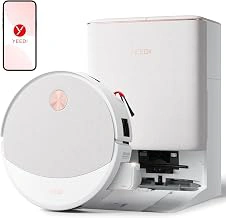
Yeedi M16 Infinity Robot Vacuum & Mop with Self-Emptying Station
The Yeedi M16 Infinity offers self-emptying capability and voice control at $449.99, making it the lowest-cost option in this comparison. For adult children managing care budgets alongside other household and medical expenses, that multiple difference matters, especially when the core features - automated cleaning, station-based dust disposal, and compatibility with Alexa or Google Assistant - remain intact.
The 4.4-out-of-5 rating reflects a product that works well for many users but requires a bit more patience during initial setup and occasionally needs a second attempt when navigating tight furniture arrangements or darker corners. Owners report that the M16 handles everyday dust, pet hair, and crumbs reliably once the mapping cycle completes, but it may take an extra run or two to learn a home's layout compared to higher-priced models. The self-emptying station holds several weeks of debris, reducing how often an elderly parent needs to touch the dustbin.
Voice commands let your parent start, pause, or dock the vacuum without bending or reaching for a phone app, which supports fall prevention by eliminating one more reason to walk across the room or crouch near furniture. The mopping function uses a damp pad suitable for sealed hard floors; it won't deep-scrub grout but does maintain a baseline level of cleanliness between full mop sessions.
This robot makes sense when immediate budget constraints outweigh the desire for premium navigation or the quietest motor. If your parent lives in a straightforward floor plan - minimal room dividers, consistent lighting - the M16 will cover the space with minimal intervention. When the home includes thick rugs, complex furniture clusters, or very low clearances, expect to occasionally redirect the vacuum or adjust furniture placement. The tradeoff is clear: lower upfront cost in exchange for a slightly higher chance of needing light troubleshooting or a brief manual assist every few weeks.
For families prioritizing value and willing to handle occasional setup questions over the phone or during a visit, the Yeedi M16 Infinity delivers the hands-free floor maintenance and voice-driven convenience that reduce physical demands on aging parents.
- ✅ Lowest price in this comparison at $449.99
- ✅ Self-emptying station reduces manual dustbin handling
- ✅ Voice control via Alexa or Google Assistant supports hands-free operation
- ⚠️ Slightly lower rating reflects longer initial setup and occasional navigation retries
- ⚠️ May require light troubleshooting or furniture adjustments in complex layouts
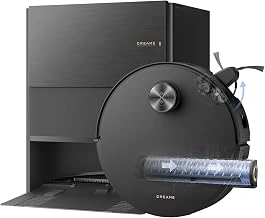
DREAME Aqua10 Roller AE Robot Vacuum & Mop with Auto-Empty
The DREAME Aqua10 Roller AE Robot Vacuum & Mop with Auto-Empty sits at $759.99 and fills the gap for families managing pet hair, mixed flooring, or homes with furniture that smaller robots struggle to navigate. Its roller mop design handles both carpet and hard floors without manual pad swaps, and the auto-empty station holds debris long enough that a parent won't need to touch the dustbin for weeks.
This model makes sense when a parent's home has obstacles - table legs, area rugs over tile, or shedding pets - that demand stronger suction and smarter routing than entry-level robots provide. The mapping process takes one or two initial cleaning cycles to learn room DREAME Aqua10 Roller AE Robot Vacuum & Mop with Auto-Empty, which adds a setup step compared to simpler plug-and-go vacuums, but the payoff is fewer stuck calls and more consistent coverage across larger square footage.
Voice control through Alexa or Google Assistant works the same way as the other models in this guide: a parent says the wake word and a simple command, and the vacuum starts, pauses, or returns to dock. The difference here is capacity and floor adaptability. If the parent has a cat or dog that sheds daily, or if their living room has both hardwood and a thick rug, this mid-tier price buys fewer manual interventions over time.
The tradeoff is complexity. Initial room mapping requires a cleared floor and a bit of patience, and the station footprint is larger than a basic dock. For a parent who lives alone in a small apartment with no pets, the extra capability goes unused. But for a household where debris builds up quickly or where floor types change room to room, the DREAME Aqua10's combination of roller mopping, auto-empty convenience, and obstacle navigation delivers enough hands-free performance to justify the middle price point.
Rated 4.5 out of 5 on Amazon, this vacuum appeals to families who need more than basic spot cleaning but don't want to manage a premium robot's advanced scheduling features. Compare navigation logic and bin capacity across all three models if the parent's home has pet hair or a cluttered floor plan - those variables matter more than brand name when deciding which robot will actually stay running without help.
- ✅ Roller mop design handles carpet and hard floors without manual pad changes
- ✅ Auto-empty station reduces bin maintenance to every few weeks
- ✅ Obstacle navigation suited for homes with furniture and mixed flooring
- ✅ Strong suction for pet hair and daily debris buildup
- ⚠️ Initial mapping requires one or two cleared-floor cleaning cycles
- ⚠️ Larger station footprint than basic docking stations
- ⚠️ Mid-tier price may exceed needs for small, pet-free spaces
Key Features That Matter for an Elderly User
- Voice control compatibility with Alexa or Google Assistant already in the home
- Self-emptying station to eliminate bending and lifting a dustbin
- Automatic scheduling so the vacuum runs without daily reminders
- Clear, large docking station that's easy to locate and doesn't require precision placement
- Low-profile design to fit under beds and furniture where dust accumulates
- Obstacle detection to avoid cords, furniture legs, and pet bowls