We may earn a commission when you buy through links on this page, at no extra cost to you. How this works.
When you're worried about an elderly parent living alone, the urge to check in constantly competes with their need for independence. Cameras feel invasive, daily phone calls create pressure, and surprise visits disrupt routines. Smart door sensors offer a middle path: discreet monitoring that preserves dignity while giving you peace of mind when Mom forgets to close the back door at night or Dad wanders out at 3 a.m.
These small devices attach to doors and windows, sending you alerts when they open or close. Unlike cameras, they don't capture images. Unlike check-in calls, they don't require your parent to remember anything. The technology is simple - a two-piece magnetic contact sensor - but the caregiving value depends entirely on four variables: how the sensor detects movement, what kind of alerts it sends, how easy installation is for someone who may not be tech-savvy, and whether it works with the monitoring tools you already use.
This guide walks through the mechanics of door sensor operation, explains what matters most when you're using them for elder care rather than home security, and highlights the setup mistakes that turn a helpful tool into a source of frustration. You'll learn how detection methods affect battery life and false alerts, why alert customization matters more than feature count, and how to configure sensors so they notify you of real problems without crying wolf every time the mail carrier arrives.
The goal is not constant surveillance. It's pattern awareness - knowing your parent's rhythms well enough to spot deviations that signal falls, confusion, or unsafe wandering, while respecting the autonomy that keeps them thriving at home.
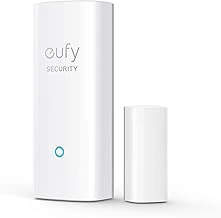
eufy Security Entry Sensor for Doors or Windows
The eufy Security Entry Sensor offers a practical balance between reliability and ecosystem flexibility, earning a 4.6/5 rating and priced at $29.99. This two-piece magnetic sensor attaches to doors or window frames using adhesive backing or screws, making it suitable for multiple entry points around a parent's home without permanent modifications.
The sensor requires a eufy HomeBase hub (sold separately) to function, which adds an upfront cost but delivers a more stable connection than many Wi-Fi-only models. If your parent already uses eufy cameras or smart locks, this sensor integrates seamlessly into that system, letting you monitor door activity alongside video alerts through a single app. The hub-based design also means no monthly subscription fees for basic alerts and activity logs.
Battery life is reliable for long-term monitoring, and the compact white housing blends into most door frames without drawing attention. The adhesive mount holds firmly on smooth surfaces, while the screw option provides extra security on textured or high-traffic doors. This sensor works well when you need to track multiple doors - front, back, and bedroom - within the same monitoring setup.
The tradeoff is clear: the hub requirement locks you into the eufy ecosystem and increases the initial investment compared to standalone sensors. If your parent lives alone and you're starting from scratch, weigh whether the hub cost fits your budget. But for multi-door monitoring without recurring fees, this sensor delivers consistent performance once the hub is in place.
- ✅ Adhesive or screw mounting adapts to different door frames
- ✅ Integrates with eufy cameras and smart locks through one app
- ✅ No monthly subscription fees for alerts and activity logs
- ✅ Reliable battery life suitable for long-term monitoring
- ✅ Compact design blends into door frames
- ⚠️ Requires separate eufy HomeBase hub, adding upfront cost
- ⚠️ Ecosystem lock-in limits compatibility with other smart home platforms
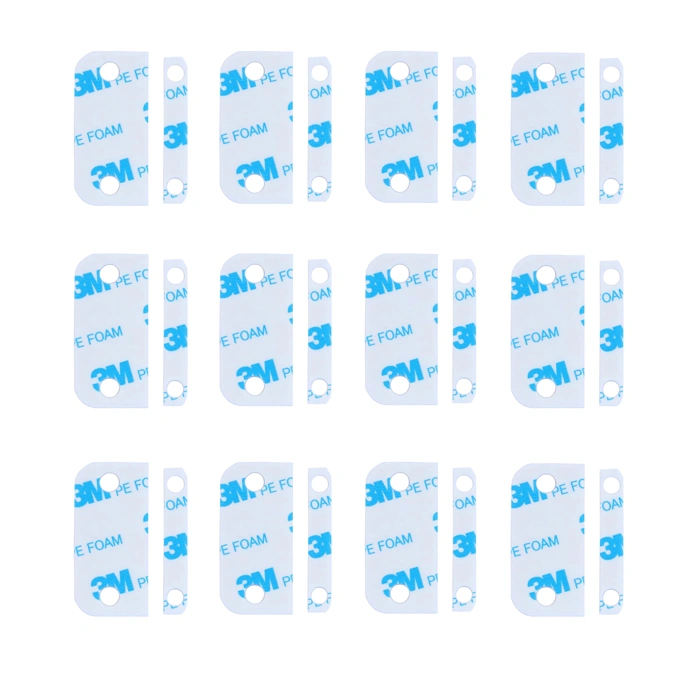
Adhesive Replacement Tape for Ring Alarm Contact Sensors & Magnets (2nd Gen) – Durable Double-Sided Pads for Easy Installation – Pack of 12 Sensor Pads & 12 Magnet Pads, Pre-Cut, No Cutting Needed
If you're using Ring 2nd Gen contact sensors to monitor your parent's doors, the Adhesive Replacement Tape offers a practical solution for maintaining reliable sensor placement over time. Priced at $8.92 and rated 4.8 out of 5, this pack includes 12 pre-cut sensor pads and 12 magnet pads designed specifically for Ring Alarm Contact Sensors (2nd Gen).
The adhesive on door sensors can weaken after repeated opening and closing, exposure to humidity in bathrooms, or if your parent accidentally bumps or removes a sensor while cleaning. In rental homes where drilling isn't allowed, having replacement adhesive on hand means you can re-secure sensors without making extra trips or waiting for parts to arrive.
Each pad is pre-cut to fit Ring 2nd Gen sensors and magnets, so no trimming or measuring is required. The double-sided pads peel and stick directly to the back of the sensor or magnet, then press onto the door frame or door edge. This makes reinstallation straightforward, even if you're guiding your parent through the process over a video call.
Keep in mind this product is designed exclusively for Ring 2nd Gen contact sensors - verify your sensor model before ordering. The pack provides enough pads for 12 full sensor replacements, which is useful if you're monitoring multiple doors across your parent's home or planning for long-term use.
Adding this to your cart during your initial sensor purchase ensures you have replacement adhesive ready when you need it, reducing the risk of monitoring gaps caused by sensor detachment. For Sandra and other caregivers managing remote monitoring setups, this low-cost accessory helps maintain consistent door activity tracking without troubleshooting delays.
- ✅ Pre-cut pads fit Ring 2nd Gen sensors and magnets without trimming
- ✅ Pack of 12 sensor and 12 magnet pads provides long-term supply
- ✅ Enables reinstallation without drilling, ideal for rentals
- ✅ Low $8.92 price for ongoing maintenance
- ⚠️ Compatible only with Ring 2nd Gen contact sensors
- ⚠️ Does not include sensors or magnets, adhesive pads only
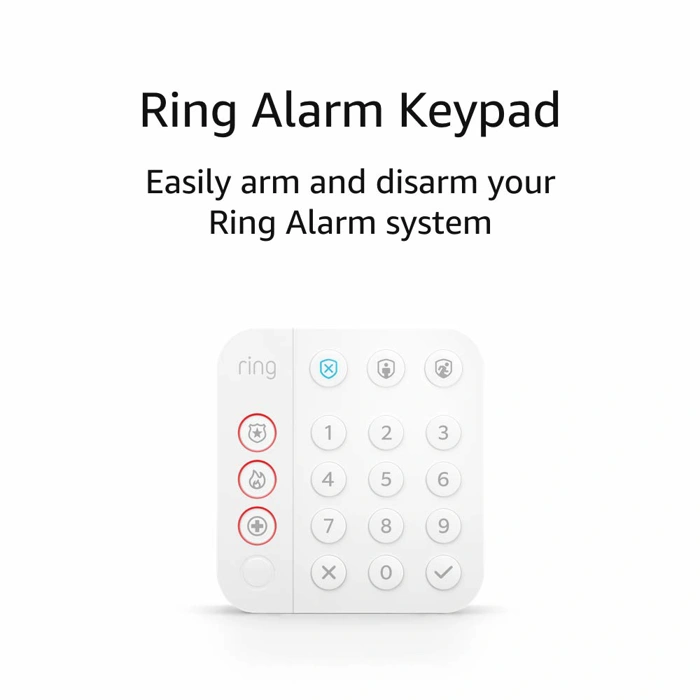
Ring Alarm Keypad (2nd Gen)
The Ring Alarm Keypad (2nd Gen) serves as a control hub for Ring Alarm systems rather than a sensor itself, making it a useful addition if you're building a Ring ecosystem to monitor your parent's home. Priced at $24.99 and rated 4.7 out of 5, this keypad allows your parent to arm and disarm their Ring Alarm system locally while providing audible alerts when doors open - an important distinction from remote-only notification systems.
The keypad pairs with Ring Contact Sensors, which are sold separately, to create a coordinated monitoring setup. When a door opens, the keypad can emit an audible chime or alarm tone at your parent's home, serving as a local reminder that the door is open. This immediate audio feedback can be more effective than remote smartphone notifications alone, especially if your parent doesn't carry a phone constantly or has hearing challenges that make nearby sounds easier to notice.
One key tradeoff to understand: while the keypad itself handles arm/disarm functions and local alerts, accessing full alert history and enabling professional monitoring options requires a Ring Protect subscription. The base keypad purchase covers local control and basic audio alerts, but remote alert logs and 24/7 monitoring come at an additional monthly cost. If your priority is simply having a local chime when the door opens, the keypad delivers that without a subscription; if you need detailed activity records or want professional monitoring backup, factor the subscription into your budget.
This setup works well if you want your parent to have tactile, physical control over the system - arm and disarm by entering a code on the keypad rather than relying solely on an app. The numbered buttons and status lights provide clear visual feedback, which can be easier for older adults to understand than app-based interfaces. However, it's important to note that the keypad is only one piece of a Ring Alarm system; you'll need to purchase Ring Contact Sensors separately to actually monitor doors, along with a Ring Alarm Base Station to coordinate all the devices.
Consider this option if you're already invested in Ring products or plan to expand into a full Ring Alarm system over time. If you only need basic door monitoring without the broader alarm ecosystem, a standalone sensor with its own hub may be simpler and potentially more cost-effective than assembling Ring components piece by piece.
- ✅ Provides local audible alerts when doors open, not just remote notifications
- ✅ Physical keypad with numbered buttons and status lights for clear, tactile control
- ✅ Affordable at $24.99 for the keypad unit itself
- ✅ Integrates with Ring Contact Sensors and broader Ring Alarm ecosystem
- ⚠️ Requires separate purchase of Ring Contact Sensors and Ring Alarm Base Station
- ⚠️ Full alert history and professional monitoring require Ring Protect subscription
- ⚠️ Only useful within a Ring Alarm system, not a standalone solution
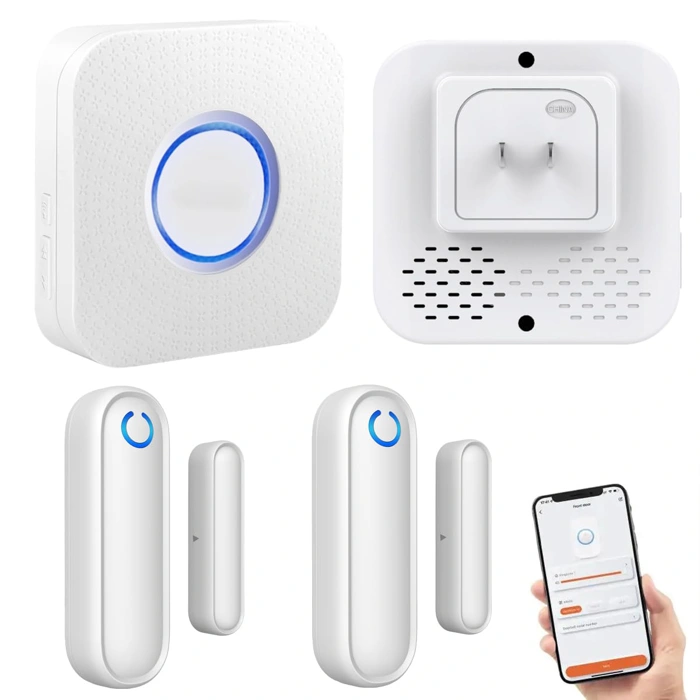
YisTech Caregiver Pager WiFi Door Sensor Alarm
The YisTech Caregiver Pager WiFi Door Sensor Alarm offers a dual-alert approach that sets it apart in elderly monitoring: it sends notifications to your smartphone while also triggering a standalone wireless pager. Priced at $31.98 with a 4.3/5 rating, this system addresses a common caregiving challenge - what happens when the primary caregiver can't check their phone immediately?
The door sensor attaches to any entry point and connects to your home WiFi network. When the door opens, the system simultaneously pushes an alert to the smartphone app and activates the physical pager, which emits an audible tone and displays a visual indicator. This redundancy means a nearby neighbor, sibling, or other local helper can carry the pager and respond quickly even if they don't use smartphones or monitoring apps.
This dual-channel design creates useful flexibility for families coordinating care across multiple people. If Sandra lives three states away but her brother lives next door to their elderly parent, she can monitor via app while he keeps the pager in his pocket during the day. Both receive the same door-open alerts, enabling faster response without requiring everyone to install and check an app.
The tradeoff is added device complexity. You're managing a sensor, a WiFi connection, a pager that needs charging or fresh batteries, and a smartphone app - more components than a simple single-app sensor. The 4.3 rating, slightly lower than some competitors, may reflect setup steps or occasional connectivity questions as users configure both alert paths.
WiFi dependency is another consideration. If your parent's internet goes down, the system loses functionality until connectivity returns. Unlike cellular-enabled sensors, there's no automatic failover, so stable home internet is essential.
The YisTech system works best for families who value alert redundancy and have a local caregiver or neighbor who can act immediately on a physical pager alert. Solo caregivers managing everything remotely through a single smartphone may find the pager an unused extra step, making a simpler app-only sensor a better fit. Weigh whether your caregiving network benefits from multiple alert methods or whether consolidating everything into one app streamlines your monitoring routine.
- ✅ Dual alerts: smartphone app and physical pager for redundant notifications
- ✅ Pager enables non-smartphone users to participate in monitoring
- ✅ Useful for coordinating care across multiple local and remote family members
- ✅ Priced at $31.98
- ⚠️ More devices to manage and charge compared to app-only sensors
- ⚠️ Requires stable WiFi; no cellular backup if internet drops
- ⚠️ Slightly lower 4.3/5 rating may indicate setup or connectivity complexity
Who This Is For
This guide is written for adult children who are monitoring aging parents living independently, often at a distance. If you're juggling work, family, and caregiving responsibilities while worrying about a parent who lives alone, smart door sensors offer a practical way to stay informed without being intrusive.
These systems are especially useful in specific situations. If your parent has mild memory issues and you want confirmation they're moving around the house each day, a door sensor on the bedroom or bathroom door can provide that reassurance. For parents recovering from a fall, monitoring entry and exit from the home helps you know they're staying safe without constant phone check-ins. And if wandering at unusual hours is a concern - such as leaving the house at 3 a.m. - door sensors can alert you immediately so you can respond quickly.
You don't need to be tech-savvy to use these systems. Most are designed for straightforward setup and daily use, with smartphone alerts that simply tell you when a door opened and at what time. The goal is peace of mind through awareness, not surveillance.
It's worth noting that this caregiving use case is different from traditional home security. While security systems focus on deterring intruders and protecting property, door sensors for elderly monitoring track routine activity patterns and unusual behavior. You're not looking for break-ins; you're looking for signs your parent is up and moving, or alerts that they've left the house when they normally wouldn't. The technology overlaps, but the intent and response are distinct.
If you're motivated by concern but hesitant about adding complexity to your parent's home - or your own routine - this approach is designed to fit quietly into daily life. The sensors are small, unobtrusive, and require minimal interaction from your parent once installed.
How Door Sensors Detect Activity
Most smart door sensors rely on a simple two-piece magnetic contact system. The sensor body mounts to the door frame, while a small magnet attaches to the door itself. When the door is closed, the magnet sits close enough to the sensor body to complete a magnetic field. Opening the door pulls the magnet away, breaking that field and triggering the sensor to send a signal.
This signal travels wirelessly to a hub or directly to your smartphone, depending on the sensor's communication protocol. Common options include Wi-Fi, Zigbee, and Z-Wave. Wi-Fi sensors connect straight to your home network and typically offer the simplest setup, but they draw more power and may require more frequent battery changes - often every few months. Zigbee and Z-Wave sensors use less energy and can run for a year or longer on a single battery, but they need a compatible hub to relay alerts to your phone.
The distance between the magnet and sensor body matters. Most manufacturers specify a maximum gap - usually around half an inch to three-quarters of an inch - beyond which the sensor may not detect the door closing properly. If the door frame is warped or the hinge sags over time, the gap can widen and cause missed alerts or false notifications.
Battery life depends on how often the door opens and how far the signal must travel. A front door that opens twenty times a day will drain a battery faster than a basement door opened twice a week. Weak wireless signals also force the sensor to work harder, shortening battery life. Checking battery status through the app every month helps you stay ahead of dead sensors and missed alerts.
Understanding this mechanism helps you troubleshoot common issues. If a sensor stops reporting, the first checks are battery level, magnet alignment, and wireless signal strength. Reliability hinges on keeping the two pieces close, the battery charged, and the wireless path clear.
How Alerts and Notifications Work
When a smart door sensor detects an open or close event, it immediately sends a wireless signal to its hub or directly to a cloud service over Wi-Fi. The hub or cloud platform then pushes a notification to your smartphone through the companion app, typically within seconds. This pathway - sensor to hub to phone - forms the backbone of remote monitoring for elderly parents.
Most systems let you customize which events trigger alerts and when. You can set time-based rules, such as receiving a notification if the front door hasn't opened by 10 a.m., signaling that your parent may not have started their usual morning routine. You can also choose to monitor only specific doors: exit doors like the front or garage for safety, and bedroom or bathroom doors for activity patterns, while muting alerts from low-priority closets or pantries.
Quiet hours are another common feature. If your parent moves around the house at night, you can silence notifications during certain hours to avoid sleep disruption, or set alerts only for exit doors during that window. This customization helps balance awareness with practicality - Sandra, for example, wanted updates without constant interruptions, so she configured alerts only for the front door during daytime hours and the bedroom door if it stayed closed past noon.
Response lag depends on your internet connection and the system architecture. Wi-Fi-based sensors that communicate directly with the cloud are generally faster than those routing through a separate hub, but both typically deliver notifications within 5 to 15 seconds under normal conditions. Keep in mind that alerts rely on stable internet at both your parent's home and your own device. If the Wi-Fi goes down or the sensor loses power, you won't receive updates until connectivity is restored - some systems send a separate offline alert, but not all do.
Review your notification settings regularly. Too many alerts can lead to alarm fatigue, where you start ignoring or dismissing messages without reading them. Too few, and you might miss a meaningful change in routine. The goal is a signal that prompts action - like a door left open unexpectedly - without turning your phone into a constant distraction.
What Matters Most for Caregiving
When you're balancing work, family, and caregiving responsibilities, the right door sensor can make the difference between constant worry and reliable peace of mind. For caregivers like Sandra, who cannot check in person multiple times a day, choosing a sensor means weighing practical tradeoffs that fit both your parent's home and your monitoring routine.
Start by matching the technology to your reality. A sensor with a two-year battery life means fewer maintenance trips, but some longer-lasting models sacrifice wireless range or require proprietary hubs. If your parent lives in a larger home, prioritize reliable signal strength between the sensor and hub - even if that means changing batteries more frequently. For rental homes or spaces where your parent may be sensitive to changes, adhesive mounting avoids the permanence and visual disruption of screws.
Alert customization determines whether notifications serve you or overwhelm you. Time-based rules let you suppress alerts during expected activity windows and escalate them during overnight hours when wandering is a concern. Door-specific settings allow you to monitor the front door differently than the bathroom, matching the level of attention each location requires.
System compatibility shapes your long-term flexibility. Standalone sensors work immediately but may limit your ability to add motion detectors, smart lights, or voice assistants later. Ecosystem-integrated options require a hub and setup time up front, but they grow with your needs and centralize alerts in one app. If you already use a smart home platform, staying within that family simplifies management.
Notification reliability is non-negotiable. Real-time alerts matter when seconds count - a delay of even two or three minutes can mean your parent has already left the house or fallen. Test delivery during setup and verify alerts reach your phone consistently, especially if you rely on cellular data during the workday.
Use this checklist to evaluate sensors and match your parent's home layout with your monitoring routine. Each decision trades one convenience for another; the right balance depends on how often you can visit, how your parent moves through their home, and what time of day poses the greatest risk.
Installation and Setup Overview
Most smart door sensors are designed for quick, tool-free installation that takes less than 10 minutes per door. Understanding the setup process helps you decide whether you're comfortable installing sensors yourself or if you'll need help from a family member or technician.
The typical installation follows a straightforward sequence. First, charge the sensor or insert the included batteries - most use coin-cell batteries that last 12 to 18 months. Next, mount the sensor on the doorframe and the magnet piece on the door itself, using either the included adhesive strips or small screws. The two pieces must align within about a quarter-inch gap when the door is closed; this proximity allows the magnetic contact to detect when they separate.
After mounting, you'll pair the sensor with the companion app. This usually involves scanning a QR code printed on the sensor or holding down a pairing button until a light blinks. Once paired, open and close the door a few times to confirm the app registers each event. Finally, configure your alert preferences: choose which family members receive notifications, set quiet hours if needed, and label each sensor by room so you know which door triggered an alert.
For caregivers like Sandra monitoring a parent remotely, the simplicity matters. You don't need to run wires or hire an electrician. However, a few common friction points deserve attention. The sensor requires a Wi-Fi network at your parent's home, and you'll need to create an app account during setup - keep login credentials somewhere accessible in case you need to troubleshoot later. Make sure the adhesive mount is firmly pressed for at least 30 seconds, and consider using the screw option on doors that open and close frequently, since vibration can loosen adhesive over time.
One often-overlooked detail: explain to your parent what the small device does and ask them not to remove it. A sensor that gets peeled off during cleaning or redecorating stops working, and you may not notice until you check the app and see no recent activity. Labeling the sensor with a small note - "health monitor, please leave in place" - can prevent accidental removal. Testing the setup together during your first visit also builds familiarity and reassures your parent that the technology is there to help, not to intrude.
Comparing Standalone vs. Ecosystem Sensors
When you're choosing a smart door sensor to monitor an elderly parent, one of the first decisions you'll face is whether to go with a standalone WiFi sensor or an ecosystem-based sensor that requires a central hub. Both approaches work, but they serve different monitoring needs and come with distinct tradeoffs.
Standalone WiFi sensors connect directly to your home network without any additional hardware. Setup is typically faster - install the sensor, download the app, connect to WiFi, and you're monitoring within minutes. For caregivers focused on watching one or two doors - a front entrance and maybe a bedroom door - this simplicity is hard to beat. You avoid the upfront cost of a hub, and there's one less device to manage. The downside is limited expansion: if you later want to add motion sensors, leak detectors, or cameras, you may end up with multiple apps and no unified view of your parent's home.
Ecosystem sensors, by contrast, require a dedicated hub that plugs into your router. This adds an extra setup step and an additional device cost, but it unlocks coordination across multiple sensor types. If your monitoring plan might grow - adding motion sensors in hallways, a camera near the medication cabinet, or a nighttime bathroom activity tracker - an ecosystem gives you one app, unified alerts, and the ability to create routines that link devices together. For example, you could set the system to send a notification if the front door opens and no motion is detected in the living room within ten minutes, a useful pattern for spotting confusion or wandering.
The decision comes down to scope. If your parent lives independently and you're focused on a narrow concern - such as confirming they're up and moving in the morning - a standalone sensor keeps things lean and manageable. If you anticipate layering in additional monitoring tools as needs evolve, or if you're already using a smart home platform for lighting or thermostats, an ecosystem sensor integrates more cleanly and saves you from juggling multiple systems down the road.
Match the system type to your monitoring scope today. You can always expand later, but starting with the right foundation - whether that's simplicity or scalability - will give you the clarity and peace of mind you need without overcomplicating the caregiving technology in your parent's home.
Final Takeaway
Smart door sensors work through simple magnetic contact detection: a magnet attaches to the door, and a sensor unit attaches to the frame. When the door opens and separates the two pieces, the sensor detects the change and sends a wireless alert via Wi-Fi, Zigbee, or Z-Wave to a hub or directly to your smartphone. This straightforward technology provides a dignified way to monitor elderly parents without invasive cameras or constant check-ins, preserving their independence while giving you peace of mind.
Setup is genuinely straightforward for most systems. Peel-and-stick adhesive mounts work on nearly every door frame and door surface, and pairing with a hub or app typically takes five minutes or less. Battery life ranges from six months to two years depending on the sensor model and how often the door opens, and most systems send low-battery warnings well in advance. You won't need special tools, technical expertise, or a home renovation to get started.
Choosing the right system depends on your parent's home layout and your own monitoring habits. If your parent lives in a single-story home with just a front and back door, a standalone Wi-Fi sensor may be all you need. Multi-story homes, homes with side entrances, or situations where you want to monitor bedroom or bathroom doors benefit from hub-based systems that support multiple sensors and more granular notification settings. Consider whether you want real-time alerts every time a door opens, summary notifications at specific times, or quiet modes during certain hours - your tolerance for interruptions matters as much as the technology itself.
Start small and adjust based on real-world use. Install sensors on one or two exit doors first - typically the front door and the most-used side or back door - and observe the pattern of alerts over a week or two. You'll quickly learn your parent's routine, identify any false alerts from loose mounting or interference, and decide whether you need additional sensors on interior doors like the bathroom or bedroom. This incremental approach prevents alert fatigue and helps you fine-tune notification settings before expanding coverage.
This technology is designed to reduce your anxiety without removing your parent's independence. Door sensors don't record video, don't require your parent to wear anything, and don't change how they move through their home. They simply provide a quiet background signal that daily routines are continuing as expected - and immediate notice if something unusual happens. With thoughtful placement, clear notification rules, and a conversation with your parent about how the system works, smart door sensors become a reliable tool for remote caregiving that respects dignity on both sides.
Review the checklist in Section 5, compare the four product examples in earlier sections, and pick the sensor that matches your parent's home layout and your monitoring style. A small investment in the right system today can deliver years of reassurance.
Common Mistakes to Avoid
- Mounting sensor and magnet too far apart - keep gap under 1/4 inch for reliable contact
- Ignoring battery level alerts - set calendar reminders to check batteries every 12 months
- Over-alerting yourself - start with exit doors only, add interior doors later if needed
- Assuming WiFi coverage reaches all doors - test signal strength before permanent install
- Skipping test runs - open and close doors several times to confirm alerts arrive promptly
- Not discussing with parent first - explain the why to preserve dignity and buy-in