We may earn a commission when you buy through links on this page, at no extra cost to you. How this works.
Choosing a medical alert system without a monthly fee means balancing upfront cost against the flexibility of ownership - no contracts, no recurring bills, and no service cancellations to manage. These systems rely on cellular connectivity, caregiver networks, or landline fallback instead of professional monitoring centers, so understanding what happens when the button is pressed is the first decision point.
Four comparison dimensions matter most: whether you need coverage only at home or on the go, how fall detection fits your mobility and risk profile, which notification method - direct-to-caregiver calls, cellular relay, or app alerts - works for your household, and what range or GPS accuracy the device offers if you leave the house. Home-only systems typically use a base station with a wearable button and operate within 600 to 1,000 feet, while mobile units add cellular radios and GPS but cost more upfront.
The tradeoff is straightforward: you pay more initially to avoid monthly fees, but you also take on the responsibility of keeping caregiver contact lists current, ensuring cellular service remains active if applicable, and replacing batteries on your own schedule. Fall detection, when included, adds another layer of upfront expense but may reduce response time if you live alone or spend time in areas where you might not be able to press a button.
This guide walks through each decision in turn - coverage area, fall detection necessity, notification structure, and range or GPS performance - so you can match system features to your living situation and caregiver availability without overpaying for capabilities you won't use.
Who This Guide Is For
This guide is written for adults aging in place who want personal emergency response capabilities without monthly service contracts. If you or a family member values independence but prefers to avoid recurring subscription fees, a no-monthly-fee medical alert system shifts the responsibility of monitoring to people you already trust - adult children, nearby relatives, neighbors, or friends who can respond quickly when an alert is triggered.
Caregivers managing budgets for aging parents will find these systems especially relevant. One-time purchase models eliminate the ongoing financial burden of professional monitoring, making emergency communication more predictable and affordable over time. This approach works best when the user has a reliable informal support network within calling or driving distance.
You should also have stable cellular coverage or home WiFi, depending on the device type you select. Mobile systems with GPS require a cellular signal to transmit location and alerts, while home-based units depend on landline or internet connectivity. If you live in a rural area with spotty service or lack nearby contacts who can respond within a reasonable timeframe, a professionally monitored subscription service may offer greater safety assurance.
Finally, this guide suits individuals who are comfortable managing their own contact lists and device settings, or who have a tech-capable caregiver to handle initial setup and occasional troubleshooting. The tradeoff for avoiding monthly fees is taking on the coordination and response planning yourself.
How No-Fee Systems Differ From Subscription Models
No-fee medical alert systems notify your chosen family members or caregivers directly when you press the emergency button, rather than routing the call to a professional monitoring center. This fundamental difference means response time depends on whether your contacts answer their phone and how quickly they can reach you or dispatch help on your behalf.
Most no-subscription devices use cellular, Wi-Fi, or Bluetooth to send a call or text alert to your pre-programmed contact list - typically three to five people - in a sequence or all at once. If your first contact does not pick up, the system moves to the next person, but if no one answers, you will not have a trained operator standing by to call emergency services automatically.
In contrast, subscription-based systems connect you immediately to a staffed call center where an operator assesses the situation, contacts 911 if needed, and stays on the line until help arrives. This layer of professional triage can be critical if you are unable to speak clearly or if your emergency contacts are at work, asleep, or otherwise unavailable.
Some higher-priced no-fee devices do offer optional professional monitoring as an add-on service, which reintroduces a monthly or annual fee but may still cost less than traditional contracts. If you live alone, have contacts in different time zones, or want guaranteed around-the-clock response, weigh whether occasional subscription costs outweigh the appeal of zero recurring fees.
The tradeoff is straightforward: no-fee systems save money and give you direct control over who responds, but they rely entirely on the availability and proximity of the people you trust.
Matching System Type to Living Situation
Your daily routine and living environment directly determine which no-monthly-fee alert system will work best. Home-only systems with base stations and wearable buttons excel when you spend most of your time indoors - cooking, bathing, moving between rooms - but lose functionality the moment you step outside the coverage range. Mobile GPS systems, by contrast, travel with you on walks, errands, or yard work, though they require cellular signal and regular charging.
If you live in an apartment or condo, a base-station system with 600 - 1,000-foot range typically covers your unit and shared hallways, but concrete walls and metal framing can shrink that range by half. Test coverage in your bathroom and bedroom before the return window closes. In a single-family home, especially a ranch or split-level, verify the base station reaches your garage, basement, and any detached structures you use regularly.
Caregiver proximity also shapes your choice. When family lives in the same building or next door, a system that calls their cell phone directly may be enough. If your nearest relative is across town or out of state, prioritize systems that connect to professional monitoring or multiple emergency contacts in sequence. Active seniors who garden, walk the dog, or drive to appointments will find mobile GPS units more practical, while those who rarely leave home can rely on the longer battery life and simpler operation of a stationary base system.
Match the system's coverage footprint to your actual movement patterns, not best-case scenarios, and choose mobile capability only if you genuinely spend time beyond your front door each week.
Understanding Alert Routing and Response Time
When an alert is triggered on a no-monthly-fee system, it must reach someone who can respond - and understanding exactly how that happens is essential to choosing the right device. Most systems without subscriptions route alerts directly to family members or caregivers through phone calls, SMS text messages, app notifications, or a combination of all three. The method matters because not every contact will answer immediately, and delays can increase if your primary contact is unavailable or out of range.
The most reliable configurations send alerts to multiple contacts in sequence or simultaneously. If the first person does not acknowledge the alert within a set window - often 30 to 60 seconds - the system automatically tries the next contact on the list. Some devices allow you to designate up to five or more backup contacts, which reduces the chance that an alert goes unanswered. A few models also offer app-based acknowledgment, so caregivers can confirm receipt and coordinate a response even if they are not nearby.
Response time depends entirely on the availability and proximity of your emergency contacts. If your primary contact is at work, asleep, or in a meeting, the delay can stretch to several minutes before someone picks up. This is why it is critical to choose contacts in different time zones or with varied schedules, and to make sure everyone on the list understands how the system works and how to respond. Realistic planning means accepting that family-based response will usually be slower than professional monitoring, where trained operators are available around the clock.
For individuals who live alone or have contacts who travel frequently, hybrid models offer a middle ground. These systems operate without a subscription by default but allow you to add optional professional monitoring on a pay-per-use or short-term basis during vacations, recovery periods, or other high-risk windows. This flexibility lets you maintain low ongoing costs while preserving access to faster, trained response when circumstances change.
Before finalizing your choice, test the alert process with every contact on your list to confirm they receive notifications reliably and know what steps to take. The best alert routing setup is one that matches your household's real availability and ensures that someone with the ability to help will be notified within minutes, every time.
Fall Detection: When It's Worth the Extra Cost
Fall detection adds upfront cost to no-monthly-fee systems but delivers automatic alerting when a hard impact or sudden change in position suggests the wearer has fallen and may be unable to press a button. This feature matters most for individuals with a history of falls, those living alone, or anyone with balance or mobility challenges that increase fall risk. The sensor uses accelerometers and algorithms to distinguish falls from everyday movements, though false positives - triggered by sitting down hard or dropping the device - remain common across most models. Users who experience frequent false alarms may disable the feature, reducing its protective value, so understanding your tolerance for occasional mistakes is part of the decision. Manual-button-only systems cost less and work reliably when the wearer can reach and press the button after a fall, making them a sensible choice for lower-risk individuals or those who want to avoid the complexity and expense of automatic detection. The tradeoff is clear: fall detection provides a safety net when incapacitation prevents manual activation, but it introduces both higher cost and the possibility of unnecessary alerts. Evaluate your fall history, living arrangement, and comfort with technology to determine whether the added layer of protection justifies the price difference in your situation.
Setting Up Your Caregiver Response Network
Your no-monthly-fee medical alert system is only as effective as the people who respond when you press the button, so building a reliable caregiver network is essential before you activate the device. Start by designating at least three to five emergency contacts in priority order - a primary responder who lives nearby and can reach you quickly, followed by backup contacts who cover different times of day or days of the week. Make sure each person understands they may receive a call at any hour and has agreed to check their phone regularly, especially if they work nights or travel frequently.
Coverage gaps often occur when all contacts work similar schedules or live in the same time zone, so include at least one person with flexible availability or a different daily routine. If your primary contact works 9-to-5, add a neighbor who is home during the day and a family member who can respond evenings and weekends. Confirm that at least two contacts have a key to your home or know where a lockbox is hidden, since emergency responders may need immediate access if you cannot reach the door.
Establish a clear response protocol so everyone knows their role: the primary contact receives the first alert and confirms they are on the way, the secondary contact is notified if the primary does not respond within a set time frame - often five to ten minutes - and any contact can call 911 directly if the situation sounds urgent or if you do not answer when they arrive. Write this sequence down and share it with each person on your list, along with your address, any gate codes, and medical information such as medications or conditions that first responders should know about.
Test the entire chain at least once before relying on it and periodically afterward - press your help button during a planned drill, let your contacts practice the response steps, and confirm that phone numbers and availability have not changed. This rehearsal reveals weak points, such as a contact who no longer keeps their phone nearby or a backup who has moved farther away, and gives you time to adjust your list before a real emergency occurs.
Final Takeaway: Prioritize Reliable Response Over Feature Lists
The best no-monthly-fee medical alert system is the one that fits the user's actual mobility range and connects to caregivers who can respond quickly. A device with fall detection, GPS tracking, and two-way audio means little if no one is available to act when an alert arrives. Before choosing a system, confirm that at least two contacts can receive notifications reliably and know what to do in an emergency.
Match the device to daily movement patterns. Someone who stays mostly indoors needs strong in-home range and clear audio, not cellular roaming. A person who walks the neighborhood or drives to appointments requires GPS accuracy and battery life that supports hours away from the charger. Features like automatic fall detection add value only when paired with a caregiver network that checks alerts promptly.
Living situations and health needs change. What works today may not fit six months from now if mobility declines, a caregiver moves, or the user relocates. Revisit the decision periodically, especially after falls, hospital stays, or changes in the caregiver roster. Return to the side-by-side checklist in section three to compare updated priorities against current device capabilities and confirm that response contacts remain ready and reachable.
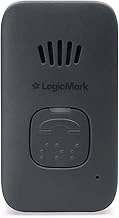
LogicMark Freedom Alert Mini Home Medical Alert System with GPS and Fall Detection
The LogicMark Freedom Alert Mini is a wearable device designed for users who need GPS tracking and fall detection without being tied to a home base station. Unlike in-home-only systems, this unit connects over cellular networks, so you can carry it outdoors, to appointments, or around the neighborhood. The fall-detection sensor is built in, and when triggered, the device routes alerts to your designated caregiver contacts rather than a call center.
The Freedom Alert Mini lists for $54.99 and carries a 4.2 out of 5 rating. Because it relies on cellular connectivity, you'll need to keep the device charged regularly - most mobile GPS units require daily or every-other-day charging depending on use. The tradeoff for portability is that battery runtime is shorter than a base-station pendant that only wakes for button presses.
If you spend time outside your home and want fall detection to follow you, this device offers that mobility. Alert routing goes directly to family or friends, so you control who responds. If you prefer professional monitoring or live alone without nearby contacts, verify that your caregivers are prepared to receive and act on alerts at any hour.
Compare the Freedom Alert Mini's cellular range and charging routine against in-home-only pendants if your mobility is mostly indoors, or against smartwatch-style devices if you want longer battery life. The key decision point is whether GPS tracking and outdoor coverage justify the need for regular charging and caregiver-based response.
- ✅ GPS tracking works outdoors and away from home
- ✅ Built-in fall detection sensor
- ✅ Alerts route to your caregiver contacts
- ✅ Cellular connectivity - no base station required
- ⚠️ Requires regular charging (daily or every other day typical for mobile GPS units)
- ⚠️ No professional monitoring call center
- ⚠️ Relies on caregivers being available to respond to alerts
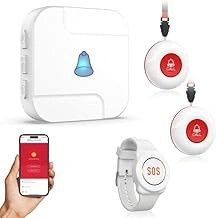
WiFi Caregiver Pager System with Emergency SOS Alert Watch and Wireless Call Buttons
The WiFi Caregiver Pager System with Emergency SOS Alert Watch and Wireless Call Buttons is designed for users who spend most of their time at home and want a multi-button alert setup without monthly fees. Priced at $53.99, the system includes a wearable SOS watch and wireless call buttons that communicate through WiFi with a caregiver pager unit, offering an affordable option for in-home monitoring.
This system works by sending alerts to a pager carried by a caregiver when the watch or any call button is pressed. Because it relies on WiFi connectivity, its effective range is limited to areas where your home network provides stable coverage. The pager-based alert model means notifications go to the portable pager unit rather than directly to smartphones, which may suit households where a caregiver is consistently present and carrying the pager. Users who leave the house regularly or need GPS tracking should look elsewhere, as this system is built for stationary, in-home use.
The inclusion of multiple call buttons allows placement in different rooms - bedroom, bathroom, living room - so help can be requested from various locations without needing to wear the watch at all times. The watch itself functions as a wearable SOS button for users who move around the house. WiFi dependency means performance will vary based on router placement and home construction; thick walls or distance from the router may reduce reliability in basements or far corners of larger homes.
At this price point, the system lacks features like fall detection, two-way voice communication, and mobile connectivity. It's best suited for users with predictable routines who stay home and have a caregiver nearby who can respond to the pager alert. Verify that your WiFi network covers all areas where the watch or call buttons will be used before committing to this setup, as coverage gaps will create blind spots where alerts may not transmit reliably.
- ✅ Affordable at $53.99 with no monthly subscription
- ✅ Includes multiple call buttons and wearable SOS watch
- ✅ Pager-based alerts work without smartphone dependency
- ⚠️ Limited to in-home WiFi range only
- ⚠️ No fall detection or GPS tracking
- ⚠️ Alerts go to pager unit, not phone or monitoring center
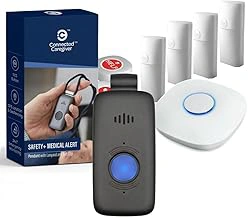
Safety+ Ultra StackCare 4G Medical Alert System with Fall Detection, GPS, 24/7 Monitoring
The Safety+ Ultra StackCare 4G Medical Alert System lists a price of $179.99 and advertises fall detection, GPS, and 24/7 monitoring in its . Because the references 24/7 monitoring, prospective buyers should contact the vendor directly to confirm which features operate without a subscription and whether cellular connectivity, GPS tracking, or fall detection require ongoing service fees. Some systems with cellular and GPS capabilities function as standalone devices for local alerts, while others rely on monitoring centers that charge monthly fees for emergency dispatch and location services. If the Safety+ Ultra StackCare does support no-subscription use, the higher upfront cost may appeal to users who need portability across larger properties, travel frequently, or want automatic fall detection without relying on manual button presses. However, the lack of verified detail about subscription-free operation makes it essential to clarify the service model before purchase. This device may suit someone willing to invest more initially if cellular range, GPS, and fall detection all function independently, but only after confirming those features remain active without monthly payments.
View product detailsWhat Matters Most in a No-Subscription System
- Coverage area: home-only range vs. mobile GPS tracking
- Alert destination: calls to family/neighbors vs. professional monitoring
- Fall detection: automatic sensing vs. manual button press only
- Battery life and charging frequency for wearable components
- Number of caregiver contacts the system can notify
- Two-way communication capability through the device
Common Mistakes to Avoid
- Assuming all no-subscription systems work without WiFi or cellular service
- Overlooking battery life and daily charging requirements
- Setting up only one emergency contact with no backup responders
- Choosing mobile GPS systems for users who never leave the house
- Ignoring waterproof ratings for shower or bath safety
- Failing to test alert delivery and response time with actual caregivers