We may earn a commission when you buy through links on this page, at no extra cost to you. How this works.
Most seniors who fall at night do so in familiar spaces - hallways, bathrooms, staircases - where they've walked confidently for years. The difference at 2 a.m. is visibility, and a motion sensor light only prevents falls if it illuminates the right zone at the right moment with enough brightness to reveal obstacles. Setting up these lights isn't about mounting hardware wherever it fits; it's about understanding detection angles, timing windows, and light placement that responds before a step is taken, not after.
If you're helping a parent who resists change, the setup challenge becomes even more specific: lights must activate reliably without false triggers from pets or drafts, stay on long enough to complete the task, and deliver soft enough illumination to avoid startling someone awake. A poorly positioned sensor might miss movement entirely, while one aimed too high creates a shadow exactly where feet land. Brightness that works in a wide hallway may overwhelm a small bathroom, and a three-second timer that suits a closet leaves someone mid-staircase in darkness.
This guide walks through placement zones that matter most - entry paths, bathrooms, stairs, and bedrooms - then covers how to adjust detection range, timing duration, and brightness levels to match each space. You'll also learn which common setup mistakes create gaps in coverage or trigger unnecessary activations, and how to configure lights so they feel like a natural extension of the home rather than an intrusive monitoring system.
Who This Setup Approach Is For
This setup approach is designed for family caregivers and seniors who want to reduce nighttime fall risk in the home without complicated wiring or installation. It's especially useful if the senior lives independently, has low vision or difficulty seeing in dim light, experiences disorientation when waking at night, or has mobility constraints that make reaching for wall switches difficult or unsafe.
The strategies work for both plug-in motion sensor lights and integrated lighting systems, focusing on placement logic and practical configuration rather than technical expertise. If you're setting up lighting for someone who frequently navigates hallways, bathrooms, or staircases during the night, this guide will help you position sensors to activate reliably without being overly sensitive or creating disruptive glare.
You don't need prior experience with smart home devices or electrical work - most solutions covered here plug directly into outlets or attach with adhesive backing. The focus is on understanding which zones need coverage, how to adjust sensitivity and brightness for each space, and how to avoid common mistakes that can leave gaps in coverage or cause false triggers.
What Matters Most: Placement Zones and Timing Logic
Effective motion sensor lighting for fall prevention depends on three critical placement zones: the bedroom exit, the hallway pathway, and the bathroom entry. Each zone requires deliberate positioning because seniors move through these areas during low-visibility hours, when fall risk peaks.
The bedroom exit zone should trigger lighting before a senior stands or takes a first step. Position the sensor to detect movement at the bedside or just beyond the bed frame, with coverage extending to the doorway. A detection range of 15 to 20 feet works well in most bedrooms, but the sensor must activate within one to two seconds to be useful. Delayed activation leaves seniors navigating in darkness, increasing trip hazards.
Hallway pathways need overlapping sensor coverage if the corridor exceeds the range of a single fixture. Place sensors at both ends of long hallways, or use ceiling-mounted units with 360-degree detection to avoid dark gaps. Brightness in hallways should be moderate - enough to distinguish furniture edges and floor transitions, but not so intense that it disrupts sleep for others in nearby rooms. A setting between 30 and 50 lumens is typically sufficient for safe navigation without glare.
Bathroom entry zones benefit from sensors mounted outside the door frame or just inside the threshold, angled to catch movement as the senior approaches. Because bathrooms often involve sudden light changes and reflective surfaces, choose fixtures with adjustable sensitivity to prevent false triggers from shadows or pets. The light should activate before the senior reaches the door handle, giving eyes time to adjust before stepping onto tile or other slippery flooring.
Activation delay and brightness level are the two variables that determine whether the system prevents falls or creates new hazards. A delay longer than three seconds can leave a senior mid-step in darkness; a delay shorter than one second may feel abrupt and disorienting. Brightness should be calibrated to the zone: lower in bedrooms to preserve night vision, higher in bathrooms where tasks require clear visibility.
When comparing configurations, always-on night lights provide continuous illumination but waste energy and can interfere with sleep quality. Motion-only setups conserve power and reduce light pollution, but rely entirely on sensor reliability and placement accuracy. Dual-mode configurations - motion activation with a manual override - offer the most flexibility, allowing seniors to switch to constant lighting during illness or recovery periods when movement may be unpredictable. The tradeoff is added complexity: more settings mean more opportunities for user error or confusion during initial setup.
Choose placement and timing settings that match actual movement patterns, not generic defaults. Walk the zones at different times of day to confirm coverage, and adjust sensitivity and delay until the system responds consistently without over-triggering.
Step-by-Step Setup: Plug-In Motion Lights
Plug-in motion sensor lights require no wiring and can be installed in minutes, making them the simplest first step in fall-prevention lighting. Start by identifying outlets at knee height or lower - light positioned near the floor illuminates walking surfaces without shining directly into the eyes, which reduces glare and disorientation when someone wakes at night. If the outlet is higher, choose a model with a downward-angled sensor or consider relocating to a lower position.
Once plugged in, adjust the detection angle if your model includes a swivel head or adjustable sensor. Point the sensor across the path of travel, not directly at the wall, so it picks up movement as someone enters the zone. Most plug-in units detect motion within 10 to 15 feet and across a 90- to 120-degree arc; confirm the coverage area reaches the full width of the hallway or doorway.
Set the brightness to the lowest effective level first. Starting dim and increasing as needed is safer than starting bright - sudden bright light can cause pupils to constrict quickly, temporarily reducing contrast perception and increasing stumble risk. Many seniors find that a soft, warm glow is enough to see edges, thresholds, and obstacles without the shock of overhead intensity.
Test activation by walking at a typical senior's pace, which is often slower than the default sensitivity on some sensors. If the light doesn't trigger reliably, increase the sensitivity setting or reposition the unit so the sensor has a clearer sightline. Walk the full length of the coverage area to confirm the light stays on during the entire passage.
Adjust the delay timer so the light remains on long enough for someone to move through the space completely. A 30- to 60-second delay is common, but longer durations - 90 seconds or more - are often more appropriate for seniors who move slowly or pause to steady themselves. Too short a delay means the light may shut off mid-step, which defeats the safety purpose.
After initial setup, observe use over several nights. If glare is still present, reduce brightness one notch or reposition the light lower. If activation is inconsistent, check for obstructions in the sensor's field of view and ensure the unit is plugged firmly into the outlet. Small adjustments in angle, brightness, and timing make the difference between a light that helps and one that causes new problems.
Common Setup Mistakes That Reduce Effectiveness
Even well-intentioned motion sensor installations can fail to protect seniors from falls if common setup errors go uncorrected. Placing lights too high - above seven feet - often narrows the detection cone and creates blind spots near furniture or doorways where falls are most likely. Mount sensors at four to five feet for wider, floor-level coverage that captures slower movement and gait patterns typical of older adults.
Setting brightness too high can cause glare and momentary disorientation, especially when a senior wakes during the night. Choose warm white bulbs (2700 - 3000 K) and adjust dimming features to provide just enough light to see obstacles without startling the eyes. In hallways and bathrooms, a low always-on night-light mode is often safer than motion-only triggering, which can leave a person in darkness if they move too slowly to re-trigger the sensor.
Installing a motion light in an outlet controlled by a wall switch is a frequent mistake that renders the system useless when the switch is turned off. Use outlets on dedicated circuits or mark controlled switches clearly. Coverage gaps between sensors are another common problem: walk the route at a senior's typical pace to confirm each light activates before the previous zone goes dark, and add an additional sensor if needed to bridge the gap.
Failing to test at realistic walking speeds leads to missed activations. Adjust sensitivity and timer duration after observing actual use, and re-test whenever furniture is moved or daily routines change. Correcting these mistakes transforms a motion sensor setup from intermittent to reliable, reducing fall risk in the spaces that matter most.
When to Add More Lights or Switch to a Different Approach
Even a well-planned motion sensor light setup may reveal gaps once a senior begins using the home at night. If you notice your family member still reaching for a handheld flashlight, stumbling in areas the sensors don't cover, or experiencing hesitation because lights activate too slowly for their gait, the initial configuration is not providing enough support.
Coverage gaps are the most common signal to add more lights. Hallways with multiple turns, stairwells with landings, and closets accessed during nighttime bathroom trips often fall outside a single sensor's detection cone. In these cases, adding plug-in motion-activated nightlights or battery-powered stick-on units fills the voids without rewiring. Place supplementary lights low on baseboards for stair treads and inside closet doorframes so the senior never steps into darkness.
Reliability issues - lights that don't turn on until the senior is already mid-step, or sensors that miss slow, shuffling movement - suggest the motion detection technology is mismatched to the user's mobility. Passive infrared sensors require body heat changes across the detection field; if movement is too gradual, activation lags. Switching to microwave or dual-technology sensors improves responsiveness, or you can bypass motion activation entirely by using dusk-to-dawn bulbs or setting fixtures to a continuous low-brightness mode overnight.
Disorientation from brightness or color temperature problems also indicates a need to adjust your approach. If the senior reports feeling startled by sudden bright white light or cannot distinguish depth on stairs under cool LED tones, replace bulbs with warm-white, lower-lumen options or install dimmer-compatible fixtures. Some households find that a hybrid strategy - motion sensors in transitional zones like hallways, and always-on amber nightlights in bedrooms and bathrooms - reduces confusion while maintaining energy efficiency.
When multiple adjustments fail to resolve activation delays, dead zones, or user discomfort, consider a fall-proofing checklist that evaluates lighting alongside grab bars, contrast marking, and clutter removal. Motion sensors are one layer; comprehensive safety often requires coordinated changes to floor surfaces, furniture layout, and task lighting at key points like medication cabinets and stovetops.
Final Takeaway: Setup Determines Safety, Not Just Product Choice
The right motion sensor light installed in the wrong place, at the wrong height, or with the wrong brightness setting will not reduce fall risk effectively. Product choice matters, but setup determines whether the light actually prevents falls. A quality fixture mounted too high or aimed at the wrong angle will fail to illuminate the path when your mother walks through the hallway at night.
After installation, plan to revisit the setup within the first few days. Watch how the lights respond to real movement patterns, check for shadows or dark patches, and ask your mother how the brightness feels at night. Small adjustments - lowering the fixture a few inches, angling the sensor downward, or dialing back the brightness - often solve issues without requiring new products or additional purchases.
This incremental approach respects independence while improving safety. Your mother retains control over her environment, and you gain confidence that the most common fall zones are reliably lit. If you find that one area needs better coverage or a different beam pattern, return to the side-by-side product comparison to identify an additional unit that complements what you've already installed. Setup is not a one-time event; it's an ongoing process of observation, adjustment, and refinement based on how the space is actually used.
Pre-Installation Checklist: What to Map Before You Buy
- Measure the distance from bed to bathroom and identify any steps, thresholds, or furniture obstacles
- Count available outlets in hallway, bedroom, and bathroom within 3 feet of the floor
- Note existing light sources that may interfere with motion sensors or create confusing shadows
- Check if outlets are controlled by wall switches that could disable motion lights
- Identify whether senior uses assistive devices (walker, cane) that affect pathway width
- Test whether motion sensor would activate reliably when senior moves slowly or sits up in bed
Post-Installation Testing Checklist
- Walk the pathway at a slow pace to confirm lights activate before you reach dark zones
- Sit on the edge of the bed and stand slowly to verify bedroom sensor detects initial movement
- Test whether light stays on long enough to complete the full bathroom trip without reactivation
- Check for glare or harsh shadows that could create new trip hazards
- Verify that lights do not activate from movement in adjacent rooms or passing cars outside
- Have the senior walk the route and adjust brightness or angle based on their feedback
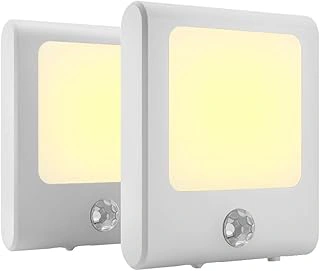
MAZ-TEK Plug in Motion Sensor Lights with Adjustable Brightness, Warm White, 2 Pack
The MAZ-TEK Plug in Motion Sensor Lights deliver a two-pack solution that fits naturally along bedroom-to-bathroom pathways, one of the most common fall zones for seniors at night. Each unit plugs directly into a standard outlet and offers adjustable brightness, letting you dial down intensity for those sensitive to glare or sudden light changes. The warm white tone softens contrast compared to cooler LEDs, making it easier on the eyes during nighttime trips.
Adjustable brightness is the standout feature here. Many seniors find full-power nightlights too harsh when waking from sleep, while dim settings may not provide enough visibility on stairs or uneven flooring. This two-level control lets you balance comfort and safety based on the specific hallway or room layout. The warm white color temperature reduces the stark, clinical feel of bright white light and helps preserve night vision better than cool-spectrum bulbs.
A two-pack setup works well when your pathway is short and relatively straight - bedroom door to bathroom door, for example, with outlets spaced no more than the listed size apart. If your hallway is longer, has corners, or includes a stairwell, you'll likely need additional units to eliminate dark gaps. The detection range is modest, so placement close to the walking path ensures reliable triggering without requiring exaggerated arm movements or footfall adjustments.
Compared to higher-end options, these units lack remote brightness adjustment or color-temperature tuning, but the physical brightness switch on each light keeps operation simple for seniors who prefer tactile controls over app-based settings. At $12.99 for two lights, the price-per-unit ratio makes expanding coverage affordable if you discover you need three or four lights to cover a full route. The plug-in design means no battery changes, though it does consume one outlet per unit - plan accordingly if outlets are limited or already in use for medical devices or phone chargers.
If your priority is low-cost baseline coverage with manual brightness control and you're comfortable adding units as needed, this two-pack offers a practical starting point for motion-activated pathway lighting.
- ✅ Adjustable brightness lets you reduce glare for light-sensitive seniors
- ✅ Warm white tone softens contrast and preserves night vision
- ✅ Two-pack covers short bedroom-to-bathroom pathways affordably
- ✅ Plug-in design eliminates battery maintenance
- ⚠️ Modest detection range may require closer spacing than advertised
- ⚠️ Each unit occupies one outlet, limiting availability for other devices
- ⚠️ No remote or app control for brightness adjustments
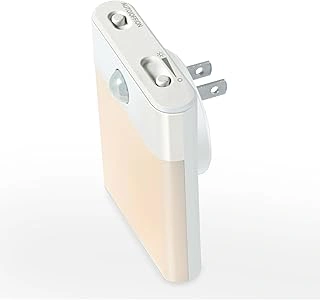
BriVIVI Motion Sensor LED Night Light with Adjustable Brightness and 3 Lighting Modes
The BriVIVI Motion Sensor LED Night Light offers three lighting modes that give you flexibility to match different zones in your home. The always-on mode maintains a soft glow, the motion-only mode activates when movement is detected, and the dual mode combines both behaviors - useful when you need a baseline level of light with a brighter boost when someone moves through the space.
For bedroom placement, the always-on mode at low brightness helps seniors orient themselves when they wake at night without flooding the room with light. Hallway installations benefit from motion-only mode, which conserves energy and provides light exactly when someone is walking through. In bathrooms, the dual mode can keep a faint reference light visible while stepping up brightness when motion is detected near the toilet or sink.
At $6.59, this is the lowest-priced option in this guide, making it practical to install several units across multiple zones without significant expense. The adjustable brightness dial lets you fine-tune output for each location, though the maximum brightness and detection range are more modest than higher-priced models. The compact plug-in design fits standard outlets but may block the second receptacle depending on your wall plate configuration.
The tradeoff here is clear: mode versatility and affordability versus a lower brightness ceiling and shorter detection distance. If you need strong illumination over a long hallway or wide bathroom, a more powerful unit may serve better. But if you want budget-friendly coverage with the option to switch behavior by room, the three-mode design delivers useful adaptability for mixed lighting needs.
- ✅ Three lighting modes adapt to bedroom, hallway, and bathroom needs
- ✅ Adjustable brightness dial for zone-specific tuning
- ✅ Lowest price point at $6.59 enables multi-unit coverage
- ⚠️ Maximum brightness and detection range more modest than higher-priced models
- ⚠️ Compact plug-in design may block adjacent outlet
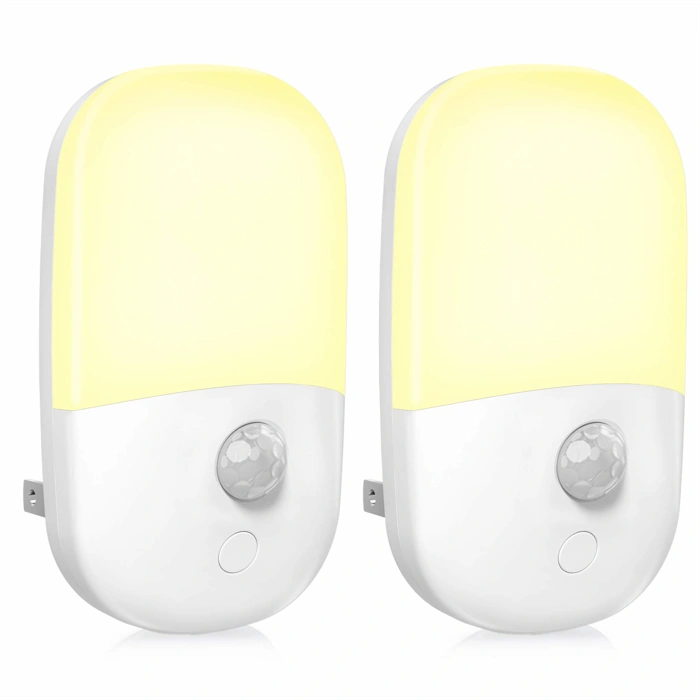
MAZ-TEK Plug-in Dimmable LED Night Light with Motion Sensor
The MAZ-TEK Plug-in Dimmable LED Night Light offers adjustable brightness control in a single-unit format, making it ideal when you need one strategically positioned light rather than multiple fixtures. Priced at $9.99 with a 4.6/5 rating, this model stands out for situations where light level customization matters - near bedroom doorways where gentle activation helps during nighttime bathroom trips, or at bathroom entries where too much brightness can be disorienting.
Dimming capability becomes especially valuable in transitional spaces between sleeping and active areas. A senior moving from a dark bedroom benefits from gradual illumination that doesn't trigger startled reactions or temporary vision impairment from sudden brightness. The plug-in design fits standard outlets without installation complexity, though placement height affects detection range and coverage area.
Choose this single unit when one well-positioned light covers your critical pathway - a hallway leading to a bathroom, for example, or a bedroom exit route. If your layout includes multiple turn points, doorways, or longer corridors, coverage gaps between motion detection zones may require the two-pack version of similar MAZ-TEK models instead. The dimmable feature justifies the focused approach: you're prioritizing light quality and comfort over quantity of fixtures.
Position the sensor to detect motion from the direction seniors approach most frequently, and set brightness low enough to guide without overwhelming night-adjusted vision. The straightforward setup works best when you've already mapped your fall-risk zones and confirmed that a single activation point addresses your specific layout needs.
- ✅ Dimmable brightness control for customized light levels
- ✅ Single-unit solution for focused placement
- ✅ Plug-in design requires no hardwiring
- ✅ Affordable at $9.99
- ⚠️ Single unit may not cover larger or multi-turn pathways
- ⚠️ Detection range depends on outlet placement height
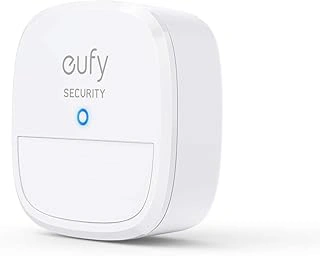
eufy Security Motion Sensor for Home Alarm System
The eufy Security Motion Sensor is designed to integrate with the eufy Home Alarm System, triggering smart lights, alerts, or other connected devices when motion is detected. Unlike standalone motion sensor lights, this sensor requires a eufy HomeBase and compatible ecosystem to function - making it a strong choice for caregivers who already use eufy equipment or plan to build a multi-room monitoring system, but not the simplest option for someone who just needs a plug-in hallway light.
This sensor works by detecting movement and sending a signal to the HomeBase, which can then activate linked eufy smart bulbs, send notifications to a caregiver's smartphone, or trigger an alarm. That flexibility is useful when you want remote visibility into a senior's nighttime activity or need to coordinate lighting across several rooms. The sensor mounts with adhesive or screws, runs on a replaceable battery, and can be placed in doorways, hallways, or beside the bed to cover key fall-risk zones.
System integration makes the most sense when a caregiver wants to monitor multiple areas, receive alerts when a senior gets up at night, or tie motion events into a broader home security setup. It's also helpful if the senior already has eufy smart lights installed and you want consistent, automatic control without switches. The tradeoff is complexity: you'll need the HomeBase hub, compatible lights or devices, and time to configure automations through the eufy app. If the goal is simply to light a bathroom or hallway when someone walks by, a standalone plug-in motion sensor light will be faster to install and requires no app, hub, or Wi-Fi.
At $24.99, the sensor itself is affordable, but remember that the total cost includes the HomeBase (sold separately, typically around multiple) and any smart bulbs or outlets you add. For households already invested in the eufy ecosystem, adding this sensor extends coverage without much hassle. For those starting from scratch, weigh whether the remote monitoring and automation features justify the extra setup and expense compared to simpler, single-unit motion lights.
Note: Requires eufy HomeBase and compatible smart devices to function. Not a standalone light.
- ✅ Integrates with eufy smart lights and alarm system for coordinated automation
- ✅ Sends caregiver notifications when motion is detected
- ✅ Battery-powered with flexible placement options
- ✅ Affordable sensor price at $24.99
- ⚠️ Requires eufy HomeBase hub and compatible devices to operate
- ⚠️ More complex setup than plug-in motion sensor lights
- ⚠️ Total system cost higher when factoring in hub and smart bulbs