We may earn a commission when you buy through links on this page, at no extra cost to you. How this works.
Walking into a dark closet increases the risk of tripping, misjudging distances, or knocking items loose - problems that grow harder to recover from as we age. Motion-activated closet lights turn on automatically when someone approaches, eliminating the need to hunt for switches or balance items while flipping a wall plate. They require no electrician, no hardwiring, and no major changes to the home, which makes them one of the simplest safety upgrades available for seniors who want to age in place comfortably.
The real choice comes down to three power sources: battery-operated units that mount anywhere with adhesive or screws, rechargeable models that cycle between charging and use, and plug-in sensors that draw continuous power from an outlet. Each approach trades off convenience, maintenance, and installation flexibility. Battery lights go up in seconds but need periodic replacements. Rechargeable versions remove that errand but require you to remember charging intervals. Plug-in models stay lit indefinitely as long as an outlet sits within cable reach.
This guide walks through the practical steps for each installation type, compares motion sensor technologies, and explains where to place lights for maximum coverage without false triggers. You'll also find product examples that reflect common configurations - stick-on puck lights for shelves, rechargeable bars for hanging rods, and outlet-powered strips for floor-level visibility. The goal is to match your closet layout, mobility priorities, and maintenance preferences to a lighting setup that works the first time and keeps working without constant attention.
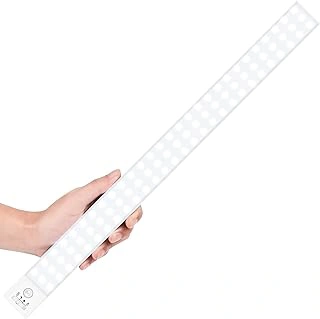
BLS 84 LED Rechargeable Motion Sensor Closet Lights
The BLS 84 LED Rechargeable Motion Sensor Closet Lights deliver broad, even illumination across both walk-in and reach-in closets without the ongoing expense of disposable batteries. With multipledividual LEDs spread along the strip, the unit produces enough light to see clothing labels, shelf corners, and floor-level items clearly.
Recharging happens via a built-in USB port, and a full charge typically supports several weeks of regular use before the indicator prompts another cycle. Caregivers or family members installing the system will appreciate the dual-mount design: a magnetic backing snaps onto the included metal plate, or the adhesive strip sticks directly to wood, laminate, or painted surfaces. No drilling or hardwiring is required, and repositioning the light takes seconds if the first placement doesn't cover the desired zone.
Motion detection range works well in standard closets up to six feet deep, though very large walk-ins may need a second strip to reduces dark corners. The BLS 84 LED Rechargeable Motion Sensor Closet Lights level suits most clothing-storage tasks but may feel slightly dimmer than a traditional overhead bulb in rooms with dark walls or deep shelving. Seniors who prefer a softer glow at night will find the output comfortable, while those accustomed to bright overhead lighting should confirm the coverage matches their expectations.
The rechargeable design reduces the need to climb or reach into closets every few months to swap batteries, a meaningful advantage for users with limited mobility. Installation takes under ten minutes, and the adhesive holds reliably on clean, dry surfaces. Check current pricing and installation feedback on Amazon to confirm fit for your closet layout and lighting preferences.
- ✅ 84 LEDs provide even, widespread coverage
- ✅ Rechargeable via USB - no battery swaps
- ✅ Magnetic or adhesive mount with no drilling
- ✅ Quick installation under ten minutes
- ⚠️ May require a second strip for very large walk-ins
- ⚠️ Brightness slightly lower than traditional overhead bulbs
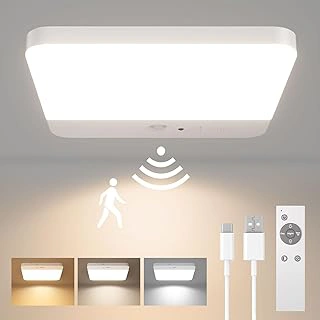
FULEN Rechargeable Motion Sensor LED Ceiling Light with Magnetic Mount and Remote
The FULEN Rechargeable Motion Sensor LED Ceiling Light offers a magnetic mounting system that lets you install overhead lighting without drilling or screws. The circular light attaches to a metal plate adhered to the ceiling, making it straightforward to remove for recharging via USB. For seniors who want ceiling-level illumination rather than rod-mounted strips, this design works well in walk-in closets or reach-in spaces with enough headroom.
The included remote control provides manual on/off and FULEN Rechargeable Motion Sensor LED Ceiling Light with Magnetic Mount and Remote adjustment, which is useful when someone wants steady light for extended organizing tasks without triggering the motion sensor repeatedly. The sensor itself detects movement within a range suitable for standard closet dimensions, though exact coverage depends on mounting height and closet width. Because the light is rechargeable, there's no need to replace batteries, but you will need to remove and charge the unit periodically depending on usage frequency.
Compared to strip lights that mount along a closet rod, this ceiling fixture spreads light more evenly from above and avoids shadows cast by hanging clothes. The tradeoff is that magnetic adhesive must bond securely to your ceiling surface - textured or painted finishes may require surface prep or alternative mounting. The remote adds convenience but introduces a small item that needs a designated storage spot to avoid misplacement.
Current pricing sits at $24.99, and the product holds a 4.4 out of 5 rating. Before purchasing, review recent customer feedback on remote pairing reliability and the adhesive's hold over time on different ceiling materials, especially if the closet sees high humidity or temperature swings.
Encourage comparing specs and customer feedback on remote functionality.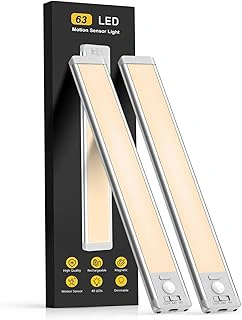
MCGOR 14.7-inch 2-Pack Rechargeable Dimmable Motion Sensor Under Cabinet Lights
The MCGOR 14.7-inch rechargeable under-cabinet lights arrive as a two-pack, offering enough coverage to line a wide shelf or split between two narrow closet zones. Each bar spans just over a foot, making them practical for rod mounting above hanging clothes or along the underside of a shelf where items tend to disappear in shadow.
The dimmable feature stands out for seniors who find bright LED strips harsh at night or early morning. Three MCGOR 14.7-inch 2-Pack Rechargeable Dimmable Motion Sensor Under Cabinet Lights levels let you dial the light down to a soft glow or push it to full output when visibility matters most. Motion activation triggers the sensor from roughly ten feet, giving time to step into the closet without fumbling for a switch.
Recharging happens via USB-C cable, and a full charge supports several weeks of typical use before the indicator reminds you to plug in again. Magnetic backing and adhesive strips provide two mounting paths - stick directly to metal surfaces or use the included tape for wood, laminate, or painted finishes. Both methods hold securely if the surface is clean and dry before installation.
The two-pack structure brings flexibility. Use both bars side by side to blanket a long reach-in closet, or place one on each side of a walk-in to eliminate dark corners. The 14.7-inch length fits standard wire shelving spans and most closet rod sections without overhang.
At $24.99 for the pair, the value proposition centers on rechargeability and adjustable MCGOR 14.7-inch 2-Pack Rechargeable Dimmable Motion Sensor Under Cabinet Lights rather than raw lumens. If you need lighting that adapts to sensitivity or plan to cover multiple spots without running new wiring, compare the dimming range and battery life against fixed-MCGOR 14.7-inch 2-Pack Rechargeable Dimmable Motion Sensor Under Cabinet Lights battery packs before deciding.
- ✅ Two 14.7-inch bars cover wide shelves or multiple zones
- ✅ Three brightness levels adjust to comfort and task needs
- ✅ Rechargeable via USB-C for weeks of typical use
- ✅ Magnetic and adhesive mounting options for flexible installation
- ⚠️ Requires periodic recharging instead of set-and-forget battery replacement
- ⚠️ 14.7-inch length may leave gaps in very wide closets without adding a third bar
Why Closet Lighting Matters for Fall Prevention
Closets rank among the most common sites for falls in the home, yet they often remain under-lit or completely dark. When someone cannot see the floor clearly, shoes left near the threshold become invisible trip hazards. Shelves and hanging rods blend into shadows, making it difficult to judge distances or identify obstacles underfoot.
Reaching for items stored on high shelves or bending to retrieve shoes from the floor requires stable footing and clear sight lines. In low light, it becomes harder to maintain balance while stretching or shifting weight. A step up into a walk-in closet can disappear into the darkness, and the edge of a storage bin or folded blanket on the floor may go unnoticed until it's too late.
Adequate lighting transforms the closet into a safer, more manageable space. Clear visibility allows someone to scan the floor before stepping in, spot obstacles before they become hazards, and move with confidence. This independence matters: when a person feels uncertain about navigating a dim space, they may rush, skip necessary tasks, or avoid the closet altogether. Good lighting supports daily routines without adding complexity or requiring someone to fumble for a switch with arms full of clothing.
Motion-activated systems address the core problem by delivering light exactly when and where it's needed, without requiring manual switches or timers. The result is a closet that feels approachable and easy to use, day or night.
Choosing the Right Type of Motion-Activated Light
Motion-activated closet lights come in three power configurations, each with distinct tradeoffs for seniors. Battery-powered models install anywhere without tools, but require periodic replacement - a task that becomes less convenient with age and that can be forgotten until the light stops working. Rechargeable options eliminate the battery-purchase cycle and reduce waste, though they introduce a recharging routine every few weeks or months depending on use. Plug-in lights offer set-and-forget reliability if an outlet sits within reach, yet they limit placement and may require extension cords in closets without convenient power access.
Form factor matters as much as power source. Puck lights mount on shelves or walls with adhesive and cast a focused beam, working well in reach-in closets where a single bright spot illuminates hanging clothes. LED strips provide even, diffused light along rod lines or shelf edges, reducing shadows in deeper walk-in closets. Ceiling-mount fixtures spread light across the entire space but usually require hardwiring or at minimum a nearby outlet, making them better suited to larger closets where installation effort pays off in coverage.
Seniors with limited hand strength should prioritize models that avoid small battery compartments or fiddly magnetic charging cables. Those who forget to recharge devices regularly will find battery or plug-in versions more reliable. If the closet already has an outlet near the door frame or on a side wall, a plug-in strip or puck eliminates both battery swaps and charging tasks. For closets without power access, a battery model with a low-battery indicator light provides a visible reminder before the fixture goes dark.
The reviews that follow focus on ease of installation, sensor responsiveness in typical closet dimensions, and real-world maintenance requirements for each power type.
Step-by-Step: Installing Motion Sensor Lights in a Closet
Installing motion sensor lights in a closet requires no wiring or special tools when you choose adhesive or magnetic models. Start by cleaning the mounting surface with rubbing alcohol and letting it dry completely - dust and moisture prevent adhesive from bonding properly. Peel the backing slowly and press the light firmly for fifteen seconds, paying attention to the sensor's field of view. The motion detector should face the area where you'll be moving, not directly at the back wall or ceiling.
Position the light three to five feet from the floor if mounting on a side wall, or directly on the closet rod if using a wraparound bracket. Sensors placed too high often miss hand movements when reaching for items, while lights aimed at hanging clothes may trigger constantly as fabric sways. After mounting, walk into the closet from different angles to confirm the sensor activates reliably. If detection feels inconsistent, adjust the angle by repositioning the light or adding a small foam wedge behind one edge to tilt the sensor downward.
Test the light in complete darkness to verify this product covers the entire closet floor. Many installations fail because the sensor points toward the doorway instead of into the space where illumination is needed. For narrow closets, center the light above the door frame; for walk-ins, use two lights on opposite walls to eliminate shadows. Magnetic mounts let you reposition easily, which helps seniors find the setup that works without leaving adhesive residue from multiple attempts.
Introducing the Change to an Independent Parent
Bringing up home modifications with an independent parent requires care and respect. Frame motion-activated closet lights as a convenience feature that makes daily tasks easier, not as a fix for decline. Start the conversation by mentioning how the lights eliminate the need to fumble for switches or leave doors open for light - practical benefits anyone can appreciate.
Involve your parent in the decision. Ask about their preferred light color temperature or whether they want brighter task lighting or softer ambient light. Let them choose placement spots or test different sensor sensitivities. This collaboration reinforces that the change is about their comfort and preferences, not someone else's worry.
Acknowledge autonomy directly if resistance comes up. You might say, "I thought this could save you a step when your hands are full," or "It's something I use in my own closet - figured it might help here too." Avoid framing the lights as safety equipment or using language that implies dependence.
Suggest a trial period with removable battery-powered units. Explain that if the lights feel intrusive or unhelpful after a week or two, they come off easily. This low-pressure approach respects your parent's authority over their own space while giving the solution a fair chance to prove useful.
Maintenance and Battery Management
Rechargeable motion-activated closet lights typically run for four to six weeks on a full charge, depending on how often the closet is used. Most models include a small indicator light that changes color or blinks when the battery drops below 20 percent. Plug the light into a USB charger overnight when you see that signal, and it will be ready for another month of use.
If the sensor stops responding or the light seems dimmer than usual, start by wiping the sensor lens with a dry microfiber cloth - dust and lint can block the infrared beam and reduce detection range. Next, press firmly along the edges of the adhesive mount to confirm the light hasn't shifted or pulled away from the wall; even a small gap can change the angle and reduce coverage. Finally, check that no clothing, boxes, or hanging items have moved into the detection zone directly in front of the sensor.
Set a monthly reminder to clean the sensor lens, inspect the adhesive bond, and walk through the closet to confirm nothing is blocking the motion path. For battery-operated models, keep a spare set of AA or AAA batteries on hand so you can swap them immediately when the light dims. This simple routine keeps the system reliable and avoids the frustration of a dark closet when someone needs it most.
Beyond the Closet: Other High-Impact Lighting Upgrades
Once you've equipped your closet with motion-activated lighting, the same approach can improve safety in every area where a senior navigates in low light. Hallways, bathrooms, staircases, and the space beside the bed all benefit from automatic illumination that eliminates fumbling for switches in the dark.
The installation logic remains identical: mount sensors to detect movement along the path, place lights at ground level or along walls to avoid glare, and choose power sources that match access to outlets or preference for battery convenience. Hallways often work well with plug-in units spaced every eight to ten feet, while staircases benefit from lights positioned on each riser or at the top and bottom landings. Bathrooms require brighter output and faster sensor response to support nighttime visits, and bedside motion lights can prevent tripping over rugs or furniture on the way to the bathroom.
Layering motion-activated lighting across multiple rooms creates a continuous path of visibility that reduces fall risk without requiring anyone to remember to flip a switch. This room-by-room expansion fits naturally into broader aging-in-place planning, where small environmental changes add up to meaningful independence and confidence at home.
Final Thoughts
Motion-activated closet lighting delivers meaningful safety benefits without expensive remodeling or complex installation. A well-placed sensor light removes the fumbling and guesswork that can make closets frustrating or risky in low-light conditions, especially for seniors who may have reduced vision or balance concerns.
Choosing between rechargeable strips, ceiling mounts, and under-cabinet options comes down to closet layout, ceiling height, and how often someone uses the space. Rechargeable strips work well in narrow reach-in closets where you need focused light on hanging rods. Ceiling mounts spread light across deeper walk-in closets. Under-cabinet puck lights fit shelves and drawers when overhead placement isn't practical. Each style has clear tradeoffs in this product, battery life, and mounting surface requirements.
Before permanent installation, test the sensor range and light angle with temporary placement. Walk through the closet entry at different speeds and angles to confirm the motion detector triggers reliably. Adjust the position until the light activates before the senior steps fully into the dark space. This trial phase prevents wasted effort and ensures the setup actually matches daily routines.
Involve the senior in decisions about this product, sensor sensitivity, and placement height. What feels bright enough for one person may be too harsh for another, and comfort with the new system builds confidence in using it regularly. Small adjustments during setup can make the difference between a light that sits unused and one that genuinely supports independence.
Starting with a single closet keeps the project manageable and provides a low-risk way to evaluate whether the technology fits the household. Once the first install proves useful, expanding to additional closets, hallways, or bathrooms becomes straightforward. These small changes add up to a home environment that responds to movement and reduces daily friction, helping seniors maintain autonomy in familiar spaces.
Best Placement Tips to Maximize Visibility and Sensor Response
- Mount lights at eye level or slightly above to reduce glare and illuminate clothing faces
- Position motion sensors to detect entry from the closet doorway, not from inside the closet
- Install strips along closet rods or above shelves where shadows typically fall
- Avoid placing sensors near windows or air vents that may trigger false activation
- Test detection range with the senior to confirm the light activates before they step fully inside