We may earn a commission when you buy through links on this page, at no extra cost to you. How this works.
You're weighing three competing priorities: your parent's safety, their independence, and your own sanity. A smart lock sits at the intersection of all three-eliminating the anxiety around lost keys, locked-out emergencies, and whether the home health aide actually showed up. This decision isn't about installing surveillance; it's about installing options.
The choice matrix is straightforward. You need a lock that your parent can operate without a smartphone tutorial, that allows you remote access for genuine emergencies, and that doesn't broadcast "elderly person lives here" to the neighborhood. The models below meet those criteria at accessible price points, with installation simple enough for a Saturday morning.
Why a Smart Lock is a Game-Changer for Caregivers and Seniors
Traditional keys create predictable problems for aging adults: misplaced in coat pockets, dropped in parking lots, or left inside when taking out trash. Smart locks eliminate the physical token that becomes a liability.
For caregivers, the operational benefits are immediate:
- Generate temporary codes for visiting nurses, therapists, or meal delivery without copying keys
- Verify when your parent left for their morning walk or returned home
- Unlock the door remotely if your parent falls and can't reach the entrance
- Eliminate the 2 a.m. panic call about being locked out
For seniors maintaining independence, the dignity factor matters. A keypad code or fingerprint scanner preserves the ritual of unlocking their own door without the fine motor challenge of key-in-lock manipulation that arthritic hands struggle with.
Essential Features to Look For in a Smart Lock
Not all smart locks serve aging-in-place scenarios equally. Prioritize these caregiver-specific features:
- Keypad with large, backlit buttons: Visibility matters for users with declining vision or shaky hands
- Multiple access methods: Code entry, fingerprint, physical key backup-redundancy prevents lockouts
- Auto-lock functionality: The door secures itself if your parent forgets, a common concern with memory decline
- Smartphone app with activity log: Tracks entries and exits without feeling invasive
- Battery operation with low-battery alerts: Avoid hardwiring complications; advance warning prevents dead-lock situations
- Voice assistant compatibility: Useful if your parent already uses Alexa or Google for reminders
Avoid locks requiring complex setup sequences or frequent Bluetooth pairing. The technology should fade into the background, not become a daily troubleshooting exercise.
Our Recommended Smart Locks for an Elderly Parent's Home
The following models balance user-friendliness with caregiver oversight. Each offers keypad entry, app connectivity, and straightforward installation. Compare features against your parent's specific needs-manual dexterity, tech comfort level, and whether they have reliable home Wi-Fi.
Addressing Common Concerns: What About Wi-Fi, Batteries, and Ease of Use?
Wi-Fi dependency: Most smart locks use Bluetooth for local access and Wi-Fi for remote features. Your parent can operate the keypad and fingerprint sensor without any network connection-the app-based remote access is what requires connectivity. If Wi-Fi is unreliable, local operation continues unaffected.
Battery life: Expect 6-12 months on standard AA batteries with typical use. Low-battery warnings appear in the app and often through beeping alerts well before failure. Keep spare batteries in an obvious location (labeled kitchen drawer) and add calendar reminders for proactive replacement.
Learning curve: The transition period matters. Walk through the unlock process multiple times during installation. Write the primary access code on a card kept in a wallet as backup. Most resistance dissolves after the first week when the convenience becomes apparent-no more purse-diving for keys in dim entryway lighting.
How to Talk to Your Parent About Installing a Smart Lock
Frame the conversation around their priorities, not yours. Lead with autonomy and convenience:
- "You won't need to worry about losing your keys anymore" addresses a tangible frustration they've likely experienced
- "You can let the physical therapist in without getting up" emphasizes their control over access
- Demonstrate the lock on your own door first, showing how simple the daily interaction actually is
- Avoid language like "monitoring" or "keeping track"-focus on "emergency access" and "backup entry method"
- Suggest a trial period: "Let's try it for a month and switch back if you hate it"
Expect initial resistance. That's normal protective instinct against change, not a verdict on the idea itself. Install during a visit when you can provide immediate support for the first few uses. Success builds confidence faster than explanation.
A Simple Step for Safety and Independence
Smart locks for elderly parents aren't about surveillance-they're about removing friction from daily life while preserving your ability to respond in genuine emergencies. The right lock becomes invisible infrastructure, noticed only in its absence when you realize you haven't fielded a panicked call about lost keys in months.
Compare the models above against your specific situation: Does your parent have reliable fingerprint recognition, or would keypad-only be simpler? Do they already use voice assistants, making integration valuable? Is the home health aide schedule complex enough to warrant temporary code generation?
Review the features side-by-side, checking which access methods align with your parent's capabilities and your oversight needs. The modest investment pays returns in reduced anxiety and maintained independence-yours and theirs.
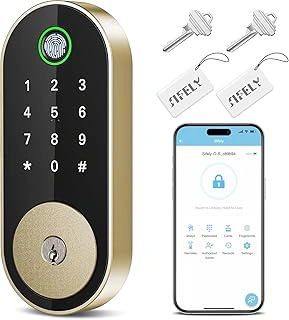
Fingerprint Smart Deadbolt with Keypad
This deadbolt model prioritizes simplicity with its dual-access design: fingerprint scan or numeric code. The auto-lock feature addresses the common caregiver concern of unlocked doors left unattended, engaging automatically after entry. App-based management allows remote code generation for service providers without requiring your parent to coordinate key handoffs.
The DIY installation works with standard door prep, and Alexa/Google compatibility integrates into existing smart home routines if your parent already uses voice commands for lighting or thermostats. At this price point, it delivers core functionality without overwhelming interface complexity. The 4.3 rating reflects reliable performance in residential settings, with users noting the fingerprint sensor's responsiveness even for older adults with dry or worn fingerprints.
- ✅ Fingerprint access eliminates code memorization
- ✅ Auto-lock prevents forgotten open doors
- ✅ App control for remote management
- ✅ Voice assistant integration available
- ⚠️ Requires battery monitoring
- ⚠️ Fingerprint sensor may need occasional cleaning
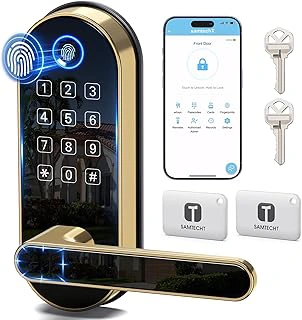
Bluetooth Fingerprint Smart Lock with Handle & Keypad
This variant delivers the same multi-method access (fingerprint, keypad, fob, Bluetooth) in an alternative finish or configuration. The handle-and-lock integration maintains the visual continuity of traditional door hardware while introducing smart functionality beneath the surface. DIY installation specifications accommodate standard door boring, avoiding contractor costs.
The system's flexibility shines in mixed-ability households-adult children can use smartphone access during visits while the parent relies on memorized codes or fingerprint recognition for daily routines. Voice assistant compatibility extends control options without requiring the primary user to adopt smartphone habits. The 4.4 rating aligns with the handle series' reliable mechanical and electronic performance across residential applications.
- ✅ Accommodates different user preferences simultaneously
- ✅ Traditional appearance masks smart features
- ✅ Comprehensive access logging
- ✅ No professional installation required
- ⚠️ Multiple features may initially confuse some users
- ⚠️ Requires clear explanation of access methods