We may earn a commission when you buy through links on this page, at no extra cost to you. How this works.
Phone call blockers for landlines can reduce unwanted and scam calls by 70 - 90% when configured properly, but they introduce a meaningful tradeoff: protection comes with setup complexity and ongoing maintenance. For seniors who receive frequent robocalls or spoofed scam attempts, that reduction often makes the effort worthwhile. For those who rarely answer the phone or already screen calls effectively, the learning curve and whitelist management may outweigh the benefit.
The core decision isn't whether call blocking works - it does - but whether the upfront configuration, the risk of accidentally blocking legitimate calls, and the need to update allow-lists over time fit into daily routines. Call blockers operate by checking incoming numbers against community blacklists, government do-not-call registries, or user-defined block rules. Calls that fail the test either go straight to a recorded message or never ring through. Calls from numbers on the allow-list ring normally.
Two hardware approaches dominate the landline blocking landscape: cordless phones with integrated call-blocking features, and standalone caller-ID boxes that sit between the wall jack and any existing phone. Built-in phone blockers streamline setup because the blocking logic, directory, and handset live in one device. Standalone boxes add a layer of filtering without replacing familiar phones, but they require an extra power outlet, a second round of button-pressing during setup, and coordination with the phone's own caller-ID display.
Both paths demand an initial investment of time - adding known contacts to the allow-list, choosing between one-button block modes and custom screening rules, and verifying that important calls from doctors, pharmacies, or family members aren't caught by overly aggressive filters. Ongoing effort centers on updating the allow-list when a new provider calls, and occasionally reviewing the block log to confirm no wanted calls were silenced.
This guide compares how much setup each option requires, what happens when a legitimate number isn't on the list, and which features - like large buttons, audible caller-ID announcement, or visual block indicators - make daily management easier. The goal is to clarify when the protection justifies the learning curve, and when simpler screening habits or a different phone feature set may be enough.
Quick Answer: When Call Blockers Make Sense
Call blockers for landlines are worth it when scam call volume is high - typically multiple unwanted calls per day - and your parent is open to a one-time setup session with help. They work best when someone can assist with adding trusted numbers to a whitelist during the first week and can check in periodically to update the allow list as new doctors, pharmacies, or service providers call.
The value depends on three factors: frequency of nuisance calls, willingness to complete initial configuration, and access to occasional support for whitelist maintenance. If your parent receives five or more robocalls daily and finds them stressful or confusing, a call blocker can restore peace and reduce exposure to scam attempts. The upfront effort - recording a greeting, adding known contacts, and explaining how the challenge prompt works to legitimate callers - pays off quickly when the phone stops ringing constantly.
Call blockers are less worthwhile if landline use has already dropped to near zero, if your parent refuses any new technology, or if the household relies on frequent inbound calls from unfamiliar numbers that cannot easily be whitelisted in advance. In those cases, the blocker may create more frustration than it prevents, blocking wanted calls and requiring repeated troubleshooting.
Standalone call-blocking boxes and landline phones with built-in blockers both require similar setup steps and whitelist management. The key difference is whether you prefer a single device that handles blocking for any phone plugged downstream, or a handset that integrates the feature directly. Either approach works when the household can commit to the initial learning curve and has a family member or friend available for occasional list updates.
What Matters Most: Your Decision Checklist
- Current scam call frequency: more than 3 per day favors blocking
- Comfort with technology: can they add a number to a block list with step-by-step guidance?
- Whitelist needs: how many regular callers (doctor, family, friends) need to be pre-approved?
- Landline dependency: is this their primary phone or a backup?
- Setup support: can you be present for initial configuration and first-week adjustments?
- Budget: built-in phone blockers cost $50 - $60; standalone boxes cost $30 - $40
Two Paths: Built-In Phone Blockers vs. Standalone Caller ID Boxes
When shopping for landline call blocking, seniors and their families face a fundamental choice: buy a cordless phone with built-in blocking features, or add a standalone caller ID box to an existing phone setup.
Built-in phone blockers are cordless phones that include block lists, one-touch block buttons, and sometimes community spam databases. The Panasonic KX-TGF544B and AT&T CRL32102 are common examples. These models combine the handset, base station, and blocking logic in one package. The main advantage is simplicity: one device to set up, one power cord, one manual. The tradeoff is that you replace your current phone entirely. If a senior is attached to a familiar handset layout or if multiple corded phones are scattered around the house, switching to a cordless system means retraining and possibly losing access points.
Standalone caller ID boxes sit between the wall jack and any phone - corded or cordless. Models like the CPR Call Blocker V5000 plug inline and intercept calls before the phone rings. They work with existing hardware, so a senior keeps the handset they know. The flexibility is the benefit: no need to replace working phones, and the box can move between rooms or phone lines. The cost is an extra device on the counter, another plug, and a separate interface to learn. Some boxes use tiny buttons or alphanumeric displays that can be harder to read than a cordless phone's backlit screen.
The core tradeoff is integration versus flexibility. Built-in blockers streamline the hardware footprint and often offer larger screens and simpler menus because the manufacturer controls the entire experience. Standalone boxes preserve existing phones but add a layer of complexity: the senior must understand that the box intercepts calls, manage its block list separately, and troubleshoot two devices if something goes wrong.
Neither path is universally better. If a household is due for a phone upgrade and the senior is comfortable learning a new handset, a built-in blocker consolidates everything. If the current phone works well and familiarity matters more than feature integration, a standalone box adds protection without disrupting daily habits.
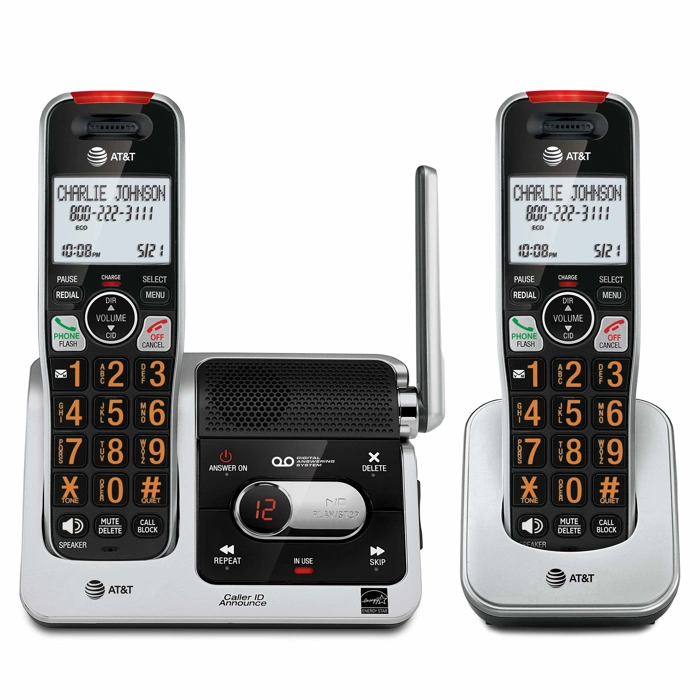
AT&T BL102-2 DECT 6.0 2-Handset Cordless Phone
The AT&T BL102-2 is a two-handset DECT 6.0 cordless phone system with integrated call blocking, designed for households that want both multi-room coverage and on-device number management. Priced at $58.45, it combines the familiar cordless-phone experience with the ability to block unwanted numbers directly from the handset.
DECT 6.0 technology operates on a different frequency than Wi-Fi, reducing interference and delivering clearer audio. The two-handset configuration lets a senior keep one phone in the bedroom and another in the kitchen or living room, so fewer trips are needed to answer calls. Each handset shares the same phonebook and block list, which simplifies management once the system is set up.
Call blocking on the BL102-2 works by scrolling through the call log on the handset and marking numbers to block. This approach keeps everything on the phone itself - no separate hub, no smartphone app, and no reliance on a third-party database. For seniors comfortable navigating a cordless-phone menu, the workflow is straightforward. For those who find small screens or multi-step menus challenging, initial setup and whitelist entry may require help from a family member.
Because the BL102-2 replaces an existing landline phone rather than sitting between the wall jack and the phone, it suits families looking to consolidate hardware. If a senior already uses a corded desk phone they prefer, this model won't layer on top - it replaces. Conversely, if the goal is to add blocking to a favorite existing phone, a standalone call blocker box may be the better fit.
The system holds its rating of 4.2 out of 5, reflecting solid performance for everyday cordless use and blocking basics. It does not offer the large robocall databases found in dedicated blockers like the CPR V5000, so expect to manually add numbers after the first unwanted ring. For households replacing an aging cordless system and prioritizing simplicity and two-room access, the BL102-2 delivers blocking and convenience in one package.
- ✅ Two handsets provide multi-room coverage without extra wiring
- ✅ DECT 6.0 reduces interference for clearer calls
- ✅ Block numbers directly from the handset menu
- ✅ Replaces existing cordless phone and blocker in one device
- ✅ Shared phonebook and block list across both handsets
- ⚠️ Manual blocking only - no pre-loaded robocall database
- ⚠️ Replaces rather than layers on top of an existing phone
- ⚠️ Small handset screens may challenge seniors with vision or dexterity issues
- ⚠️ First unwanted call from each number will still ring through
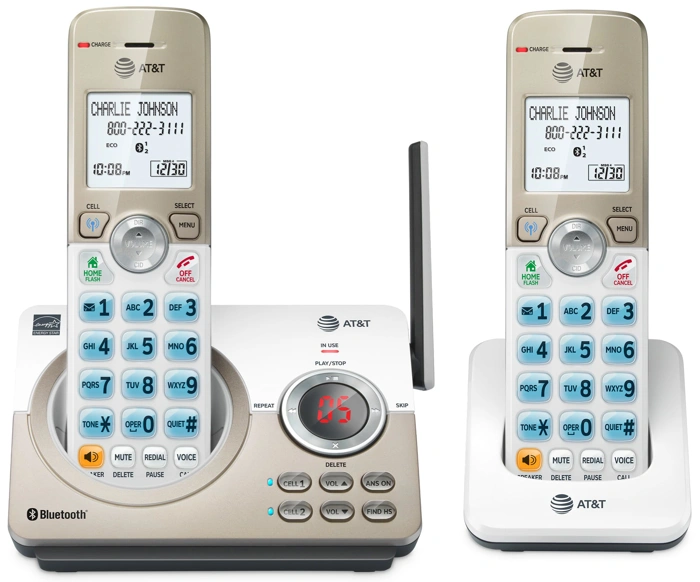
AT&T DL72219 DECT 6.0 2-Handset Cordless Phone
The AT&T DL72219 is a DECT 6.0 cordless phone system that ships with two handsets and includes built-in call blocking features. Priced at $50.96, it appeals to seniors who want a complete cordless replacement at a lower cost than many competitors while still gaining access to call-blocking controls.
This system uses DECT 6.0 technology for clear audio and reduced interference from Wi-Fi networks and other household devices. Both handsets can block unwanted callers, and the phone stores a block list so repeat scam numbers are silenced automatically. Setup involves registering the handsets to the base, then adding numbers to the block list as unwanted calls arrive.
Compared to the AT&T BL102-2, the DL72219 offers similar blocking features and the same two-handset configuration but at a slightly lower price point. Both systems let you maintain a whitelist of allowed contacts and block anonymous or out-of-area calls, and both rely on DECT 6.0 for reliable range around the home. The primary difference is cost: the DL72219 trades a few dollars in savings for nearly identical functionality, making it a sensible choice when budget is the deciding factor.
The call-blocking interface requires stepping through on-screen menus to add or remove numbers, which may feel slower than a dedicated hardware button but follows the same logic as most cordless phones with blocking. The two-handset setup means a senior can keep one phone in the bedroom and another in the living room, reducing the need to move between rooms to answer calls.
This system fits best for cost-conscious buyers who still want a full cordless phone with call blocking and don't need advanced features like larger displays or talking caller ID. If your priority is saving a few dollars while gaining two-handset convenience and solid blocking tools, the DL72219 delivers that balance.
- ✅ Lower price point at $50.96 for a two-handset system
- ✅ DECT 6.0 standard reduces interference from Wi-Fi and other devices
- ✅ Built-in call blocking with stored block list
- ✅ Two handsets allow coverage in multiple rooms
- ⚠️ Menu-based blocking interface may feel slower than hardware buttons
- ⚠️ Fewer advanced features compared to higher-priced models
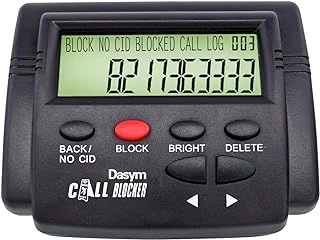
Landline Call Blocker 2000 Caller ID Box
The Landline Call Blocker 2000 Caller ID Box is a standalone device that sits between your wall jack and your existing landline phone, adding blocking capability without replacing your current handset. Priced at $39.99, it offers a 2000-number blocking capacity and an LCD display that shows caller information as it arrives.
This approach works well for households that already have a familiar phone they want to keep using - whether it's a corded model, a cordless base station, or even an older phone without built-in blocking. You simply plug the wall cord into the blocker box, then connect your phone to the output port. The box intercepts each call, checks the incoming number against its block list, and either allows the ring-through or silently stops the call.
The 2000-number capacity is generous enough to accumulate months or even years of scam numbers without needing to clear old entries. The LCD screen makes it easier to review incoming caller ID at a glance, especially in bright rooms where some phone displays can be hard to read. Setup typically involves programming your area code and date, then adding numbers to the block list as unwanted calls arrive.
Because the Landline Call Blocker 2000 works as an in-line filter, it won't interfere with voicemail services or other carrier features tied to your phone line. It also means you can keep using large-button phones, amplified handsets, or any specialty phone that suits your hearing or dexterity needs. The tradeoff is that you'll have one more piece of hardware on your phone table, and you'll need to manage the block list through the box's own buttons rather than through a handset menu.
This device has earned a 5.0/5 rating, reflecting strong satisfaction among users who value the flexibility of adding blocking to their existing setup. It's a practical choice for families who want a dedicated blocking layer without the commitment or learning curve of a new all-in-one phone system.
- ✅ 2000-number blocking capacity for long-term use
- ✅ Works with any existing landline phone
- ✅ LCD display for clear caller ID visibility
- ✅ Does not interfere with carrier voicemail or line features
- ✅ Affordable at $39.99
- ⚠️ Requires desk or table space for an additional device
- ⚠️ Block list managed through box buttons, not phone handset
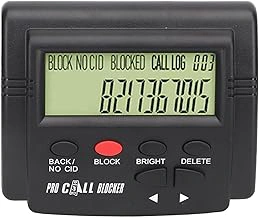
Caller ID Box, 2000 Groups Convenient Call Blocker with LCD Display for Phone
The Caller ID Box with 2000 Groups blocking capacity offers standalone call filtering at a lower price point than many integrated phone systems. Priced at $33.11 with a 5.0/5 rating, this device sits between your existing landline phone and wall jack, adding a layer of call screening without requiring you to replace equipment you already own.
The LCD display shows caller information as calls arrive, letting you decide whether to pick up or block. The 2000-group capacity means you can store a substantial number of blocked number ranges or prefixes - useful if you're dealing with scam calls that cycle through similar number patterns. Setup involves plugging the box into your phone line and connecting your handset to the blocker, then programming numbers or groups you want to block using the on-screen menu.
This unit is best suited for budget-focused buyers who want standalone blocking functionality and are comfortable with a basic LCD interface. Because it operates as a pass-through device, it works with most standard landline phones, including models you may already be using. The trade-off is manual programming: you'll need to enter blocked numbers or groups yourself, rather than relying on pre-loaded spam databases or automatic updates.
Compared to the CPR V5000, which offers one-touch blocking and pre-loaded scam number lists at a higher price, this caller ID box requires more upfront effort to configure but costs significantly less. If your priority is straightforward blocking on a tight budget and you're willing to manage your block list manually, the 2000-group capacity and standalone design make this a practical option.
- ✅ Lower price point at $33.11
- ✅ 2000-group blocking capacity for extensive filtering
- ✅ Works with existing landline phones as a pass-through device
- ✅ LCD display shows caller information before you answer
- ⚠️ Requires manual programming of blocked numbers and groups
- ⚠️ No pre-loaded spam databases or automatic updates
- ⚠️ Basic LCD interface may be less intuitive than newer models
Setup Reality: What to Expect in the First Week
The first week with a call blocker is a learning phase. Out of the box, most devices arrive with a preloaded database of known scam numbers, but they don't know which calls Sandra wants to receive. That means the first few days require hands-on whitelist management - manually adding trusted contacts like family members, doctors' offices, pharmacies, and any service providers who call regularly.
Expect to spend 15 to 30 minutes entering these numbers during initial setup. Some blockers let you add contacts from caller ID memory; others require typing each number using the keypad. If Sandra has a long list of regular callers, this step takes time and focus. Having a printed contact list nearby makes the process smoother.
During the first week, monitor incoming calls closely. A legitimate caller may be blocked if their number isn't on the whitelist and the device is set to a strict blocking mode. When this happens, check the call log, identify the number, and add it to the allowed list. Most devices store blocked call records for at least 24 hours, so you can review and correct mistakes without missing important callbacks.
False positives are common in the early days, especially if the blocker uses an allow-list-only mode. If Sandra misses a call from her pharmacy or a appointment reminder, walk through the call log together, find the number, and whitelist it. This trial-and-error period is normal and diminishes as the whitelist grows.
Plan to check in with Sandra daily during the first week - either in person or by phone - to handle any confusion. Some seniors find the call log interface unintuitive, and a quick walkthrough can prevent frustration. If she's comfortable with technology, a single setup session may be enough. If not, budget time for follow-up visits to adjust settings and add overlooked contacts.
By the end of the first week, most users settle into a routine. The whitelist stabilizes, blocking accuracy improves, and the device requires less daily attention. But that first stretch demands patience and availability from both Sandra and her helper.
Common Tradeoffs and How to Manage Them
Phone call blockers reduce nuisance calls, but they introduce three common tradeoffs that matter most to seniors. Understanding these challenges - and how to manage them - helps you decide whether the benefits outweigh the effort.
Accidentally blocking wanted calls. Blockers that rely on whitelists or strict number filtering can reject legitimate calls from new doctors, delivery drivers, or friends calling from unfamiliar numbers. To mitigate this, set up your whitelist carefully from day one. Add all current contacts, healthcare providers, pharmacies, family members, and any service providers before activating aggressive blocking modes. Write down the process for adding new numbers on a card taped near the phone, and make sure the senior knows how to check missed-call logs if an expected call doesn't come through.
Adding complexity to phone use. Many seniors value simplicity. A call blocker introduces new buttons, menus, or indicator lights that can feel intimidating. Choose devices with large, clearly labeled buttons and intuitive interfaces. Use a label maker to mark key functions - such as "Allow This Number" or "Block" - directly on the device. Write step-by-step instructions on laminated cards in large print, and walk through the process together several times. If the senior struggles with multi-step menus, opt for a blocker with one-touch operation or a model that works silently in the background without requiring interaction.
Ongoing maintenance. Whitelists and block lists require periodic updates. Numbers change, new scam patterns emerge, and legitimate callers get added over time. Plan a quarterly review: sit down with the senior, review the call log, remove obsolete entries, and add new trusted numbers. Set a calendar reminder so maintenance becomes routine rather than reactive. If quarterly reviews feel burdensome, consider a cloud-based blocker that receives automatic database updates, reducing the need for manual list management.
These tradeoffs are manageable with upfront planning and consistent support. The key is matching the blocker's features to the senior's comfort level and ensuring someone is available to help with setup and periodic adjustments.
Simple Next Steps: Choosing and Installing Your Blocker
Once you've weighed the tradeoffs between built-in phone blockers and standalone boxes, it's time to move from research to action. A clear plan will make setup smoother and help you or your senior family member avoid common pitfalls like accidentally blocking important calls or struggling with unclear interfaces.
Start by using the decision checklist earlier in this guide to narrow your choice. If the senior already manages a contact list comfortably and prefers a simpler desk footprint, a phone with built-in blocking may be the better fit. If whitelisting feels overwhelming or multiple landline extensions are in use, a standalone call blocker that sits between the wall jack and any phone offers more flexibility.
After selecting a product, place the order and schedule a dedicated setup visit - either in person or over a video call. Rushing through installation during a quick drop-by often leads to incomplete configuration. Block out an hour to unbox, connect cables, update the whitelist, and test a few known numbers.
Before the setup day, prepare a written list of essential phone numbers: primary care doctor, pharmacy, family members, trusted neighbors, and any services like home health aides or meal delivery. Having this whitelist ready in advance saves time and ensures no critical caller gets blocked during the first week.
Plan a follow-up check-in one week after activation. Review the call log together, ask whether any legitimate calls were blocked, and adjust settings as needed. This short conversation catches issues early and builds confidence in the new system.
If you're comparing multiple products from this guide, open each product link side by side in separate browser tabs. Look at the control layout in the product images, compare the number of programmable slots, and read user reviews that mention ease of setup. Print the decision checklist and bring it to the setup visit so you can confirm each requirement is met before the box goes back on the shelf.
For additional guidance on senior-friendly phone and communication setups, explore other Steady Home resources that cover large-button phones, amplified handsets, and home safety communication tools. A well-chosen call blocker works best as part of a broader plan to keep seniors connected and protected.