We may earn a commission when you buy through links on this page, at no extra cost to you. How this works.
Nexytrix Long Range Wireless Intercom System for Home
Simple security systems that protect your aging parent without complicated tech hassles.
Fit and safety come first
Use the comparison as a shortlist, but keep fit, comfort, and any health or safety constraints ahead of price.
Your mother insists she's fine living alone. You want to believe her, but the nagging worry never quite disappears. A security system can ease that anxiety - if it's simple enough that she'll actually use it and you won't become her round-the-clock tech support line.
The decision matrix is straightforward: Does the system require professional installation? Can your parent arm and disarm it without reading a manual? Will you get clear alerts on your phone when something's wrong? And critically, does it lock you into expensive monitoring contracts?
The four systems below meet different needs. One prioritizes voice communication, another integrates seamlessly with a smart lock, the third offers budget-friendly DIY flexibility, and the fourth provides comprehensive monitoring at an accessible price point. Compare them side by side to match your parent's comfort level with technology and your own budget constraints.
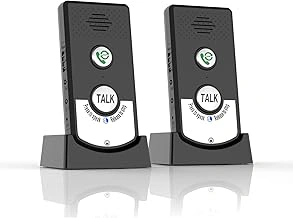
Nexytrix Long Range Wireless Intercom System for Home
This system prioritizes two-way voice communication over traditional alarm features, making it ideal when checking in matters more than intrusion alerts. The wireless units plug into standard outlets and let you talk instantly without your parent needing to answer a phone or navigate an app.
At $39.99, it's the most affordable option here, though it lacks door sensors and motion detection. Think of it as a direct line rather than a full security system. Picture this: your mother is in the kitchen and you want to confirm she took her medication. Press the intercom button on your phone and your voice comes through her unit immediately - no ringing, no waiting, no forgotten passwords.
The long-range claim helps in larger homes, but walls and appliances still interfere with wireless signals. Test placement before mounting permanently. The 4.2 rating reflects solid performance for its specific purpose, though some users report occasional connectivity drops that require unplugging to reset.
- ✅ Direct voice communication without phone calls
- ✅ Simple plug-in installation
- ✅ Budget-friendly entry point
- ⚠️ No door or window sensors included
- ⚠️ Requires stable WiFi connection
- ⚠️ Limited to intercom functionality
What Makes a Security System 'Easy' for Seniors (and Their Kids)?
A senior-friendly security system isn't just about large buttons - it's about reducing friction at every step. Installation should require nothing more than peel-and-stick sensors and a power outlet. Arming and disarming must be intuitive: a single button press, a familiar keypad, or even voice control.
The app matters as much for you as the hardware does for your parent. You need instant notifications that don't require interpretation. 'Front door opened at 2:47 AM' tells you something might be wrong. 'Motion detected in Zone 3' leaves you guessing.
Contract flexibility protects you from overpaying for features your parent won't use. Self-monitoring through your smartphone costs nothing monthly. Professional monitoring adds 24/7 response but should be optional, not mandatory. Battery backup ensures the system works during power outages, and cellular connectivity keeps it running if internet fails.
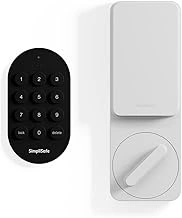
SimpliSafe Smart Lock Series 2 (White) for The Gen 3 Home Security System
This smart lock integrates with SimpliSafe's broader security ecosystem, letting your parent unlock the door with a keypad code instead of fumbling for keys. At $119.99, it's a component piece rather than a complete system, but it solves a specific aging-in-place problem: lost keys and locked-out emergencies.
The keypad eliminates the worry about your mother losing her house key or being unable to turn a stiff deadbolt. You can create temporary codes for caregivers or neighbors and delete them remotely when access is no longer needed. Imagine your parent returns from a doctor's appointment with arms full of groceries - she punches in her code and enters without setting anything down.
Installation requires replacing your existing deadbolt, which takes moderate DIY skill or a handyman visit. The lock requires the SimpliSafe Gen 3 system to unlock its smart features; standalone mode offers basic keypad entry but no remote control. Battery life typically runs 8-12 months before requiring AA replacements.
- ✅ Eliminates key management problems
- ✅ Integrates with SimpliSafe ecosystem
- ✅ Remote code management for caregivers
- ⚠️ Requires SimpliSafe base system for full features
- ⚠️ Deadbolt replacement needed
- ⚠️ Periodic battery changes required
Key Features Checklist for a Senior-Friendly Security System
- Tool-free installation requiring only adhesive mounting and power outlets
- Large, clearly labeled arming buttons or simple voice control options
- Mobile app with plain-language notifications ('Front door opened' not 'Zone 3 breach')
- Battery backup that keeps the system running during power outages
- Optional professional monitoring rather than mandatory contracts
- Cellular backup maintaining connectivity when internet fails
- Adjustable siren volume or silent mode for noise-sensitive situations
- Emergency button or panic feature your parent can activate easily
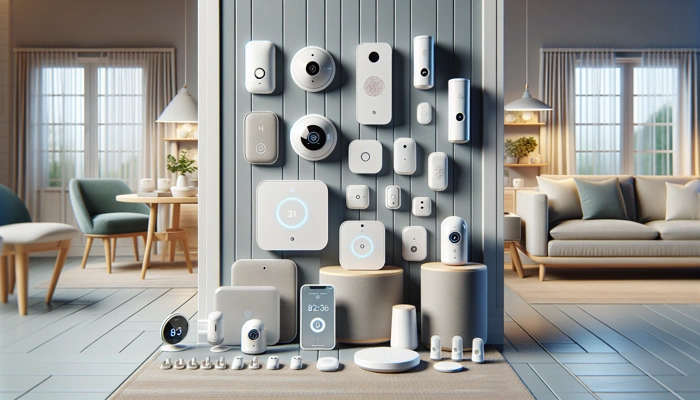
tolviviov WiFi Wireless Smart Home Security System 8-Piece Kit
This 8-piece kit delivers comprehensive coverage at $54.99, including door sensors, motion detectors, and a hub that connects everything to your WiFi network. The peel-and-stick sensors install without tools, making it approachable for DIY setup during a weekend visit.
The smartphone app sends push notifications when sensors trigger, giving you real-time awareness of door openings and motion events. No monthly fees required - you monitor everything yourself through the app. Think about this scenario: your father typically doesn't leave the house after 8 PM. A notification at 10:15 PM that the front door opened lets you call and check whether he's okay or confused.
The system lacks professional monitoring and cellular backup, so it depends entirely on working WiFi and power. The app interface requires some learning - expect to guide your parent through arming and disarming procedures multiple times. The 4.2 rating indicates generally reliable performance, though some users note delayed notifications during heavy internet traffic.
- ✅ Complete 8-piece kit at budget price
- ✅ No monthly monitoring fees
- ✅ Tool-free installation
- ⚠️ Requires stable WiFi and power
- ⚠️ Self-monitoring only
- ⚠️ App learning curve for seniors
How to Talk to Your Independent Parent About a Security System
Frame the conversation around what matters to them, not your anxiety. 'I worry about you constantly' triggers defensiveness. 'This would help me sleep better, and you'd still have complete control' respects their autonomy while acknowledging your feelings.
Emphasize the features that serve their interests. The system notifies you when they're moving around each morning, confirming they're okay without a daily phone call. The emergency button summons help if they fall and can't reach the phone. The smart lock means never being locked out or searching for misplaced keys.
Let them control the system. Show them how to arm and disarm it themselves. Explain that you'll receive notifications but won't monitor their every move - just door openings and emergency alerts. Offer a trial period: install the system and agree to remove it after a month if they hate it. Most parents discover the technology is less intrusive than they feared, and many appreciate the quiet reassurance it provides both of you.
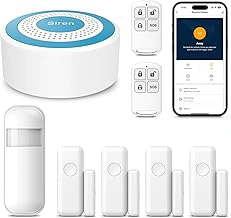
PGST Smart WiFi Home Security System with Siren Hub and Sensors
The PGST system includes a siren hub alongside door and motion sensors, providing both alerts and audible deterrence at the $39.99 price point. The loud alarm can startle an intruder while simultaneously alerting neighbors - useful when your parent lives in a community where people notice unusual sounds.
Setup mirrors other DIY systems: stick sensors to doors and windows, plug in the hub, connect to WiFi via the companion app. You receive notifications when sensors trigger, and you can arm or disarm the system remotely if your parent forgets. Picture this situation: your mother arms the system before bed but gets confused at 3 AM and can't remember how to disarm it. You can turn it off from your phone before the siren wakes the neighborhood.
Like the tolviviov system, this relies on WiFi and offers no professional monitoring or cellular backup. The siren volume isn't adjustable, which some find too loud for small homes. The 4.2 rating reflects solid basic functionality, though customer service responsiveness appears inconsistent based on user feedback.
- ✅ Built-in siren for audible deterrence
- ✅ Remote arm/disarm capability
- ✅ Competitive budget pricing
- ⚠️ Siren volume cannot be adjusted
- ⚠️ WiFi-dependent with no cellular backup
- ⚠️ Mixed customer service feedback
The Right System Protects Them and Reassures You
The easiest home security system for elderly parents balances real protection with realistic usability. The Nexytrix intercom works when communication matters most. The SimpliSafe smart lock solves key management headaches. The tolviviov kit delivers comprehensive monitoring without monthly fees. The PGST system adds audible deterrence at an entry-level price.
Compare these four against your parent's comfort with technology, your budget constraints, and the specific risks you're trying to address. Check return policies before purchasing - a system that seems simple in product photos might frustrate in daily use. Start with basic sensors and add components gradually rather than overwhelming your parent with a complex installation all at once.
The goal isn't perfect security. It's reducing your worry to manageable levels while respecting your parent's independence. Install what you can both live with, test the notifications, and adjust as needed. Peace of mind doesn't require perfection - just reliable alerts and the knowledge that you'll know when something's wrong.