When your parent lives alone, the worry never quite goes away. You picture them losing balance in the bathroom at 2 a.m., lying on the floor unable to reach the phone, or falling in a hallway where no one will notice for hours. That mental loop drives thousands of families to research fall detection technology every month, but the choice quickly splits into two very different paths: wearable devices your parent carries on their body, or wall-mounted motion sensors that watch for unusual patterns without requiring them to wear anything at all.
Each approach solves the detection problem in fundamentally different ways. Wearables use accelerometers and gyroscopes to sense sudden drops or impacts, then trigger an alert the moment a fall happens. Motion sensors track movement across rooms and hallways, flagging when someone hasn't moved in a suspicious amount of time or when activity stops in a high-risk area like the bathroom. The wearable catches the fall itself; the sensor infers something went wrong by noticing absence.
That difference shapes everything else: how reliably each system works, whether your parent will actually use it, what it costs to install and maintain, and how much privacy they'll need to trade for safety. Some families assume wearables are obviously better because they're direct and immediate. Others discover their parent refuses to wear a pendant every day, or that motion sensors miss falls that happen too quickly to generate a pattern. Neither technology is universally superior, and the wrong choice can mean paying for a system that sits unused or fails when it matters most.
This comparison walks through five decision factors - detection method, compliance and comfort, coverage and blind spots, privacy concerns, and total cost - so you can match the technology to your parent's actual daily routine, the layout of their home, and how they feel about being monitored. By the end, you'll know which system fits their specific situation, or whether a hybrid approach makes the most sense.
Quick comparison
| Bed Alarm Caregiver Pager with 2 Wireless Motion Sensors for Fall Prevention Door Chime | Check current price and reviews |
| HENDUN Motion Sensor Doorbell and Caregiver Alarm | Check current price and reviews |
Fit and safety come first
Use the comparison as a shortlist, but keep fit, comfort, and any health or safety constraints ahead of price.
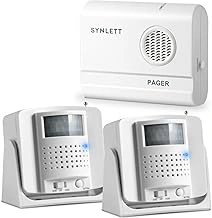
Bed Alarm Caregiver Pager with 2 Wireless Motion Sensors for Fall Prevention Door Chime
This wireless caregiver pager system pairs a compact receiver with two motion sensors, designed to monitor movement around the bed and through doorways during the night. Each sensor detects when your parent gets up or crosses a threshold, then alerts the caregiver pager so you can respond quickly if they need help. The wireless design means no drilling into walls or running cables across hallways, and the two-sensor coverage lets you protect key transition zones where falls often happen - getting out of bed and moving through the doorway.
At $33.24, the system offers an affordable entry point into nighttime monitoring without requiring smartphone apps or monthly fees. The 4.4 out of 5 rating reflects generally reliable alerts, though range and interference vary by home layout. Setup involves placing the sensors near the bed frame and doorway, then pairing them to the pager; most caregivers complete installation in under ten minutes.
Alert reliability depends on sensor placement and distance from the pager. Because the sensors rely on infrared motion detection, they work best when positioned to capture the full path your parent takes when standing up or walking through the door. If your home has thick walls or multiple floors, test the range before finalizing sensor locations. The pager vibrates and chimes, so you can carry it in a pocket or leave it on a nightstand within earshot.
This system suits families who need simple, immediate alerts when a parent moves during high-risk hours, especially if dementia or balance issues mean they should not walk unassisted at night. It will not detect a fall already on the floor, so it functions as an early warning rather than post-fall detection. For caregivers who sleep in the same home and want to know the moment their parent gets up, the two-sensor setup and low price point make it a practical first step in fall prevention.
- ✅ Two wireless sensors cover bed and doorway zones
- ✅ No monthly fees or smartphone required
- ✅ Quick setup with no drilling or wiring
- ✅ Affordable at $33.24
- ⚠️ Range limited by walls and floor layout
- ⚠️ Does not detect falls already on the floor
- ⚠️ Infrared sensors require careful placement for reliable alerts
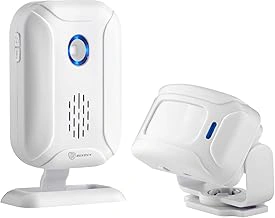
HENDUN Motion Sensor Doorbell and Caregiver Alarm
The HENDUN Motion Sensor Doorbell and Caregiver Alarm offers a straightforward way to monitor movement between rooms or alert you when a parent enters or leaves a specific area. Priced at $20.59, this dual-purpose device pairs a wireless motion sensor with a plug-in receiver that chimes whenever movement is detected within the sensor's range. For caregivers who need to know when someone crosses a doorway or walks past a hallway, it delivers basic presence awareness without cameras or wearables.
Setup requires no wiring or professional installation. Mount the battery-powered sensor near the doorway or zone you want to monitor, plug the receiver into an outlet, and the two units pair automatically. When the sensor detects motion, the receiver chimes - useful for tracking when a parent gets out of bed at night, leaves the front door, or moves toward the kitchen. The system supports multiple sensors paired to one receiver, so you can cover several rooms or entry points if needed.
The 4.4 out of 5 rating reflects solid performance for basic monitoring, though user reviews note the sensor's detection range and angle can vary depending on placement and the size of the person moving. Some caregivers find the chime volume adequate for daytime alerts but too quiet to wake them at night, and there is no option to send notifications to a smartphone. The device works entirely as a local alert system - when motion happens, the chime sounds in real time, but there is no log, no connectivity to other devices, and no way to review activity remotely.
This sensor fits situations where you want immediate audio feedback in the home rather than remote monitoring or fall detection. It cannot tell the difference between a fall and normal movement, so it serves as an entry/exit tracker or room transition monitor, not a safety device that responds to emergencies. For caregivers who are home and want to hear when a parent is on the move, the HENDUN offers a low-cost, plug-and-play option that requires no subscription or complex setup.
- ✅ Affordable at $20.59 with no subscription fees
- ✅ Simple plug-and-play setup with no wiring required
- ✅ Supports multiple sensors paired to one receiver for multi-room coverage
- ✅ Provides immediate local audio alert when motion is detected
- ⚠️ No smartphone notifications or remote monitoring capability
- ⚠️ Chime volume may not be loud enough to wake caregivers at night
- ⚠️ Cannot distinguish between falls and normal movement
- ⚠️ Detection range and angle can vary with placement and user size
Understanding Wearable Fall Detectors: How They Work, Pros, and Cons
Wearable fall detectors rely on built-in accelerometers and sensors that monitor sudden changes in motion, impact force, and body orientation. When the device registers a pattern consistent with a fall - such as a rapid downward movement followed by motionlessness - it triggers an alert to a monitoring center or designated contacts. Most models also include a manual help button that the wearer can press in any emergency, whether or not a fall has occurred.
The main advantage of wearable devices is mobility. Your parent can move freely throughout the home, yard, or even nearby errands without losing access to help. Because the device stays on the body, alerts connect directly to the person who needs assistance, not just a room or zone. Many systems route alerts through 24/7 monitoring services that can verify the emergency, contact family, and dispatch responders if needed.
Compliance is the biggest practical hurdle. The device only works if your parent wears it consistently. Forgetfulness, discomfort, or reluctance to wear a visible device can leave gaps in coverage. Charging schedules add another layer of routine - most pendants and wristbands require recharging every few days to a week, and a dead battery means no protection. False positives can also occur when sudden movements like sitting down hard or dropping the device are misread as falls, leading to unnecessary check-ins.
Ongoing subscription fees are typical, especially for systems with professional monitoring. Monthly costs range widely depending on service level, and some families find the recurring expense adds up over time. Wearable fall detection fits best when your parent is active, moves between rooms frequently, and can manage the habit of wearing and charging the device daily.
Exploring Wall-Mounted Motion Sensors: How They Work, Pros, and Cons
Wall-mounted motion sensors track movement across specific areas of the home using passive infrared technology. These sensors detect body heat and motion within their field of view, then send alerts when activity patterns change or when no movement is detected for a set period. Most systems notify caregivers by text, email, or a dedicated pager when a zone remains inactive longer than expected.
The primary advantage is that your parent doesn't need to remember to wear anything. Sensors sit unobtrusively on walls or in corners, quietly monitoring hallways, bathrooms, bedrooms, and other high-traffic zones. Installation is straightforward - most units mount with adhesive strips or a single screw - and ongoing costs are lower than subscription-based wearable services. You can build coverage incrementally, adding sensors to rooms where falls or confusion are most likely.
The tradeoff is coverage. Motion sensors only see what happens in their assigned room or corridor. If your parent falls in an unmonitored space, or leaves the house entirely, the system won't know. These devices also can't distinguish a fall from sitting quietly or sleeping, so alerts focus on inactivity rather than specific incidents. You'll receive a notification if your parent hasn't moved through the kitchen by mid-morning, but the sensor won't tell you whether they've fallen or simply slept late.
Gaps between zones are another consideration. A sensor in the bedroom won't detect trouble in the garage, and blind spots near furniture or doorways can let movement go unnoticed. For parents who spend time outdoors, visit neighbors, or move unpredictably between rooms, motion sensors provide incomplete visibility. They work best when combined with routine habits - regular bathroom visits, predictable meal times, consistent sleep schedules - so deviations stand out clearly. If your parent's daily rhythm is stable and they rarely leave home alone, wall-mounted sensors offer a low-friction way to confirm that normal activity is continuing without requiring any change in behavior.
Side-by-Side Comparison: Autonomy, Privacy, Reliability, and Cost
Choosing between wearable fall detection and wall-mounted motion sensors means weighing four practical tradeoffs: how much autonomy your parent retains, how the technology affects their sense of privacy, what reliability looks like day-to-day, and what you'll pay upfront and over time.
Autonomy and lifestyle:Wearable devices travel with your parent everywhere - bathroom, backyard, hallway - so protection follows them room to room. Motion sensors require your parent to stay within monitored zones; if they fall in an unmonitored space or a coverage gap exists between sensors, the system may not register the event. Wearables demand active compliance: your parent must charge the device nightly and wear it consistently. Passive sensors require no daily habit change but limit mobility protection to equipped rooms.
Privacy perception:Many older adults feel that wearing a device on their body signals frailty or loss of independence, and some worry about being monitored constantly. Wall-mounted sensors observe movement patterns in specific rooms, which can feel less intrusive because there is no body-worn tracker. Others prefer wearables precisely because sensors in every room can feel like surveillance. Privacy comfort varies by individual, so ask your parent which approach feels more respectful to them.
Reliability factors:Wearable systems depend on the user remembering to charge and wear the device daily; forgotten units offer zero protection. Motion sensors rely on correct placement, adequate coverage, and algorithm accuracy - some systems generate false positives if a pet crosses the room or your parent moves slowly. Wearables with automatic fall detection use accelerometers and sometimes location data, which generally deliver faster alerts than passive sensors that infer falls from unusual movement patterns or prolonged stillness. Both technologies require Wi-Fi or cellular connectivity; network outages can delay alerts regardless of device type.
Cost breakdown:Entry-level wearable pendants with manual alert buttons start around $30 to $50 with no monthly fee, but automatic fall detection models typically cost $100 to $200 upfront plus $20 to $50 per month for monitoring. Wall-mounted motion sensor kits range from $150 to $400 for hardware covering two to four rooms, with optional monitoring subscriptions adding $10 to $30 monthly. Installation complexity differs: wearables require no setup beyond charging and pairing with a smartphone app, while motion sensors need mounting, calibration, and sometimes professional installation if you want sensors integrated with a broader smart-home system.
The right choice hinges on your parent's daily routine, their comfort with wearing technology, the size and layout of their home, and whether your budget prioritizes lower upfront costs or reduced monthly fees. If your parent moves freely across many rooms and forgets routines easily, passive sensors may offer more consistent coverage. If they spend most time in a few key areas and prefer not to wear anything, strategically placed motion sensors can work well. Evaluate both options against your parent's specific habits and living space before committing.
Talking to Your Parent About Home Safety Technology
Bringing up home safety technology with an aging parent often stirs resistance rooted in fear of losing independence or feeling watched. The conversation works better when you frame devices as tools that support autonomy rather than limit it. Start by asking what worries your parent most about living at home - falling when alone, not being able to reach help quickly, or feeling isolated. Listen first, then connect the technology directly to those specific concerns.
Position the choice as something you make together, not something imposed. Walk through options side by side: show how a wearable device works, explain what a motion sensor does and doesn't track, and clarify that alerts go to family or a response service, not constant monitoring. Many parents soften when they understand the difference between emergency detection and surveillance.
Suggest a trial period with clear terms. Agree to test one system for 30 or 60 days, then reassess together. This reduces the feeling of permanence and gives your parent control over the outcome. If they resist wearing a device, start with a motion sensor in one high-risk room. If privacy is the sticking point, a wearable with manual activation might feel less intrusive than wall-mounted cameras or sensors.
Acknowledge the emotional weight. Accepting help often feels like admitting decline, and that's hard. Reinforce that using technology is a proactive choice, not a concession. Share stories of friends or neighbors who use similar systems and still live independently. Avoid scare tactics or hypothetical disasters - those tend to shut down dialogue rather than open it.
If your parent remains firmly opposed, respect that boundary while keeping the door open. Leave printed information, revisit the topic after a few weeks, or involve a trusted doctor or friend who might carry more influence. The goal is a decision your parent feels part of, not one that deepens conflict or erodes trust. When safety technology is chosen collaboratively, compliance and long-term use improve significantly.
Choosing Peace of Mind for You and Independence for Them
The right fall-detection system depends on your parent's routine, living space, and how they feel about wearing a device all day. Neither wearable sensors nor wall-mounted motion detectors work perfectly in every home, and that's okay. What matters is finding the setup that your parent will actually use and that gives you both the reassurance you need without adding unnecessary friction to daily life.
Start by reviewing the trade-offs. If your parent is active, moves between rooms frequently, or spends time outdoors in the yard, a wearable device travels with them and provides coverage no matter where they are. If privacy is a priority, or if they resist wearing anything new, motion sensors offer passive monitoring that doesn't require daily buy-in. Cost also plays a role: wearables often involve monthly subscriptions, while motion sensor systems may have a higher upfront price but lower ongoing fees.
You don't have to commit to one approach forever. Many families begin with a single wearable pendant or a motion sensor in the bathroom and bedroom, then adjust based on what works. Pay attention to false alarms, whether your parent finds the device comfortable or intrusive, and how quickly help can actually arrive when an alert goes off. Real-world use will show you gaps that weren't obvious on paper.
The goal isn't to create a surveillance system or eliminate every risk. It's to support your parent's independence while reducing the chance that a fall goes unnoticed for hours. Choose the option that respects their preferences, fits their daily patterns, and gives you confidence that someone will know if something goes wrong. Revisit the comparison points and checklists you've worked through, talk with your parent about what feels manageable, and move forward with a plan that balances safety and dignity.
How to Choose: Scenarios Where Wearables Make More Sense
- Parent is mobile and spends time outdoors or in multiple rooms throughout the day
- History of falls or significant fall risk identified by healthcare provider
- Parent is comfortable wearing a device and will consistently use it
- Willing to manage battery charging or replacement on a regular schedule
- Budget allows for monthly monitoring service fees if required
- Parent lives alone without frequent in-person check-ins
How to Choose: When Motion Sensors are the Better Option
- Parent is resistant to wearing devices or forgets to put them on
- Main concern is nighttime activity or getting out of bed safely
- Parent's daily routine is predictable and centered in a few key rooms
- Caregiver or family member lives nearby and can respond to alerts quickly
- Preference for one-time purchase with no ongoing subscription fees
- Focus is on awareness of movement patterns rather than immediate fall detection